This thread has been locked.

If you have a related question, please click the "Ask a related question" button in the top right corner. The newly created question will be automatically linked to this question.

'Run To Line' For Unreachable Code Causes Error


Hello,

A minor UI problem.

If 'Run To Line' is used but the program flow can never reach the line, then a Error is launched:
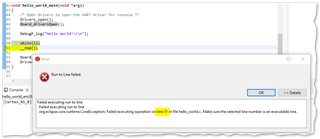
I'm expecting a regular breakpoint to be set transparently behind the 'Run To Line' functionality. If that's how it works, I would just expect the program to run continuously as if I had just pressed Resume. I don't really think it's an error as such.

  • Hello,

    I'm expecting a regular breakpoint to be set transparently behind the 'Run To Line' functionality.

    This is accurate. Hence, you must be able to set a source line breakpoint on line 51. Since the line is never reached, I suspect that the code for it got optimized out and there is no code associated with that source line. Hence the error message.

    Are you able to manually set a breakpoint on line 51?

    Thanks

    ki

  • Are you able to manually set a breakpoint on line 51?

    Good point, thanks. I assumed that since Optimization was = 0, that the nop would be present but it wasn't there on inspection of the disassembly.

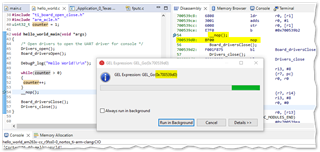
    I constructed a different example that does have the nop and this time I get a slightly different issue. This time when I 'Run To Line' I get a GEL Expression dialogue pop up. Not a big problem I suppose, just unnecessary.

  • GEL Expression dialogue pop up

    Some debugger actions simply call GEL under the hood. In some of these instances, you will see the GEL dialog for that call appear. As you mentioned, this is expected and not an issue.