This thread has been locked.

If you have a related question, please click the "Ask a related question" button in the top right corner. The newly created question will be automatically linked to this question.

CODECOMPOSER: CCS does not copy the MotorControlSDK files into the workspace folder anymore?

Part Number: CODECOMPOSER
Other Parts Discussed in Thread: C2000WARE

After I renamed some of the projects,

I noticed that the CCS started to modify the original source files from the SDK Folder.

So I checked my workspace folder, and while it has all the directories set up of the project I imported,

It does not have any source files on them.

This all started after I renamed a couple of projects in my Workspace. I already tried uninstalling and reinstalling CCS and all of the C2000Ware and SDK's

C2000Ware files seem to be copying fine, but MotorControlSDK is stil lbeing modified.

Please help!

  • Hansol,

    We will loop in the MotorControl SDK team to comment.  The example files themselves specify if the file should be copied or just linked to the original.

    Regards,

    John

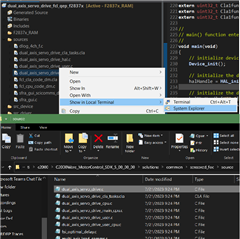
  • As seen here, if I open a source file in system explorer in CCS it opens at the SDK folder

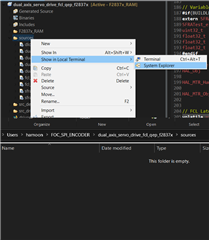
    If I open the source folder itself, then I get directed to the workspace which does not have any files copied on it.

    However during export, "copy files to the location" is clearly checked.

    So I don't know what's going on

  • Most of the example projects in the MotorControl SDK are set to link to files instead of copy. If you go find the .projectspec file for the example you're using, you'll be able to open it up and look for the file "action" property and see if it's set to link or copy. So in boostxl_3phganinv\f2837x\ccs\sensored_foc\dual_axis_servo_drive_fcl_qep_f2837x.projectspec I see they're set to "link."

        <file action="link" path="SDK_ROOT/libraries/fcl/source/fcl_cla_code_dm.cla" targetDirectory="sources" />
        <file action="link" path="SDK_ROOT/libraries/fcl/source/fcl_cpu_code_dm.c" targetDirectory="sources" />
    
        <file action="link" path="SFRA_INSTALL_ROOT/gui/source/sfra_gui_scicomms_driverlib.c" targetDirectory="sources" />
    
        <file action="link" path="SDK_ROOT/libraries/utilities/datalog/source/dlog_4ch_f.c" targetDirectory="sources" />
    

    You could try changing them to "copy" and reimporting the project. I would recommend keeping .lib files set to "link", but the other source code should be okay to change.

    Whitney

  • However during export, "copy files to the location" is clearly checked.

    I believe this only applies when you're importing an existing project. The MC SDK doesn't contain actual projects; it uses .projectspec files that tell CCS the properties to use when to create a new project in your workspace.

    Whitney