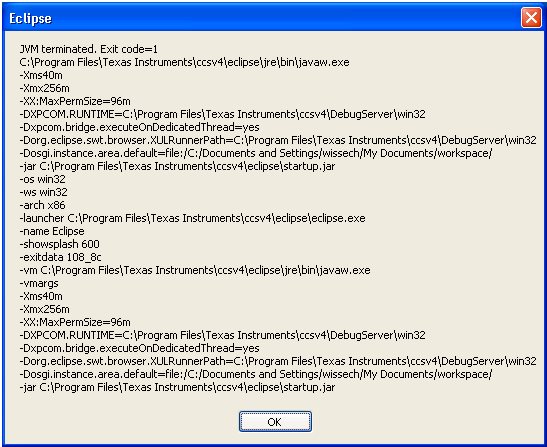
#
# An unexpected error has been detected by HotSpot Virtual Machine:
#
#  EXCEPTION_ACCESS_VIOLATION (0xc0000005) at pc=0x781b606f, pid=4276, tid=3716
#
# Java VM: Java HotSpot(TM) Client VM (1.5.0_14-b03 mixed mode)
# Problematic frame:
# C  [urlmon.dll+0x8606f]
#

---------------  T H R E A D  ---------------

Current thread (0x04bbfe50):  JavaThread "Worker-0" [_thread_in_native, id=3716]

siginfo: ExceptionCode=0xc0000005, reading address 0x00000000

Registers:
EAX=0x00000000, EBX=0x00000000, ECX=0x075ad4c0, EDX=0x00000000
ESP=0x03cee488, EBP=0x03cee49c, ESI=0x00000000, EDI=0x00000000
EIP=0x781b606f, EFLAGS=0x00010246

Top of Stack: (sp=0x03cee488)
0x03cee488:   00000104 080f1e00 00000000 00000000
0x03cee498:   00000000 03cee818 075a6e12 080f1e00
0x03cee4a8:   00000000 04bab918 075ad598 03cee598
0x03cee4b8:   000f4b80 000afc30 03cee4f8 77128278
0x03cee4c8:   00000190 03cee4e0 000dd9a0 075f13f4
0x03cee4d8:   77128297 00000030 000f4b80 00020400
0x03cee4e8:   00000000 77126c41 77127526 000f4ba8
0x03cee4f8:   00000000 000dd9a0 03cee864 77127f3c

Instructions: (pc=0x781b606f)
0x781b605f:   75 f8 e8 e5 fc ff ff 8b 7d f8 8b d8 3b de 7c 11
0x781b606f:   8b 07 56 56 56 6a 04 57 ff 50 14 8b d8 3b de 7d


Stack: [0x03cb0000,0x03cf0000),  sp=0x03cee488,  free space=249k
Native frames: (J=compiled Java code, j=interpreted, Vv=VM code, C=native code)
C  [urlmon.dll+0x8606f]
C  [JavaWebStart.dll+0x6e12]
C  [OLEAUT32.dll+0x15cd9]
C  [OLEAUT32.dll+0x162e8]
C  [JavaWebStart.dll+0x39f9]
C  [jscript.dll+0x22c02]
C  [jscript.dll+0x22b6f]
C  [jscript.dll+0x22afa]
C  [jscript.dll+0x23555]
C  [jscript.dll+0x21221]
C  [jscript.dll+0x211d6]
C  [jscript.dll+0x22a69]
C  [jscript.dll+0x21133]
C  [jscript.dll+0x22f99]
C  [jscript.dll+0x21b42]
C  [jscript.dll+0x22a69]
C  [jscript.dll+0x21133]
C  [jscript.dll+0x22f99]
C  [jscript.dll+0x21b42]
C  [jscript.dll+0x22a69]
C  [jscript.dll+0x21133]
C  [jscript.dll+0x20f9a]
C  [jscript.dll+0x1378f]
C  [jscript.dll+0xc377]
C  [jscript.dll+0xc1c8]
C  [deploy.dll+0x4451]
C  [deploy.dll+0x4ed3]
j  com.sun.deploy.net.proxy.WIExplorerAutoProxyHandler.evalScript(Ljava/lang/String;)Ljava/lang/String;+0
j  com.sun.deploy.net.proxy.WIExplorerAutoProxyHandler.getProxyInfo(Ljava/net/URL;)[Lcom/sun/deploy/net/proxy/ProxyInfo;+81
j  com.sun.deploy.net.proxy.DynamicProxyManager.getProxyInfo(Ljava/net/URL;)Lcom/sun/deploy/net/proxy/ProxyInfo;+96
j  com.sun.deploy.net.proxy.DeployProxySelector.select(Ljava/net/URI;)Ljava/util/List;+258
j  com.ti.ccstudio.internal.osgi.NetProxySelector.select(Ljava/net/URI;)Ljava/util/List;+13
j  sun.net.www.protocol.http.HttpURLConnection.plainConnect()V+187
j  sun.net.www.protocol.https.AbstractDelegateHttpsURLConnection.connect()V+9
j  sun.net.www.protocol.http.HttpURLConnection.getOutputStream()Ljava/io/OutputStream;+134
j  sun.net.www.protocol.https.HttpsURLConnectionImpl.getOutputStream()Ljava/io/OutputStream;+4
j  isus.rpc.RPCObject.ExecuteWithPost(Lisus/shared/UpdateServiceProperties;Ljava/lang/String;Ljava/lang/String;Ljava/lang/String;)V+227
j  isus.rpc.RPCObject.Execute(Lisus/shared/UpdateServiceProperties;Ljava/lang/String;Ljava/lang/String;Ljava/lang/String;)V+13
j  isus.rpc.RPCSendProfiles.Run(Z)V+62
j  isus.ProfileManager.synchProfiles()V+35
j  isus.ProfileMgr.uploadCollection(Ljava/lang/String;)V+10
j  com.ti.ccstudio.update.CCEUpdateStartup.heartbeat()V+89
j  com.ti.ccstudio.update.CCEUpdateStartup.earlyStartup()V+0
j  org.eclipse.ui.internal.EarlyStartupRunnable.runEarlyStartup(Ljava/lang/Object;)V+15
j  org.eclipse.ui.internal.EarlyStartupRunnable.run()V+49
j  org.eclipse.core.runtime.SafeRunner.run(Lorg/eclipse/core/runtime/ISafeRunnable;)V+5
j  org.eclipse.ui.internal.Workbench$20.run(Lorg/eclipse/core/runtime/IProgressMonitor;)Lorg/eclipse/core/runtime/IStatus;+104
j  org.eclipse.core.internal.jobs.Worker.run()V+52
v  ~StubRoutines::call_stub
V  [jvm.dll+0x875dd]
V  [jvm.dll+0xdfd96]
V  [jvm.dll+0x874ae]
V  [jvm.dll+0x8720b]
V  [jvm.dll+0xa2089]
V  [jvm.dll+0x1112e8]
V  [jvm.dll+0x1112b6]
C  [MSVCRT.dll+0x2a3b0]
C  [kernel32.dll+0xb729]

Java frames: (J=compiled Java code, j=interpreted, Vv=VM code)
j  com.sun.deploy.net.proxy.WIExplorerAutoProxyHandler.evalScript(Ljava/lang/String;)Ljava/lang/String;+0
j  com.sun.deploy.net.proxy.WIExplorerAutoProxyHandler.getProxyInfo(Ljava/net/URL;)[Lcom/sun/deploy/net/proxy/ProxyInfo;+81
j  com.sun.deploy.net.proxy.DynamicProxyManager.getProxyInfo(Ljava/net/URL;)Lcom/sun/deploy/net/proxy/ProxyInfo;+96
j  com.sun.deploy.net.proxy.DeployProxySelector.select(Ljava/net/URI;)Ljava/util/List;+258
j  com.ti.ccstudio.internal.osgi.NetProxySelector.select(Ljava/net/URI;)Ljava/util/List;+13
j  sun.net.www.protocol.http.HttpURLConnection.plainConnect()V+187
j  sun.net.www.protocol.https.AbstractDelegateHttpsURLConnection.connect()V+9
j  sun.net.www.protocol.http.HttpURLConnection.getOutputStream()Ljava/io/OutputStream;+134
j  sun.net.www.protocol.https.HttpsURLConnectionImpl.getOutputStream()Ljava/io/OutputStream;+4
j  isus.rpc.RPCObject.ExecuteWithPost(Lisus/shared/UpdateServiceProperties;Ljava/lang/String;Ljava/lang/String;Ljava/lang/String;)V+227
j  isus.rpc.RPCObject.Execute(Lisus/shared/UpdateServiceProperties;Ljava/lang/String;Ljava/lang/String;Ljava/lang/String;)V+13
j  isus.rpc.RPCSendProfiles.Run(Z)V+62
j  isus.ProfileManager.synchProfiles()V+35
j  isus.ProfileMgr.uploadCollection(Ljava/lang/String;)V+10
j  com.ti.ccstudio.update.CCEUpdateStartup.heartbeat()V+89
j  com.ti.ccstudio.update.CCEUpdateStartup.earlyStartup()V+0
j  org.eclipse.ui.internal.EarlyStartupRunnable.runEarlyStartup(Ljava/lang/Object;)V+15
j  org.eclipse.ui.internal.EarlyStartupRunnable.run()V+49
j  org.eclipse.core.runtime.SafeRunner.run(Lorg/eclipse/core/runtime/ISafeRunnable;)V+5
j  org.eclipse.ui.internal.Workbench$20.run(Lorg/eclipse/core/runtime/IProgressMonitor;)Lorg/eclipse/core/runtime/IStatus;+104
j  org.eclipse.core.internal.jobs.Worker.run()V+52
v  ~StubRoutines::call_stub

---------------  P R O C E S S  ---------------

Java Threads: ( => current thread )
  0x04c62ba0 JavaThread "polling thread" daemon [_thread_blocked, id=576]
  0x0307b470 JavaThread "pool-2-thread-1" [_thread_blocked, id=5716]
  0x04be9a28 JavaThread "Worker-4" [_thread_blocked, id=4156]
  0x02e69bb8 JavaThread "Worker-3" [_thread_blocked, id=5964]
  0x02e5b008 JavaThread "Worker-2" [_thread_blocked, id=2084]
  0x008b8770 JavaThread "Worker-1" [_thread_blocked, id=6068]
=>0x04bbfe50 JavaThread "Worker-0" [_thread_in_native, id=3716]
  0x02fc6630 JavaThread "Start Level Event Dispatcher" daemon [_thread_blocked, id=5008]
  0x03091c28 JavaThread "Framework Event Dispatcher" daemon [_thread_blocked, id=4420]
  0x030d5bf0 JavaThread "traceMsgQueueThread" daemon [_thread_blocked, id=4208]
  0x0091fa20 JavaThread "State Data Manager" daemon [_thread_blocked, id=4740]
  0x008e72b0 JavaThread "Low Memory Detector" daemon [_thread_blocked, id=4920]
  0x008e5fe0 JavaThread "CompilerThread0" daemon [_thread_blocked, id=4596]
  0x008e5308 JavaThread "Signal Dispatcher" daemon [_thread_blocked, id=3016]
  0x008dc068 JavaThread "Finalizer" daemon [_thread_blocked, id=3908]
  0x008dabf8 JavaThread "Reference Handler" daemon [_thread_blocked, id=6020]
  0x00820748 JavaThread "main" [_thread_in_native, id=200]

Other Threads:
  0x003a5af8 VMThread [id=4720]
  0x008e5180 WatcherThread [id=1736]

VM state:not at safepoint (normal execution)

VM Mutex/Monitor currently owned by a thread: None

Heap
 def new generation   total 2880K, used 378K [0x10020000, 0x10340000, 0x113d0000)
  eden space 2560K,   2% used [0x10020000, 0x1002e990, 0x102a0000)
  from space 320K, 100% used [0x102f0000, 0x10340000, 0x10340000)
  to   space 320K,   0% used [0x102a0000, 0x102a0000, 0x102f0000)
 tenured generation   total 37824K, used 15284K [0x113d0000, 0x138c0000, 0x20020000)
   the space 37824K,  40% used [0x113d0000, 0x122bd108, 0x122bd200, 0x138c0000)
 compacting perm gen  total 27904K, used 27840K [0x20020000, 0x21b60000, 0x26020000)
   the space 27904K,  99% used [0x20020000, 0x21b503d0, 0x21b50400, 0x21b60000)
No shared spaces configured.

Dynamic libraries:
0x00400000 - 0x0040d000 	C:\Program Files\Texas Instruments\ccsv4\eclipse\jre\bin\javaw.exe
0x7c900000 - 0x7c9b2000 	C:\WINDOWS\system32\ntdll.dll
0x7c800000 - 0x7c8f6000 	C:\WINDOWS\system32\kernel32.dll
0x77dd0000 - 0x77e6b000 	C:\WINDOWS\system32\ADVAPI32.dll
0x77e70000 - 0x77f03000 	C:\WINDOWS\system32\RPCRT4.dll
0x77fe0000 - 0x77ff1000 	C:\WINDOWS\system32\Secur32.dll
0x7e410000 - 0x7e4a1000 	C:\WINDOWS\system32\USER32.dll
0x77f10000 - 0x77f59000 	C:\WINDOWS\system32\GDI32.dll
0x77c10000 - 0x77c68000 	C:\WINDOWS\system32\MSVCRT.dll
0x76390000 - 0x763ad000 	C:\WINDOWS\system32\IMM32.DLL
0x10000000 - 0x10017000 	C:\WINDOWS\system32\AMINIT32.dll
0x6fa00000 - 0x6fa3c000 	C:\PROGRA~1\Sophos\SOPHOS~1\SOPHOS~1.DLL
0x76bf0000 - 0x76bfb000 	C:\WINDOWS\system32\PSAPI.DLL
0x6d640000 - 0x6d7de000 	C:\Program Files\Texas Instruments\ccsv4\eclipse\jre\bin\client\jvm.dll
0x76b40000 - 0x76b6d000 	C:\WINDOWS\system32\WINMM.dll
0x5dac0000 - 0x5dac8000 	C:\WINDOWS\system32\rdpsnd.dll
0x76360000 - 0x76370000 	C:\WINDOWS\system32\WINSTA.dll
0x5b860000 - 0x5b8b5000 	C:\WINDOWS\system32\NETAPI32.dll
0x6d290000 - 0x6d298000 	C:\Program Files\Texas Instruments\ccsv4\eclipse\jre\bin\hpi.dll
0x6d610000 - 0x6d61c000 	C:\Program Files\Texas Instruments\ccsv4\eclipse\jre\bin\verify.dll
0x6d310000 - 0x6d32d000 	C:\Program Files\Texas Instruments\ccsv4\eclipse\jre\bin\java.dll
0x6d630000 - 0x6d63f000 	C:\Program Files\Texas Instruments\ccsv4\eclipse\jre\bin\zip.dll
0x6d4d0000 - 0x6d4e3000 	C:\Program Files\Texas Instruments\ccsv4\eclipse\jre\bin\net.dll
0x71ab0000 - 0x71ac7000 	C:\WINDOWS\system32\WS2_32.dll
0x71aa0000 - 0x71aa8000 	C:\WINDOWS\system32\WS2HELP.dll
0x6d4f0000 - 0x6d4f9000 	C:\Program Files\Texas Instruments\ccsv4\eclipse\jre\bin\nio.dll
0x6d1f0000 - 0x6d203000 	C:\Program Files\Texas Instruments\ccsv4\eclipse\jre\bin\deploy.dll
0x3d930000 - 0x3da01000 	C:\WINDOWS\system32\WININET.dll
0x77f60000 - 0x77fd6000 	C:\WINDOWS\system32\SHLWAPI.dll
0x03430000 - 0x03439000 	C:\WINDOWS\system32\Normaliz.dll
0x3dfd0000 - 0x3e015000 	C:\WINDOWS\system32\iertutil.dll
0x78130000 - 0x78258000 	C:\WINDOWS\system32\urlmon.dll
0x774e0000 - 0x7761e000 	C:\WINDOWS\system32\ole32.dll
0x77120000 - 0x771ab000 	C:\WINDOWS\system32\OLEAUT32.dll
0x7c9c0000 - 0x7d1d7000 	C:\WINDOWS\system32\SHELL32.dll
0x77a80000 - 0x77b15000 	C:\WINDOWS\system32\CRYPT32.dll
0x77b20000 - 0x77b32000 	C:\WINDOWS\system32\MSASN1.dll
0x773d0000 - 0x774d3000 	C:\WINDOWS\WinSxS\x86_Microsoft.Windows.Common-Controls_6595b64144ccf1df_6.0.2600.6028_x-ww_61e65202\comctl32.dll
0x5d090000 - 0x5d12a000 	C:\WINDOWS\system32\comctl32.dll
0x6d5c0000 - 0x6d5e5000 	C:\Program Files\Texas Instruments\ccsv4\eclipse\jre\bin\RegUtils.dll
0x77c00000 - 0x77c08000 	C:\WINDOWS\system32\VERSION.dll
0x3fde0000 - 0x40221000 	C:\WINDOWS\system32\msi.dll
0x76ee0000 - 0x76f1c000 	C:\WINDOWS\system32\RASAPI32.dll
0x76e90000 - 0x76ea2000 	C:\WINDOWS\system32\rasman.dll
0x76eb0000 - 0x76edf000 	C:\WINDOWS\system32\TAPI32.dll
0x76e80000 - 0x76e8e000 	C:\WINDOWS\system32\rtutils.dll
0x769c0000 - 0x76a74000 	C:\WINDOWS\system32\USERENV.dll
0x77c70000 - 0x77c95000 	C:\WINDOWS\system32\msv1_0.dll
0x76790000 - 0x7679c000 	C:\WINDOWS\system32\cryptdll.dll
0x76d60000 - 0x76d79000 	C:\WINDOWS\system32\iphlpapi.dll
0x722b0000 - 0x722b5000 	C:\WINDOWS\system32\sensapi.dll
0x71a50000 - 0x71a8f000 	C:\WINDOWS\System32\mswsock.dll
0x76f20000 - 0x76f47000 	C:\WINDOWS\system32\DNSAPI.dll
0x76fb0000 - 0x76fb8000 	C:\WINDOWS\System32\winrnr.dll
0x76f60000 - 0x76f8c000 	C:\WINDOWS\system32\WLDAP32.dll
0x76fc0000 - 0x76fc6000 	C:\WINDOWS\system32\rasadhlp.dll
0x662b0000 - 0x66308000 	C:\WINDOWS\system32\hnetcfg.dll
0x71a90000 - 0x71a98000 	C:\WINDOWS\System32\wshtcpip.dll
0x03900000 - 0x03952000 	C:\Program Files\Texas Instruments\ccsv4\eclipse\configuration\org.eclipse.osgi\bundles\183\1\.cp\swt-win32-3232.dll
0x763b0000 - 0x763f9000 	C:\WINDOWS\system32\comdlg32.dll
0x74d90000 - 0x74dfb000 	C:\WINDOWS\system32\USP10.dll
0x75a70000 - 0x75a91000 	C:\WINDOWS\system32\MSVFW32.dll
0x5ad70000 - 0x5ada8000 	c:\windows\system32\uxtheme.dll
0x74720000 - 0x7476c000 	C:\WINDOWS\system32\MSCTF.dll
0x755c0000 - 0x755ee000 	C:\WINDOWS\system32\msctfime.ime
0x74c80000 - 0x74cac000 	C:\WINDOWS\system32\oleacc.dll
0x76080000 - 0x760e5000 	C:\WINDOWS\system32\MSVCP60.dll
0x03d60000 - 0x03d73000 	C:\Program Files\Texas Instruments\ccsv4\eclipse\configuration\org.eclipse.osgi\bundles\183\1\.cp\swt-gdip-win32-3232.dll
0x4ec50000 - 0x4edfb000 	C:\WINDOWS\WinSxS\x86_Microsoft.Windows.GdiPlus_6595b64144ccf1df_1.0.6002.22509_x-ww_c7dad023\gdiplus.dll
0x05780000 - 0x05a45000 	C:\WINDOWS\system32\xpsp2res.dll
0x7c000000 - 0x7c054000 	C:\Program Files\Texas Instruments\ccsv4\emulation\analysis\bin\msvcr70.dll
0x7c080000 - 0x7c0f7000 	C:\Program Files\Texas Instruments\ccsv4\emulation\analysis\bin\msvcp70.dll
0x7c140000 - 0x7c23d000 	C:\Program Files\Texas Instruments\ccsv4\emulation\analysis\bin\mfc70.dll
0x05750000 - 0x05761000 	C:\Program Files\Texas Instruments\ccsv4\emulation\analysis\bin\cToolsIF.dll
0x05ad0000 - 0x05b38000 	C:\Program Files\Texas Instruments\ccsv4\emulation\analysis\bin\ctools.dll
0x05b40000 - 0x05d32000 	C:\Program Files\Texas Instruments\ccsv4\common\bin\xerces-c_2_5_0.dll
0x05d40000 - 0x05ddb000 	C:\WINDOWS\WinSxS\x86_Microsoft.VC80.CRT_1fc8b3b9a1e18e3b_8.0.50727.6195_x-ww_44262b86\MSVCR80.dll
0x03830000 - 0x03848000 	C:\Program Files\Texas Instruments\ccsv4\emulation\analysis\bin\JTrace.dll
0x03850000 - 0x03861000 	C:\Program Files\Texas Instruments\ccsv4\emulation\analysis\bin\TraceFactory.dll
0x05e00000 - 0x05e42000 	C:\Program Files\Texas Instruments\ccsv4\emulation\analysis\bin\ICECD.dll
0x05e50000 - 0x05e71000 	C:\Program Files\Texas Instruments\ccsv4\emulation\analysis\bin\icestorm21.dll
0x05e80000 - 0x05e9f000 	C:\Program Files\Texas Instruments\ccsv4\emulation\analysis\bin\iceutil21.dll
0x05ea0000 - 0x05f7c000 	C:\Program Files\Texas Instruments\ccsv4\emulation\analysis\bin\ice21.dll
0x05f80000 - 0x05f9c000 	C:\Program Files\Texas Instruments\ccsv4\emulation\analysis\bin\LIBBZ2.dll
0x76380000 - 0x76385000 	C:\WINDOWS\system32\msimg32.dll
0x06070000 - 0x06077000 	C:\Program Files\Texas Instruments\ccsv4\DebugServer\bin\win32\LibraryLoader.dll
0x7c420000 - 0x7c4a7000 	C:\WINDOWS\WinSxS\x86_Microsoft.VC80.CRT_1fc8b3b9a1e18e3b_8.0.50727.6195_x-ww_44262b86\MSVCP80.dll
0x06090000 - 0x060f3000 	C:\Program Files\Texas Instruments\ccsv4\common\bin\CCReg.dll
0x06110000 - 0x06161000 	C:\Program Files\Texas Instruments\ccsv4\common\bin\Logger.dll
0x06180000 - 0x061d1000 	C:\Program Files\Texas Instruments\ccsv4\common\bin\fsutil.dll
0x061f0000 - 0x06283000 	C:\Program Files\Texas Instruments\ccsv4\common\bin\rtdx.dll
0x06290000 - 0x06436000 	C:\Program Files\Texas Instruments\ccsv4\common\bin\setup_parser.dll
0x06450000 - 0x0645b000 	C:\Program Files\Texas Instruments\ccsv4\common\uscif\jtagdata.dll
0x06560000 - 0x0656e000 	C:\Program Files\Texas Instruments\ccsv4\common\bin\ti_targetdb_parser.dll
0x06580000 - 0x06587000 	C:\Program Files\Texas Instruments\ccsv4\DebugServer\win32\javaxpcomglue.dll
0x06590000 - 0x065b8000 	C:\Program Files\Texas Instruments\ccsv4\DebugServer\win32\nspr4.dll
0x71ad0000 - 0x71ad9000 	C:\WINDOWS\system32\WSOCK32.dll
0x065c0000 - 0x065c7000 	C:\Program Files\Texas Instruments\ccsv4\DebugServer\win32\plc4.dll
0x065d0000 - 0x065d6000 	C:\Program Files\Texas Instruments\ccsv4\DebugServer\win32\plds4.dll
0x065e0000 - 0x06652000 	C:\Program Files\Texas Instruments\ccsv4\DebugServer\win32\js3250.dll
0x06660000 - 0x06d44000 	C:\Program Files\Texas Instruments\ccsv4\DebugServer\win32\xul.dll
0x73000000 - 0x73026000 	C:\WINDOWS\system32\WINSPOOL.DRV
0x06d60000 - 0x06d66000 	C:\Program Files\Texas Instruments\ccsv4\DebugServer\win32\xpcom.dll
0x76fd0000 - 0x7704f000 	C:\WINDOWS\system32\CLBCATQ.DLL
0x77050000 - 0x77115000 	C:\WINDOWS\system32\COMRes.dll
0x06e40000 - 0x06fdf000 	C:\Program Files\Texas Instruments\ccsv4\DebugServer\win32\components\mdex.dll
0x06ff0000 - 0x0726d000 	C:\Program Files\Texas Instruments\ccsv4\DebugServer\license\mdexutil.dll
0x71f60000 - 0x71f68000 	C:\WINDOWS\system32\snmpapi.dll
0x77920000 - 0x77a13000 	C:\WINDOWS\system32\SETUPAPI.dll
0x06e00000 - 0x06e0b000 	C:\Program Files\Texas Instruments\ccsv4\emulation\analysis\bin\TraceJNI.dll
0x68000000 - 0x68036000 	C:\WINDOWS\system32\rsaenh.dll
0x06e10000 - 0x06e1d000 	C:\Documents and Settings\wissech\Local Settings\Temp\ext62901.dll
0x74ef0000 - 0x74ef8000 	C:\WINDOWS\system32\wbem\wbemprox.dll
0x75290000 - 0x752c7000 	C:\WINDOWS\system32\wbem\wbemcomn.dll
0x76c30000 - 0x76c5e000 	C:\WINDOWS\system32\WINTRUST.dll
0x76c90000 - 0x76cb8000 	C:\WINDOWS\system32\IMAGEHLP.dll
0x74ed0000 - 0x74ede000 	C:\WINDOWS\system32\wbem\wbemsvc.dll
0x75690000 - 0x75706000 	C:\WINDOWS\system32\wbem\fastprox.dll
0x767a0000 - 0x767b3000 	C:\WINDOWS\system32\NTDSAPI.dll
0x07800000 - 0x07d90000 	C:\Program Files\Texas Instruments\ccsv4\DebugServer\win32\components\DebugServer.dll
0x07440000 - 0x074a9000 	C:\Program Files\Texas Instruments\ccsv4\DebugServer\bin\win32\tiofr11.dll
0x074c0000 - 0x07529000 	C:\Program Files\Texas Instruments\ccsv4\DebugServer\bin\win32\XPCOMUtility.dll
0x07d90000 - 0x07ef2000 	C:\Program Files\Texas Instruments\ccsv4\DebugServer\bin\win32\CollectorServer.dll
0x07f00000 - 0x07ff0000 	C:\Program Files\Texas Instruments\ccsv4\DebugServer\bin\win32\DatasetServer.dll
0x59a60000 - 0x59b01000 	C:\WINDOWS\system32\DBGHELP.DLL
0x75c50000 - 0x75ccd000 	C:\WINDOWS\system32\jscript.dll
0x075a0000 - 0x075c3000 	C:\Program Files\Rational\common\java\jre\javaws\JavaWebStart.dll
0x7e720000 - 0x7e7d0000 	C:\WINDOWS\system32\SXS.DLL

VM Arguments:
jvm_args: -Xms40m -Xmx256m -XX:MaxPermSize=96m -DXPCOM.RUNTIME=C:\Program Files\Texas Instruments\ccsv4\DebugServer\win32 -Dxpcom.bridge.executeOnDedicatedThread=yes -Dorg.eclipse.swt.browser.XULRunnerPath=C:\Program Files\Texas Instruments\ccsv4\DebugServer\win32 -Dosgi.instance.area.default=file:/C:/Documents and Settings/wissech/My Documents/workspace/
java_command: C:\Program Files\Texas Instruments\ccsv4\eclipse\startup.jar -os win32 -ws win32 -arch x86 -launcher C:\Program Files\Texas Instruments\ccsv4\eclipse\eclipse.exe -name Eclipse -showsplash 600 -exitdata 108_8c -vm C:\Program Files\Texas Instruments\ccsv4\eclipse\jre\bin\javaw.exe -vmargs -Xms40m -Xmx256m -XX:MaxPermSize=96m -DXPCOM.RUNTIME=C:\Program Files\Texas Instruments\ccsv4\DebugServer\win32 -Dxpcom.bridge.executeOnDedicatedThread=yes -Dorg.eclipse.swt.browser.XULRunnerPath=C:\Program Files\Texas Instruments\ccsv4\DebugServer\win32 -Dosgi.instance.area.default=file:/C:/Documents and Settings/wissech/My Documents/workspace/ -jar C:\Program Files\Texas Instruments\ccsv4\eclipse\startup.jar
Launcher Type: SUN_STANDARD

Environment Variables:
CLASSPATH=C:\Program Files\Common Files\SAP Shared\System\java\VisWebS.jar;C:\Program Files\Common Files\SAP Shared\System\java\eaisupport.jar;C:\Program Files\Common Files\SAP Shared\System\java
PATH=C:\Program Files\Texas Instruments\ccsv4\common\bin;C:\Program Files\Texas Instruments\ccsv4\common\uscif;C:\Program Files\Texas Instruments\ccsv4\DebugServer\slicense;C:\Program Files\Texas Instruments\ccsv4\eclipse\..\common\bin;C:\Program Files\Texas Instruments\ccsv4\eclipse\..\common\uscif;C:\Program Files\Texas Instruments\ccsv4\eclipse\..\DebugServer\license;C:\oracle\ora10g\bin;c:\windows\system32;c:\windows;c:\windows\system32\wbem;c:\altera\quartus60\bin;c:\altera\quartus60\win;c:\altera\quartus60\bin;C:\Coverity\prevent-mingw-4.3.0\bin;C:\Program Files\IVI\bin;C:\VXIPNP\WinNT\Bin;c:\altera\90\quartus\bin;C:\Program Files\Aldec\Active-HDL 8.2\BIN;C:\altera\90\nios2eds\bin;C:\altera\90\nios2eds\bin\nios2-gnutools\H-i686-pc-cygwin\bin;C:\Program Files\ActivIdentity\ActivClient\;C:\Program Files\QuickTime\QTSystem\;C:\Program Files\Rational\common;C:\Program Files\Rational\ClearCase\bin;C:\altera\90\modelsim_ase\win32aloem
USERNAME=wissech
OS=Windows_NT
PROCESSOR_IDENTIFIER=x86 Family 6 Model 15 Stepping 6, GenuineIntel


---------------  S Y S T E M  ---------------

OS: Windows XP Build 2600 Service Pack 3

CPU:total 4 (cores per cpu 2, threads per core 1) family 6 model 15 stepping 6, cmov, cx8, fxsr, mmx, sse, sse2

Memory: 4k page, physical 2097151k(2097151k free), swap 4194303k(4194303k free)

vm_info: Java HotSpot(TM) Client VM (1.5.0_14-b03) for windows-x86, built on Oct  5 2007 01:21:52 by "java_re" with MS VC++ 6.0
I tried this on a second computer installing ClearCase then CCS with the same outcome.
A CCE 3.1 installation works.