This thread has been locked.

If you have a related question, please click the "Ask a related question" button in the top right corner. The newly created question will be automatically linked to this question.

CCS4 project clean on startup


I am running CCS 4.2.0

Whenever I start up CCS and build, all of the projects are completely rebuilt from scratch even when no files have changed.   It takes about 15 minutes to build my projects, so I would really like to know if I can make this behavior stop.   Is there a preference somewhere that I have missed?

Thanks,

   Jay Gowdy

  • Hi Jay,

    I hope the following might help.

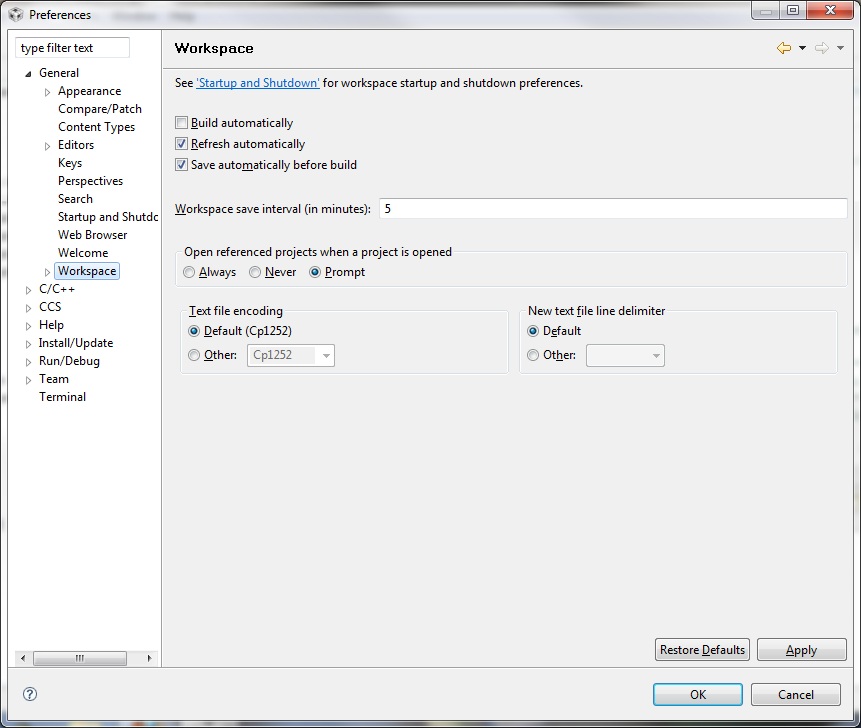
    If you mean that upon startup, CCS starts automatically building.  This can be changed by going to Window->Preferences.   Expand the General Tab and you will find the settings of interest under "Workspace".   See the attached screenshot.

    If you mean when you manually click/select build all your projects are being built/rebuilt then there are various ways to control this as well.   For example under Project you have

    Build Active Project

    Build All

    Withing a project you can have different configurations setup and you can even set the Active build configuration.

    In the Project menu make sure you have Build Automatically turned off.

    I hope this helps!

    Best Regards,

    Lisa

  • Lisa,

    After some more experimentation, I realized I was mistaken:  it was not exiting CCS4.2.0 that causes my problem, it is my system (64 bit Windows 7) crashing.

    Let me describe the scenario exactly:

    1. I build my project in CCS4.2.0
    2. I hit "rebuild all" immediately, and, as expected, no compilation takes place, because no file has been changed.
    3. I debug and run my code on both processors of an OMAP L138 via a BlackHawk USB560BP
    4. I terminate all or exit code composer:  sometimes this blue screens my system
    5. I reboot and restart CCS4.2.0
    6. I hit "rebuild all" and every source file in every project in my workspace is recompiled, even though no source file has been changed.

    So, it sounds like some critical file is changed in the system crash that causes the make system to rebuild of everything.   It would be nice if this didn't happen, but I suppose the real problem is CCS4 BSOD'ing my system.

       Jay

  • Hi Jay,

    ok this makes things a lot more complicated. 

    It could be something with CCS/Setup, a corrupted file, some incompatibility, etc.

    My first suggestion is to update to either the latest production release of CCS 4.2.4 or else if you wish give the beta 5.1 version that is also out there a try.

    http://processors.wiki.ti.com/index.php/Download_CCS#Code_Composer_Studio_Version_4_Downloads

    The first step might be a clean uninstall and reinstall.   You could also first try simply trying the code from a fresh workspace.  That alone might help.

    Please keep me informed.

    Best Regards,
    Lisa

  • HI again Jay,

    I thought I would see if there is any update here.  Also whether you have had a chance to try the update/reinstall.

    If CCS is continuing to cause crashes, could you please send any log files generated, symptoms, steps etc in order to help us.

    Best Regards,
    Lisa

  • Hi Lisa,
    I am facing same problem with CCS 4.2.4.00033.
    I did not understand what to do in the workspace settings.

    --
    Vishwanatha

  • Hi,

    I see that the makefile has this line:

    .PHONY: all clean dependents

    is this the reason? if so, how do I configure CCS4 such that this line is modified?

    --

    Vishwanatha