


Hi,
I would like to ask some questions on CCS 3.3’s Image Viewer.
The input is 640 × 480 4:2:2 BT.656 stream, and the starting address for their location in DDR2 memory is 0x81000000. The order is YUYV.

An image frame which can be correctly displayed in CCS 4.1.2 cannot be properly displayed in CCS 3.3. In the first figure above, the right smaller image is an image sensor’s test pattern showing vertical color bars. In CCS 4.1.2, using the settings in “Properties”, although I made a mistake in that U and V mask should actually be exchanged(U before V, not the reverse), the image can basically get correctly displayed. The dimensions of the display is 640 × 480, same as the input stream.
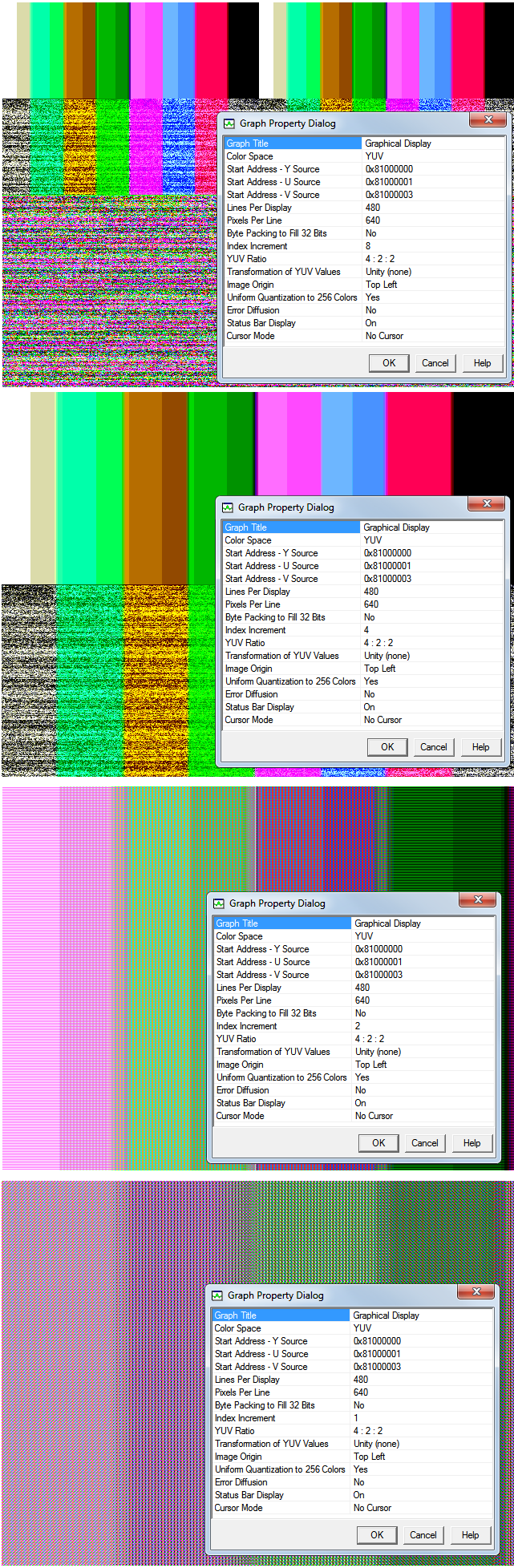
In 3.3 however, I have tried different configurations, and the closest one to the input is when “Index Increment” = 4, and has the bottom half looks like having been contaminated. In addition to this, each of the eight color bars (starting from white in the left) appear as two bars with slightly different shades.
When “Index Increment” = 8, the result is like a scaled version of “Index Increment” = 4, replicated in the upper two quadrants. The lower half contains unexplainable color mixes.
When “Index Increment” = 2 and 1, no part of the display has a uniform color.
I am confused. According to 8-bit BT.656 YUV standard, each pixel in the image would be represented by two pixels, so I expected “Index Increment” = 2, however the experiment result differs largely from this.
Whyt there is no get correct image here in CCS 3.3? Could anyone instruct me on how to configure? Although I have CCS 4 installed, it is very unstable with SEED XDS560 emulator, so I have to switch back and use 3.3 for my project.
Thanks,
Zheng

