This thread has been locked.

If you have a related question, please click the "Ask a related question" button in the top right corner. The newly created question will be automatically linked to this question.

Get Source Code Line Address


Hello, 

I was wondering if I can get the address of specific line in source code.

I'm trying to make sure that where the target is halted when it hit a breakpoint.

thanks in advance.

  • I was wondering if I can get the address of specific line in source code.

    You can get the address of a specific line in the assembly code but not the source code because the latter is an intermediate step. The exception might be a function call and definition.

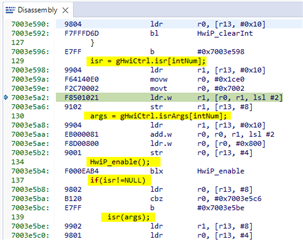
    Go to Window -> Show View -> Disassembly.

    The debugger then inserts the source code that made it into the program at appropriate points in the Disassembly. For example:

  • Hello Kier,

    Thanks for you response, 

    I need to make this through the com object , I'm trying to implement this scenario: 

    1. adding breakpoint by line number
    2. run
    3. check whether debugger hit the breakpoint or not (by checking if it's halted or not)
    4. check if the address that debugger is halted at is the same as the BP line address

    I tried to make this scenario with adding breakpoint by address and symbol, and it works fine.

    my problem is that I can't get line address.

    Thank you for your help.

  • I would use breakpoint properties instead. Note that the User's Guide has some typos in the examples. It is missing the "Type" node.

    Below is a working example:

    // Import the DSS packages into our namespace to save on typing
    importPackage(Packages.com.ti.debug.engine.scripting)
    importPackage(Packages.com.ti.ccstudio.scripting.environment)
    importPackage(Packages.java.lang)
    
    // Create our scripting environment object - which is the main entry point into any script and
    // the factory for creating other Scriptable ervers and Sessions
    var script = ScriptingEnvironment.instance()
    
    // Create a log file in the current directory to log script execution
    script.traceBegin("BreakpointsTestLog.xml", "DefaultStylesheet.xsl")
    
    // Set our TimeOut
    script.setScriptTimeout(15000)
    
    // Log everything
    script.traceSetConsoleLevel(TraceLevel.INFO)
    script.traceSetFileLevel(TraceLevel.ALL)
    
    // Get the Debug Server and start a Debug Session
    debugServer = script.getServer("DebugServer.1")
    debugServer.setConfig("./targetConfigs/MSPM0G3507.ccxml");
    debugSession = debugServer.openSession("*", "CORTEX_M0P")
    
    debugSession.target.connect();
    
    // Load a program
    // (ScriptingEnvironment has a concept of a working folder and for all of the APIs which take
    // path names as arguments you can either pass a relative path or an absolute path)
    debugSession.memory.loadProgram("./Debug/gpio_toggle_output_LP_MSPM0G3507_nortos_ticlang.out")
    
    // for setting breakpoint to perform profile control point
    var bpProps2 = debugSession.breakpoint.createProperties(1);
    
    bpProps2.setSourceLocation("Hardware Configuration.Type.Location", "C:/Users/user/workspace_v1250/gpio_toggle_output_LP_MSPM0G3507_nortos_ticlang/gpio_toggle_output.c", 51);
    
    var bp2 = debugSession.breakpoint.add(bpProps2); // add breakpoint
    
    var bpLoc = bpProps2.getNumeric("Hardware Configuration.Type.Location");    // get address of breakpoint
    
    script.traceWrite("BP Location: 0x" + bpLoc.toString(16));
    
    if(debugSession.expression.evaluate("PC") != bpLoc)
    {
        script.traceWrite("PC: 0x" + debugSession.expression.evaluate("PC").toString(16));
        debugSession.target.run();
    }
    
    script.traceWrite("PC: 0x" + debugSession.expression.evaluate("PC").toString(16));
    script.traceWrite("Halted at breakpoint");
    
    // All done
    debugSession.target.disconnect();
    debugSession.terminate()
    debugServer.stop()
    
    script.traceSetConsoleLevel(TraceLevel.INFO)
    script.traceWrite("TEST SUCCEEDED!")
    
    // Stop logging and exit.
    script.traceEnd()

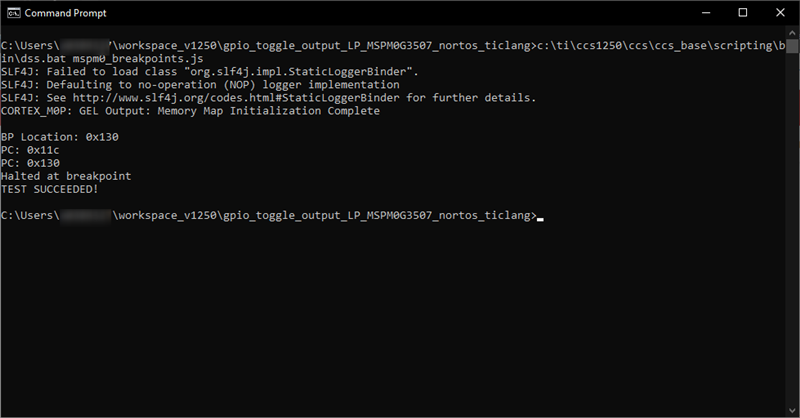
    console output:

    Thanks

    ki

  • Hello Ki

    Thanks you this helped me a lot.

    I have one more question regarding this params "Hardware Configuration.Type.Location" , is this parameter a constant parameter ?

    Thanks

  • I have one more question regarding this params "Hardware Configuration.Type.Location" , is this parameter a constant parameter ?

    No, you can change the value. If you set the value with a numeric value, it will set it on an address. In my example I passed in a string with the source file and line.

    When reading back the value, If I read a string, I'd get the source and line info. In my example, I read a numeric value so i got the address.

  • Okay Thanks a lot for your help