This thread has been locked.

If you have a related question, please click the "Ask a related question" button in the top right corner. The newly created question will be automatically linked to this question.

How to save projects built in CCS to another location?

Other Parts Discussed in Thread: SYSCONFIG

Hi,

I am using CCS to build some projects and I'd like to save these projects on Git.

I saw that some files like the ones that are built according to the configuration I set using SysConfig don't show in my workspace path.

How do I get access to all the files so I can save them in my Git?

Thank you!

  • Hello,

    I saw that some files like the ones that are built according to the configuration I set using SysConfig don't show in my workspace path.

    Are you referring to the files generated in <PROJECT ROOT>/<BUILD CONFIGURATION SUBFOLDER>/syscfg?

    Or files referenced from the SDK?

    Thanks

    ki

  • Hi Ki,

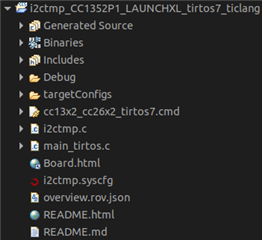
    I refer to files like "Generated Source", "Binaries", "Includes"...

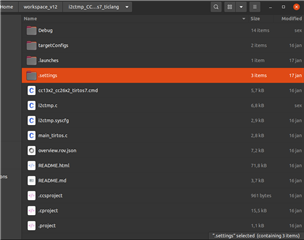
    I can see them in the Project Explorer in CCS but when I go to the folder I can't find them:

    Are they stored elsewhere?

    Regards,

    Eduardo.

  • I refer to files like "Generated Source", "Binaries", "Includes"...

    Ah, those. Yes they are just references. Please see:

    https://software-dl.ti.com/ccs/esd/documents/users_guide/ccs_project-management.html#project-explorer-view

    Note that not all files that appear in the view will exist in the filesystem and vice versa. Linked files will appear in the view but because they are references and not actual copies, they will not appear in the actual filesystem. The ‘Binaries’ and ‘Includes’ folders that appear in the Project Explorer view also are just references. The ‘Binaries’ folder points to the executable file in your active build configuration sub-folder (example, ‘Debug’).

    Hence:

    Generated Source typically contains references to additional source. For example, it would contain the same generated SysConfig files in: <PROJECT DIR>/<BUILD CONFIGURATION SUBFOLDER>/syscfg

    Includes would should the contents of the include directories specified in the project properties

    Binaries would show the generated executable for the project that is in  <PROJECT DIR>/<BUILD CONFIGURATION SUBFOLDER>

  • Thank you for your explanation!

    Now refering to the Includes specifically, if I want to export a full project to save it in my Git, I need to manually add these files to the folder I have linked to Git?

    Regards.

  • Now refering to the Includes specifically, if I want to export a full project to save it in my Git, I need to manually add these files to the folder I have linked to Git?

    I'm not sure you always want to do this. The Includes folder in Project Explorer will list the contents of the whole folder, including files that are not used by your project at all. Often times there includes come from some SDK that you are using and people typically do not add that content to version control.

    You will need to decide if they must be added to your git repo or not. 

  • And if I save the project without the Includes and then clone it to another notebook, will I be able to compile it correctly?

  • It depends. For example, most people do not add (unchanged) SDK files to the git repo. They do list a dependency on the SDK however. So on a clean machine, the steps would be that you pull the project out of the repo and then manually install the SDK to get the files from the SDK. 

    If you want EVERYTHING in the git repo regardless, then yeah you can add the entire SDK to the repo (or whatever files are being used from the SDK). That way you can just do your clone and everything is there. It is up to you.

  • So once I don't make any changes on SDK files if I pull the project to another machine it will automatically "find" these Includes if I already have the SDK installed?

  • So once I don't make any changes on SDK files if I pull the project to another machine it will automatically "find" these Includes if I already have the SDK installed?

    If the SDK is installed in the same location as the original project, then yes.

    While we are on this topic, I suggest reading the below article. There are some useful tips in there:

    https://dev.ti.com/tirex/explore/node?node=A__APCOPn6qUQAjzKNUeB0cuQ__ccs_devtools__FUz-xrs__LATEST

    Thanks

    ki

  • Hi Ki,

    I was readying the documentation and based on what you said, once my SDK is installed in the path /home/ti/simplelink_xxxxxx and the projects are located in /home/workspace_yyy, if I also install the SDK on another machine in the same location /home/ti/simplelink_xxxxxx it should work correctly?

    Thanks

    Eduardo

  • if I also install the SDK on another machine in the same location /home/ti/simplelink_xxxxxx it should work correctly?

    In that case that it should just work with no changes needed.

  • Thank you Ki.

    I appreciate your help. I have no further questions. For me it's ok to close the thread.

    Best regards,

    Eduardo.