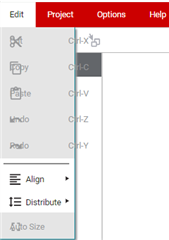
I had not used it in a few months, and I logged back in today, and it looks like it's broken:


Windows 11 22H2 PC, Google Chrome 121.0.6167.189
This thread has been locked.
If you have a related question, please click the "Ask a related question" button in the top right corner. The newly created question will be automatically linked to this question.
I had not used it in a few months, and I logged back in today, and it looks like it's broken:
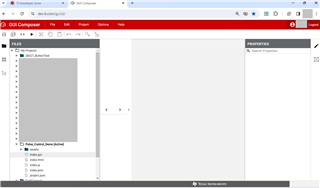

Windows 11 22H2 PC, Google Chrome 121.0.6167.189
Hi,
I just tried with Edge on the same PC, and it seems to work. It still is not working under Chrome. I had used GUI Composer extensively last autumn with the same PC and Chrome. Clearing the browser cached did not fix the issue. Chrome was updated to the latest version 122.0.6261.70 today and the issue remains.
Chrome is typically well supported by GUI Composer. I'm not sure why you are having issue there while Edge (which is Chromium based) is fine. I'll need to investigate further.
It is the same today.
FYI...I tried my home network, no change. I disabled the ad blocker, set zoom to 100%, and allowed 3rd party cookies. No changes after all of these.
Perhaps it some Chrome setting, although I don't recall making changes. From a quick look, I do not see any obvious settings that might impact the site.
Thanks Mark. We are still investigating. We can't seem to reproduce the issue on our end yet so it is taking some time.
Mark - On chrome, can you open the debug console in the browser provide the console messages/errors?
To so do:
Open GC, once the windows are shown, press F12 to open Chrome Development Tools, then switch to Console tab (red box), right click in console output and choose “Save As.

The log file is attached.
utag.266.js?utv=ut4.39.202311032045:3 Refused to load the script 'https://img.en25.com/i/elqCfg.min.js' because it violates the following Content Security Policy directive: "script-src 'self' https://*.ti.com https://*.akamaihd.net https://code.jquery.com https://tags.tiqcdn.com https://*.tealiumiq.com https://*.google-analytics.com https://*.googletagmanager.com https://*.googleadservices.com https://googleads.g.doubleclick.net https://*.decibelinsight.net https://*.abtasty.com wss://*.decibelinsight.net https://*.brightcove.net https://*.px-cloud.net https://*.3playmedia.com https://*.zencdn.net data: blob: 'unsafe-inline' 'unsafe-eval'". Note that 'script-src-elem' was not explicitly set, so 'script-src' is used as a fallback.
u.loader @ utag.266.js?utv=ut4.39.202311032045:3
utag.272.js?utv=ut4.39.202311032045:3 Refused to load the script 'https://img.en25.com/i/elqCfg.min.js' because it violates the following Content Security Policy directive: "script-src 'self' https://*.ti.com https://*.akamaihd.net https://code.jquery.com https://tags.tiqcdn.com https://*.tealiumiq.com https://*.google-analytics.com https://*.googletagmanager.com https://*.googleadservices.com https://googleads.g.doubleclick.net https://*.decibelinsight.net https://*.abtasty.com wss://*.decibelinsight.net https://*.brightcove.net https://*.px-cloud.net https://*.3playmedia.com https://*.zencdn.net data: blob: 'unsafe-inline' 'unsafe-eval'". Note that 'script-src-elem' was not explicitly set, so 'script-src' is used as a fallback.
u.loader @ utag.272.js?utv=ut4.39.202311032045:3
ti-core-assets.html.js:187 Help for gc.console:
To see logs for a particular module, set a cookie for that module name (e.g. gc.console.setCookie('ti-core-backplane',5) ).
To see logs for all modules, use a module name of 'all (e.g. gc.console.setCookie('all',5) ).
To see the location that logged the message, click on the triangle to the left of the message to expand the stack trace.
Colors: Red: error, Orange: warning, Black: info or a generic log, Blue: debug.
Commands: the following function calls can be called from the Chrome dev tools console window command line:
gc.console.setCookie(moduleName,<0-5>)
- creates a cookie for the specified module name. Use 'all' for all modules.
- value: 0 = remove the cookie, 1 = only errors, 2 = errors and warnings, 3 = errors,warnings,info, 4 = errors,warnings,info,logs, 5=debug+all others
gc.console.getCookies()
- dynamically updates any added or removed cookies and returns a list of all currently active cookies and their values.
gc.console.log(moduleName,msg)
- To log messages, use gc.console.log / gc.console.error / gc.console.warning / gc.console.info / gc.console.debug
This file is deprecated. Please use `iron-flex-layout/iron-flex-layout-classes.html`, and one of the specific dom-modules instead
(anonymous) @ v2/components/iron-f…ex-layout.html.js:2
This file is deprecated. Please use `iron-flex-layout/iron-flex-layout-classes.html`, and one of the specific dom-modules instead
(anonymous) @ v2/components/iron-f…ex-layout.html.js:2
ti-guicomposer-editor-area.html.js:129 [Deprecation] Listener added for a synchronous 'DOMNodeInserted' DOM Mutation Event. This event type is deprecated (https://w3c.github.io/uievents/#legacy-event-types) and work is underway to remove it from this browser. Usage of this event listener will cause performance issues today, and represents a risk of future incompatibility. Consider using MutationObserver instead.
ready @ ti-guicomposer-editor-area.html.js:129
color-editor.html.js:45 this.value =
ti-core-splitter.html.js:148 targetChanged: target=transportSelectionPanel[minWidth]=undefined
ti-core-splitter.html.js:137 update: dimension=width, horiz=false
ti-core-splitter.html.js:148 targetChanged: target=transportSelectionPanel[minWidth]=100px
ti-core-splitter.html.js:137 update: dimension=width, horiz=false
workspace/default//project.json:1
Failed to load resource: the server responded with a status of 404 ()
GcConsole.ts:357 Enter "gc.console.help() + <enter>" to see help info for GcConsole logging.
GcConsole.ts:109 [myapp] info: index.js is loaded...
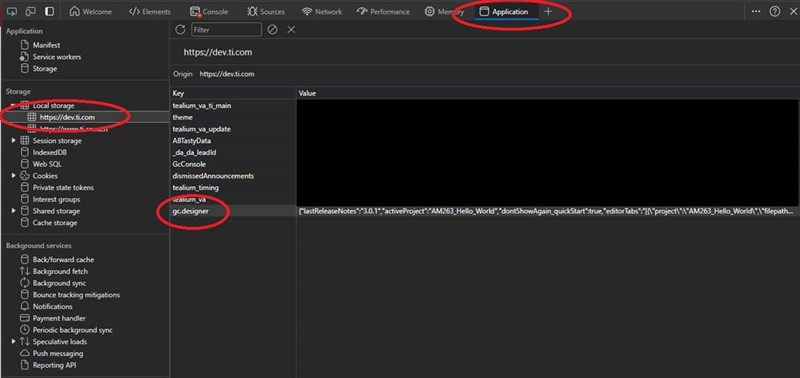
Thanks. Engineering took a look and suggested clearing the local storage.

Hello Ki,
I did as suggested, and no luck. The log from the developer tools is below, and it looks similar to what I had seen before.
utag.266.js?utv=ut4.39.202311032045:3 Refused to load the script 'https://img.en25.com/i/elqCfg.min.js' because it violates the following Content Security Policy directive: "script-src 'self' https://*.ti.com https://*.akamaihd.net https://code.jquery.com https://tags.tiqcdn.com https://*.tealiumiq.com https://*.google-analytics.com https://*.googletagmanager.com https://*.googleadservices.com https://googleads.g.doubleclick.net https://*.decibelinsight.net https://*.abtasty.com wss://*.decibelinsight.net https://*.brightcove.net https://*.px-cloud.net https://*.3playmedia.com https://*.zencdn.net data: blob: 'unsafe-inline' 'unsafe-eval'". Note that 'script-src-elem' was not explicitly set, so 'script-src' is used as a fallback.
u.loader @ utag.266.js?utv=ut4.39.202311032045:3
u.send @ utag.266.js?utv=ut4.39.202311032045:16
sendTag @ utag.js:440
trigger @ utag.js:441
track @ utag.js:431
utag.track @ utag.js:816
view @ utag.js:431
(anonymous) @ utag.266.js?utv=ut4.39.202311032045:5
window.onload @ utag.js:467
load (async)
window.addLoadEvent @ utag.js:467
u.extend @ utag.273.js?utv=ut4.39.202401242034:112
execute_send @ utag.273.js?utv=ut4.39.202401242034:123
u.send @ utag.273.js?utv=ut4.39.202401242034:119
LOAD @ utag.js:420
(anonymous) @ utag.273.js?utv=ut4.39.202401242034:146
utag.272.js?utv=ut4.39.202311032045:3 Refused to load the script 'https://img.en25.com/i/elqCfg.min.js' because it violates the following Content Security Policy directive: "script-src 'self' https://*.ti.com https://*.akamaihd.net https://code.jquery.com https://tags.tiqcdn.com https://*.tealiumiq.com https://*.google-analytics.com https://*.googletagmanager.com https://*.googleadservices.com https://googleads.g.doubleclick.net https://*.decibelinsight.net https://*.abtasty.com wss://*.decibelinsight.net https://*.brightcove.net https://*.px-cloud.net https://*.3playmedia.com https://*.zencdn.net data: blob: 'unsafe-inline' 'unsafe-eval'". Note that 'script-src-elem' was not explicitly set, so 'script-src' is used as a fallback.
u.loader @ utag.272.js?utv=ut4.39.202311032045:3
u.send @ utag.272.js?utv=ut4.39.202311032045:14
sendTag @ utag.js:440
trigger @ utag.js:441
track @ utag.js:431
utag.track @ utag.js:816
view @ utag.js:431
(anonymous) @ utag.272.js?utv=ut4.39.202311032045:5
window.onload @ utag.js:468
window.onload @ utag.js:467
load (async)
window.addLoadEvent @ utag.js:467
u.extend @ utag.273.js?utv=ut4.39.202401242034:112
execute_send @ utag.273.js?utv=ut4.39.202401242034:123
u.send @ utag.273.js?utv=ut4.39.202401242034:119
LOAD @ utag.js:420
(anonymous) @ utag.273.js?utv=ut4.39.202401242034:146
ti-core-assets.html.js:187 Help for gc.console:
To see logs for a particular module, set a cookie for that module name (e.g. gc.console.setCookie('ti-core-backplane',5) ).
To see logs for all modules, use a module name of 'all (e.g. gc.console.setCookie('all',5) ).
To see the location that logged the message, click on the triangle to the left of the message to expand the stack trace.
Colors: Red: error, Orange: warning, Black: info or a generic log, Blue: debug.
Commands: the following function calls can be called from the Chrome dev tools console window command line:
gc.console.setCookie(moduleName,<0-5>)
- creates a cookie for the specified module name. Use 'all' for all modules.
- value: 0 = remove the cookie, 1 = only errors, 2 = errors and warnings, 3 = errors,warnings,info, 4 = errors,warnings,info,logs, 5=debug+all others
gc.console.getCookies()
- dynamically updates any added or removed cookies and returns a list of all currently active cookies and their values.
gc.console.log(moduleName,msg)
- To log messages, use gc.console.log / gc.console.error / gc.console.warning / gc.console.info / gc.console.debug
iron-shadow-flex-layout.html.js:2 This file is deprecated. Please use `iron-flex-layout/iron-flex-layout-classes.html`, and one of the specific dom-modules instead
(anonymous) @ iron-shadow-flex-layout.html.js:2
iron-flex-layout.html.js:2 This file is deprecated. Please use `iron-flex-layout/iron-flex-layout-classes.html`, and one of the specific dom-modules instead
(anonymous) @ iron-flex-layout.html.js:2
ti-guicomposer-editor-area.html.js:129 [Deprecation] Listener added for a synchronous 'DOMNodeInserted' DOM Mutation Event. This event type is deprecated (https://w3c.github.io/uievents/#legacy-event-types) and work is underway to remove it from this browser. Usage of this event listener will cause performance issues today, and represents a risk of future incompatibility. Consider using MutationObserver instead.
ready @ ti-guicomposer-editor-area.html.js:129
_readySelf @ polymer-mini.html.js:157
_ready @ polymer-mini.html.js:137
_readyClients @ polymer-mini.html.js:144
_ready @ polymer-mini.html.js:132
_tryReady @ polymer-mini.html.js:122
_initFeatures @ polymer.html.js:4140
__initialize @ polymer-micro.html.js:227
createdCallback @ polymer-micro.html.js:210
created @ webcomponents-lite.js:2220
upgradeWithDefinition @ webcomponents-lite.js:2188
upgrade @ webcomponents-lite.js:2176
added @ webcomponents-lite.js:1981
(anonymous) @ webcomponents-lite.js:1990
(anonymous) @ webcomponents-lite.js:1922
findAllElements @ webcomponents-lite.js:1938
findAllElements @ webcomponents-lite.js:1939
forSubtree @ webcomponents-lite.js:1921
addedSubtree @ webcomponents-lite.js:1989
addedNode @ webcomponents-lite.js:1978
upgradeDocument @ webcomponents-lite.js:2139
_forDocumentTree @ webcomponents-lite.js:1967
forDocumentTree @ webcomponents-lite.js:1953
upgradeDocumentTree @ webcomponents-lite.js:2144
register @ webcomponents-lite.js:2266
window.Polymer @ polymer-micro.html.js:55
(anonymous) @ ti-guicomposer-app.html.js:2
color-editor.html.js:45 this.value =
ti-core-splitter.html.js:148 targetChanged: target=transportSelectionPanel[minWidth]=undefined
ti-core-splitter.html.js:137 update: dimension=width, horiz=false
ti-core-splitter.html.js:148 targetChanged: target=transportSelectionPanel[minWidth]=100px
ti-core-splitter.html.js:137 update: dimension=width, horiz=false
v2/components/font-awesome/fontawesome-webfont.woff:1
GET https://dev.ti.com/gc/v2/components/font-awesome/fontawesome-webfont.woff net::ERR_ABORTED 404 (Not Found)
v2/components/font-awesome/fontawesome-webfont.ttf:1
GET https://dev.ti.com/gc/v2/components/font-awesome/fontawesome-webfont.ttf net::ERR_ABORTED 404 (Not Found)
Thanks,
Mark