


Part Number: CODECOMPOSER
Other Parts Discussed in Thread: CCSTUDIO
I'm trying to build my CCS v12.6.0.00008 project using the command line on Windows 11.
I tried following this guide without success https://software-dl.ti.com/ccs/esd/documents/ccs_projects-command-line.html#build-a-ccs-project
Here's my command and the output:
$  eclipsec -noSplash -data "C:\Users\gabriel\workspace_v12" -application com.ti.ccstudio.apps.projectBuild -ccs.projects BMSM -ccs.configuration Debug -ccs.listProblems -ccs.listErrors
SLF4J: Failed to load class "org.slf4j.impl.StaticLoggerBinder".
SLF4J: Defaulting to no-operation (NOP) logger implementation
SLF4J: See http://www.slf4j.org/codes.html#StaticLoggerBinder for further details.

Usage:
        eclipsec -noSplash -data "<workspace_dir>"
                -application com.ti.ccstudio.apps.buildProject
                (-ccs.projects <name1>[ <name2>]* | -ccs.workspace) [<options>]

where options include:
        -ccs.projects <name1>[ <name2>]*
                Space-separated list of projects to build.

        -ccs.workspace
                Build entire workspace.

        -ccs.configuration <name>
                The build-configuration to build (optional).
                Defaults to active build-configuration.

        -ccs.buildType (incremental | full | clean)
                The type of build to perform (optional).
                Defaults to 'incremental'.

        -ccs.listErrors
                List all errors after build completes (optional).

        -ccs.listProblems
                List all errors and warnings after build completes (optional).

        -ccs.autoOpen
                Automatically open any closed projects (optional).

        -ccs.args <file>
                File containing any extra arguments (optional).

        -ccs.help
                Print this help message.
I observe the following:
- there's a Java logging library error for some reason
- I don't see any error message to help me diagnose the problem
- The exit code is 1
- The error message thinks I'm using the `buildProject` command, but I'm using `projectBuild`.
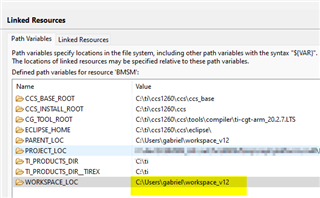
The workspace seems to be correct
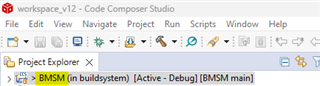
The project name and configuration seem to be correct
Any ideas?
Best,
Gabriel

