This thread has been locked.

If you have a related question, please click the "Ask a related question" button in the top right corner. The newly created question will be automatically linked to this question.

C66XCODECS: Load memory using CCS

Part Number: C66XCODECS

Hello,

I am writing a unit test for my modules which will be using C66x core (hence using all the intrinsic and compiler support). To module test I need to load a memory which is around 2MB. I have two option to do that

  1. use classical method from C and use fscanf and do something like this 
    1. for (i = 0; i < array_size; i++)
      {
      fscanf(my_file, "%u\n", &temp);
      output_array[i] = temp;
      }
  2. Other is to use the script to load the memory or memory browser like suggested long back in the link "e2e.ti.com/.../load-memory"

The test vectors i generate is from Matlab and i can easily generate in TI Data Format ".dat" or also in binary.

Now if I go with option 1 it takes approx of 3 hours to read the complete memory (as file reading is too slow). Second method needs a human intervention and when i want to automate my test modules its not possible.

Can you please help me in doing this as its adding so much time just to load the memory.

Br

Deepak Joshi

  • Deepak,

    Let me look at the methods and get back.

    Regards

    Shankari G

  • Deepak,

    When you say, the second method needs a human intervention, would you please expand?

    Because, this DSS script is for the automation purpose only.

    That is loading the raw memory or the CCS .dat files.

    For more info on DSS, visit here:- https://software-dl.ti.com/ccs/esd/documents/ccs_scripting_console_view.html

    Regards

    Shankari G

  • Hello Shankari,

    Thanks for this link it really help in figuring out the thing.

    What i want to do is like a Module\Unit Test which will have following step

    1. Load Project
    2. in the project read input file (using fscanf for say) --->(fscanf take 2-3 hours)
    3. Run Module
    4. Read Output from Reference file --> (fscanf take 1 hours)
    5. Compare Output from step 3 and 4
    6. Repeat 2 to 5 over N times

    This project will be done by me when i developing a module and then will be done by Continuous integration process during nightly build or when sanity testing is triggered in remote setup, So what I want is solution which can fit both developer and CI requirement.

    Now if i dump the files from Matlab in TI format and somehow use Memory explorer to load or save memory it can be done in few seconds ( to be fair i have never used scripting on CCS like loadRaw commands).

    what is your opinion how should i proceed for this case and if possible can you point me out some demo code or script to do the step 2 and 4 for my case.

    BTW thanks for the link it was quite informative.

    Br

    Deepak Joshi

  • Deepak,

    Welcome.

    For step 2 and 4, try using loadRaw commands

    ---

    The same link has the syntax too.

    ---

    Examples

    Loading and saving memory

    Memory and program load operations such as loadRaw, loadData, loadProg have the basic syntax below.

    Select text
        loadRaw(0x80000000,PAGE_PROGRAM,"C:\\temp\\myFile.bin",32,false)
        loadRaw(0x80000000,0,"/temp/myFile.bin",32,true)
    
    • Do not insert spaces between the commas and the parameters inside the parenthesis
    • When passing a reference to a file, use double quotes and use C-syntax parameters, including escaping special characters
    • Boolean values must be passed with the constants false and true these must be in lowercase.
    • The constants that designate the memory page of the target are optional: PAGE_PROGRAM, PAGE_DATA and PAGE_IO can be replaced with 0, 1 and 2 respectively.

    Memory save operations are slightly different

    Select text
        saveRaw(PAGE_PROGRAM,0x80000000,"C:\\temp\\myFile.bin",0x400,32,false)
    
    • The forward slash syntax for the filename designator does not work in this case.
    • The length parameter (0x400 in this example) specifies the total number of elements to be read, which is dependent on the target device. For MSP430, F28x and C55x each element consists of 16 bits or two bytes (in the example above 0x800 bytes will be read). For all other architectures it is 32 bits or four bytes (0x1000 bytes for the example above).

    Regards

    Shankari G

  • Hi Shankari,

    sorry one question regarding loadRaw,

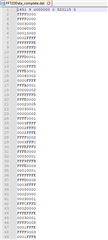
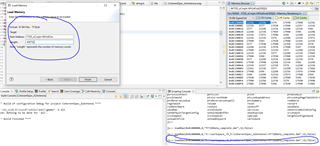
    1. I have file generated for TI data format *.dat file, So when I execute loadRaw(0x0c000000,0,"E:\\workspace_v5_5\\FT2DData_complete.dat",32,false) so will it be same when i use the load memory (in both case i open the file FT2DData_complete.dat
      1. Reason i see FT2DData_complete.dat is different with load memory (which is correct vs loadRaw)

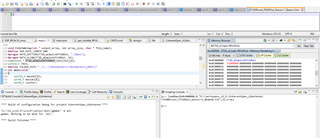
    I tried to put one variable in memory using loadRaw with only 1 written in file "F5200tvout_Fft2DOut_Sensor=1_Beam=0.txt" (loadRaw(0x0c000000,PAGE_DATA,"E:\\workspace_v5_5\\CoherentSpec_A2Antenna\\F5200tvout_Fft2DOut_Sensor=1_Beam=0.txt",32,true)) and snippet of map file where FT2D_aCmplx16Ft2dOut is in bss segment, You can see its wrongly loaded in memory as 0x31000000 

    address name
    ------- ----
    00805ad8 Arrange_FT3D_Arrays
    0080574c Arrange_Virtual_Channels
    0080bca0 C$$EXIT
    0080b678 C$$IO$$
    00805754 CoherentSpeCSingleZone
    00805aec Compute_Amplitude_Square
    00805744 Correct_Spdo_offsets
    00820dc0 DSP_fft16x16_imre
    00805ae4 FFT16_FT3D_Transpose
    0c000000 FT2D_aCmplx16Ft2dOut


    thanks again for your support

    Br

    Deepak Joshi 

  • Deepak,

    Please check the difference between "loadRaw, loadData, loadProg" etc..

    ---

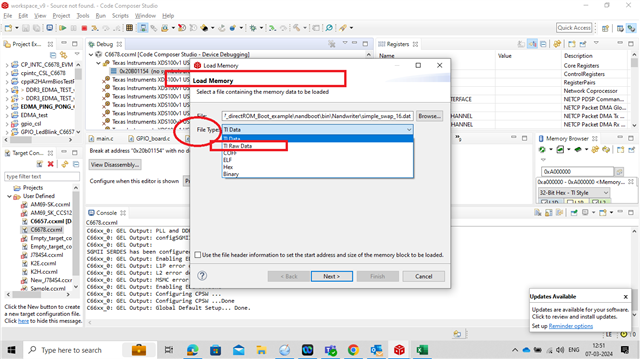
    Yes, the load memory option in CCS and these functions will be similar with differences in the file type options...

    But keep in mind, while using the "load memory option" in CCS, there are few additional options too.

    for example options like :- "filetype" ---> "TI-data" , "Ti Raw Data", Binary etc....

    ---


    ---

    And also----> In CCS --> GO to help --> help contents ---> search text like "load memory"... IT gives more details about the file types

    TI Data Format (*.dat),

    Coff Format (*.out),

    or Raw Data Format (*.bin).

    Regards

    Shankari G

  • Hello Shankari,

    Sorry i am on vacation for 2 days and will check this on monday. Once again thanks for yours wonderful help.

    Br

    deepak Joshi