Part Number: LAUNCHXL-F28P65X
Hello,
i use the Code Composer Studio Theia Version: 1.3.1.4
Where is it posible to select the cmd linker file (*.cmd)?
I'm looking in the properties, but I can't find the setting!
Regards,
Jürgen
This thread has been locked.
If you have a related question, please click the "Ask a related question" button in the top right corner. The newly created question will be automatically linked to this question.
Part Number: LAUNCHXL-F28P65X
Hello,
i use the Code Composer Studio Theia Version: 1.3.1.4
Where is it posible to select the cmd linker file (*.cmd)?
I'm looking in the properties, but I can't find the setting!
Regards,
Jürgen
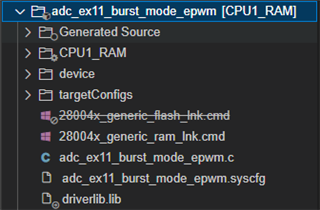
Hi Juergen,
Are you wanting to build a project as RAM or FLASH?

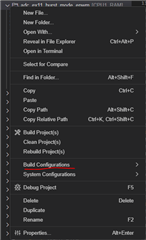
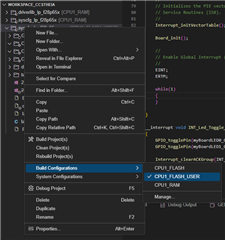
In order for me to select which .cmd file to use, all I have to do right click on the project and change the build configurations to be CPU1_RAM or CPU1_FLASH. This will change which linker command file that is being used.

Best regards,
Ryan Ma
Hi Ryan,
thanks for your answer.
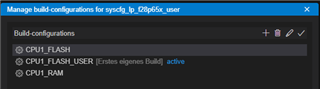
I create a new Build Configuration. I use the "Copy settings from" CPU1_FLASH setting.

and select this as active Build Configuration

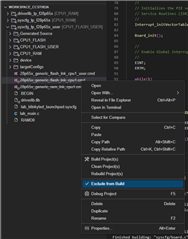
Next i create an user defined linker cmd file by copy and rename the existing x_flash_Ink_cpu1.cmd file.
Now I deactivate the previously used linker cmd file with "Exclude from Build"

Now I can build the new configuration with the new linker file.
Is this the more common and correct approach?
Or is there a simpler way?
Best regards,
Jürgen