This thread has been locked.

If you have a related question, please click the "Ask a related question" button in the top right corner. The newly created question will be automatically linked to this question.

CCSTUDIO: GEL Scripts Not Available For Cores 1, 2 & 3

Part Number: CCSTUDIO


Hello,

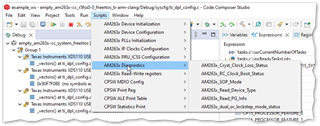
In CCS 12.5 with AM2634x, scripts appear in the menu when Core 0 is selected:
...but they are not available for the other cores:
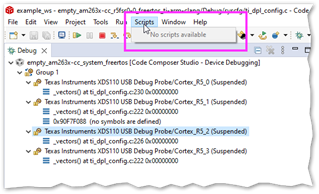
I would have expected them to be available at least each sub system i.e. Core 2.

Is this intentional and how can I work around it please?

  • Hello Kier,

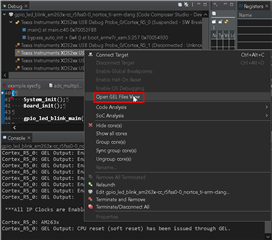
    This is done intentionally to ensure all device configuration is done correctly directly from the R5FSS0_0 core without any interference from other cores. The gel scripts that are loaded to the R5FSS0_0 core can also be loaded and used by any other core.

    This can be done with the following steps:

    1) Right click the core debug instance, and select "Open GEL Files View".

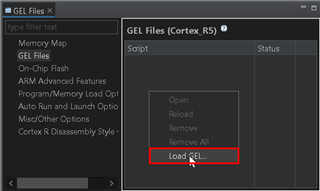
    2) Right click in in the Gel Files View, and select "Load GEL...".

    3) Navigate to the AM263x.gel source file in your file browser ( C:\ti\ccs12XX\ccs\ccs_base\emulation\gel\AM263x\* )

    4) Select "Open", CCS will load all the associated GEL files in the pane and the scripts tab will now contain the associated functions.

    Please let me know if this works for you and if there are any additional questions.

    Best Regards,

    Zackary Fleenor