This thread has been locked.

If you have a related question, please click the "Ask a related question" button in the top right corner. The newly created question will be automatically linked to this question.

Compilation with unwanted compiler version


It can happen, that in the preferences the compiler version is lost.
If there are 2 compiler versions are installed, it is possible, that for compilation the wrong compiler is used.

  • Rainer,

    What version of Code Composer Studio are you using?


    John

  • Version: 5.1.0.201105121800

    Build id: N201105121800


  • Rainer,

    You can check which version of the compiler your project is set to use.  Right click on your project and select properties.  Click on CCS General.  In the case of my project below the project is set to use the 3.3.3 compiler but is actually using the 4.0.0B1 compiler as this CCS installation is not aware of where the 3.3.3 compiler is installed.

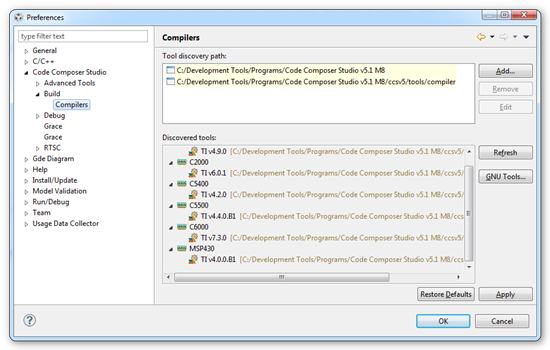
    You can tell CCS where additional compilers are installed by going to Window -> Preferences:


    Regards,

    John


  • Hi John,

    we are using compiler version 7.0.4.

    We have also selected this compiler Version in the preferences of Code Composer Studio.

     But sometimes, we don't know when the compiler entry is lost for all workspaces.

    By default, CCS5 uses then the compiler Version which was installed together with CCS5 without any warning.

    In order to prevent compiling with the wrong version, we uninstall the default compiler.

    Then we get the information, that no compiler is available and we can reintroduce our compiler 7.0.4 in the Preferences.


    Regards

    Rainer


  • Rainer,

    There should be a warning in the problems view:

    However you are likely not going to see this until after your build and if there were no errors you may not even look (especially if you were hitting the bug button to build and then launch the debugger).

    Currently CCS will halt the build if the compiler being used is much older than the one the project is set to use.  If it is just a little bit older it gives a warning or if it is newer it just gives a warning.  There has been some thought to making the behavior user controllable.

    Regards,

    John

  • Hi John,

    i didn't test with an older Version installed.

    We are using CGT 7.0.4, because with any newer Tool version our SW doesn't work anymore on our target HW.

    The standard Version installed together with CCS5 is if I remember well, CGT 7.2.3.

    It happened several times, that version 7.2.3 was used without any warning. I only did wonder after loading our SW to our target HW, that it was not running anymore.

    We found now a workaround, which is to uninstall manually the CGT version which has been installed with CCS5. Then we get immediately the indication that the compiler has been gone.

    In CCS4 there was a similar message as in the picture above.


    Regards


    Rainer


  • The screen capture I sent with the warning is from 5.1.0 M8.  That one is a bit newer than the build you have installed.  We are actually installing the 7.3.0 compiler now as the default for C6000.  My project situation was the same as yours.  CCS had a newer version but my project was configured to use an older version (which could not be found).  CCS used the newer one but gave me the warning in the problems view.  It is real easy to miss the warning though.

    When CCS forgets where your 7.0.4 compiler is does the location entry disappear from the preferences dialog?

    John


  • The directories that CCS searches for compiler locations are stored in \ccsv5\eclipse\configuration\ccs.properties  At least that is where it is stored in the latest 5.1 builds.  It got moved there so that they wouldn't get wiped if someone cleans out the workspace.

    If you don't have that file you may want to try updating to 5.1.0 M8.5 and see if that helps with the problem of the directories getting lost.

    John

  • Hello,

    after building with the wrong compiler version, I didn't get any hint in the problems window or in the build console window that the wrong compiler version has been used. See screenshot


  • Rainer Rathgeb said:

    after building with the wrong compiler version, I didn't get any hint in the problems window or in the build console window that the wrong compiler version has been used. See screenshot

    This is a bug in CCS 5.1. For this situation there should've been a warning generated telling you that the effective compiler version used for the build is different than the version the project was created with. The warning should appear whenever Y is different between the 2 versions (where the CGT version is designated as X.Y.Z).

    We are tracking this in bug # SDSCM00042050 and it should be fixed in a future release.