This thread has been locked.

If you have a related question, please click the "Ask a related question" button in the top right corner. The newly created question will be automatically linked to this question.

RTA tool to debug DSP side code of an ARM+DSP application

Other Parts Discussed in Thread: CCSTUDIO, SYSBIOS

Hi,


I am trying to debug an ARM+DSP application on DM8148 where in the ARM application loads a BIOS 6 based excutable on the DSP.  The code on the DSP uses log_print statements to create a debug log which I need to be able to see in the RTA tool. However when I load the symbols from the executable after halting the ARM side application, CCS does not allow me to open the RTA windows after I connect to the DSP. My application is on the ARM side so, I launch the debug session directly from the target configuration. I have set the XDC tools in the preferences and also have tried enabling the clock as some forum post had earlier suggested. 

I wanted to know if this feature is supported in the CCS environment where I can see logs in the RTA tool when only symbols from an excutable are loaded. This is a very important feature required in this kind of multi processor environment so I really hope there is a way to enable this feature.


Regards,

Rahul

  • Rahul,


    You may want to check out the system analyzer: http://processors.wiki.ti.com/index.php/Multicore_System_Analyzer_Tutorials  The 3rd set of tutorials deals with RTA type features.  I will ask an expert to respond about the specific question you had but you may want to look over the tutorials in they meantime.


    Regards,

    John

  • Thanks for the response John. I have looked at the wiki, it looks like the wiki is still under construction and doesn`t really talk about the use case that I have described, wherein the DSP executable is not built and loaded in the CCS environment. In my use case, the ARM loads the DSP executable over syslink and debugging is done by halting the the DSP and loading only symbols from the DSP excutable.

    Regards,

    Rahul

  • Rahul,

    The use case of connecting to the DSP, loading only the Symbols for that DSP in CCStudio and then accessing the RTA view should be supported. What issues are you seeing ... are the RTA menu items greyed out. If so are you certain that the DSP program has RTA enabled. If you connect to the DSP and load the program onto it, are the RTA menu items enabled?

    This use case should also be supported by the System Analyzer (wiki John pointed you to earlier).

    Regards,

    Imtaz.

  • Imtaz,

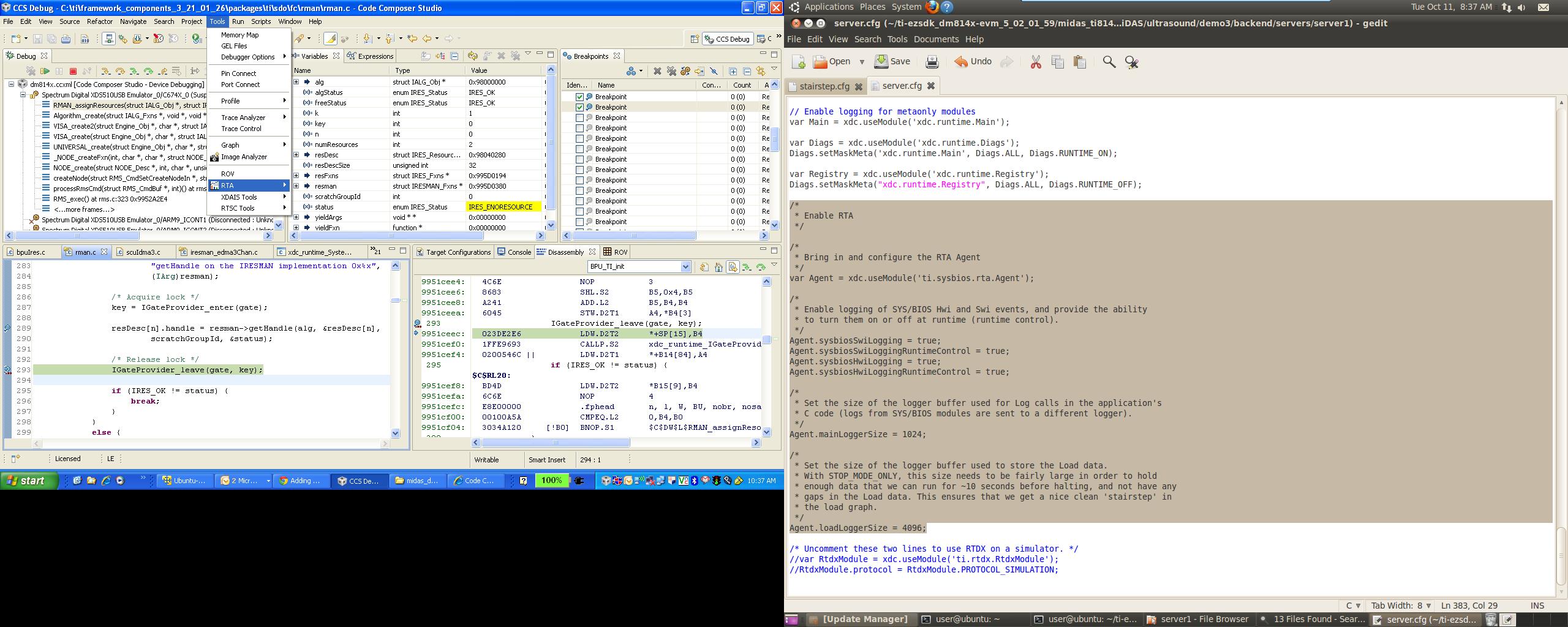
    I am using CCSv5, in which when I open up the debug view, the RTA tool options are all greyed out but when I load the symbols, the RTA option on the tools Tab does not show me any options to enable.  Please see the image attached to see the behaviour


    The DSP program does have RTA enabled using the following configurations

    /*
     * Bring in and configure the RTA Agent
     */
    var Agent = xdc.useModule('ti.sysbios.rta.Agent');

    Agent.sysbiosSwiLogging = true;
    Agent.sysbiosSwiLoggingRuntimeControl = true;
    Agent.sysbiosHwiLogging = true;
    Agent.sysbiosHwiLoggingRuntimeControl = true;

    Agent.mainLoggerSize = 1024;

    Agent.loadLoggerSize = 4096;

  • Hi Rahul,

    Could you please open the Error Log view (under Window->Show View->Error Log) to see whether there are any related RTA errors reported there?

    Thanks,

    -pegah

  • Rahul,

    Were you able to make any progress with this. As mentioned, RTA should be supported for this use case. It is most likely that there is some error which is preventing the menu items from showing up. If this is the case then there should report in the error log. If you can send us the error log file that will be helpful. The error log should be in your <CCSworkspace>/.metadata/.log

    Regards,

    Imtaz.

  • Imtaz,

    Sorry for the delay in response here. I haven`t been able to progress with this. I had given up on this for the last few days. Here is the error log file from my work space .

    4466..log


    Regards,

    Rahul