This thread has been locked.

If you have a related question, please click the "Ask a related question" button in the top right corner. The newly created question will be automatically linked to this question.

CCS5.1M8 on Windows and STM trace

Hi,


since this does not seem to be supported currently on Linux, we switched to Windows and M8 release. We are using the instructions attached and an XDS560v2 STM pod, and on my machine with Win XP, this works. My customer however has the following error occur, when the Trace Control is configured on the CSSTM core and the connection is trying to establish.

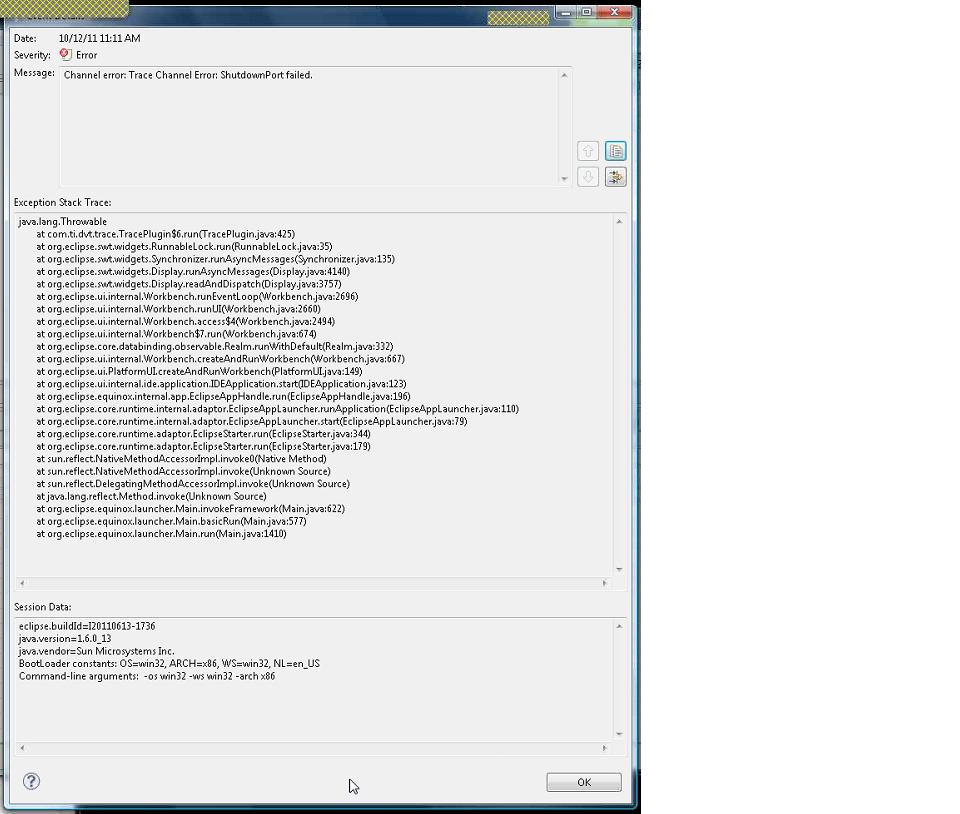
Message: Channel error: Trace Channel Error: ShutdownPort failed.

This was the same result with a native Windows Vista Machine (using XDS560v2 with USB) and with Windows 7 on VirtualBox (using XDS560v2 with Ethernet).

Regards,

--Gunter

  • Hi,


    we were using the following instructions attached.


    Thanks,

    --Gunter


    DDR_Bandwidth_ScreenShots.ppt
  • Gunter,

    This could be a trace calibration issue. Please ask the customer to power cycle the XDS560V2 and try again. If this doesn't work ask them to turn on trace logging and send us the log. To turn on trace logging set the environment variable TI_TRACE_LOGGING to 6. The log file will be written to C:\Users\<username>\.TI-trace

    Thanks,

    Oliver


  • Gunter, the installation instructions are out-dated.  With M8.5 there is no longer a need to install emupack 5.0.281.1.  I suggest using a clean install of M8.5 without any additional emupack.  I appologize and we will make sure the wiki gets updated.

    Best Regards,

    Jason Letbetter

  • Hi,


    we determined that the Port Shutdown issue with STM trace is likely related to HW

    (1) Centaurus EVM works: We are using STM 1-pin mode, which I think uses EMU0 and EMU1. PU 4.7k resistors on EMU0/1.

    (2) DM8127 IPNC fails: We are also using STM 1-pin mode, which uses EMU0/1, we also have PU 4.7k resistors on EMU0/1. However the board traces are probably less optimal and then there is a ribbon cable that brings JTAG signals and EMU0/1 out to a small debug board where there is the 20-pin connector. So overall EMU0/1 traces maybe be such that speed and signal integrity may be impacted.

    Here is my question:

    Is there a way to slow down the EMU0/1 speed for the STM 1-pin mode, so that we could live with less optimal EMU0/1 layout and signals?


    Thanks,

    --Gunter


  • Hi,


    for this slower speed STM 1-pin mode question, I am also attaching the GEL file loaded into the DAPSS core.


    Regards,

    --Gunter

    Centaurus_trace_dapdebugss.zip
  • Gunter, we don't normally expect a signal integrity issue to lead to an error in shutdown port.  Have you tried reinstalling CCS M8.5 (ie. w/o any extra emupacks)?

  • Jason,


    yes we have tried CCS5.1M8.5 and the result is the same. Since it works on the Centaurus EVM and it doesnt work on the Centaurus IPNC HW, there must be a HW difference. Here are a few differences:

    Centaurus EVM (works)

    Here all EVM0/1/2/3/4 are connected to the 20pin connector. The connector is on the board and traces are probably good. Again we are using only 1-pin STM, which means that only EMU0/1 should be used.


    Centaurus IPNC (fails)

    Here only EMU0/1 are connected to the 20pin connector. The connector is on a separate debug board and that is connected via a ribbon cable to the processor board. This is where the shutdown port message occurs.


    Is there more information we can gather from CCS itself?


    Thanks,

    --Gunter

  • Hi,


    based on Olivers feedback, I am attaching the CCS Trace Log for TI_TRACE_LOGGING = 6. This log includes the Port Shutdown error. Please let me know whether there is more logging needed and why it says "Failed to claim STM".


    Regards,

    --Gunter

    ti_trace_log_1112011_2164.zip
  • Hi,

    From the log file I can see the STM module was successfully claimed. But when the SW tried to enable the module, instead of enabled, the STM module was released. Please let us know if you have run any GEL file before bring up Trace Control.

    Since I don't have the target I would like you to do the following test if it is possible.

    1. After trace calibration failed, read memory value at the address 0x4b161fb4 from CS_DAP_DebugSS. If the value is not 0x01 write 0xC5ACCE55 to 0x4b161fb0 to see if the value of 0x4b161fb4 changes 0x01. If you see the value of 0x4b161fb4 is 0x01 then do next.
    2. Write 0x40000000 at memory address at 0x4b161024 to see if the value will be changed to 0x60000000. If it does then write 0x80000000 to the same address to see if the value will be changed to 0xA0000000.
    3. Exit CCS, power cycle the target, bring up CCS again. Repeat above two tests before bring up Trace Control and runing calibration.

    Please let me know the test result.

    Regards,

    Joe Liu

  • Hi Joe,


    thanks for the feedback. We are going through this. Here is the GEL File we are loading into the DAP core and we run from it the 1-pin STM configuration script.


    Regards,

    --Gunter

    Centaurus_trace_dapdebugss.zip