This thread has been locked.

If you have a related question, please click the "Ask a related question" button in the top right corner. The newly created question will be automatically linked to this question.

Reading F2812 peripheral registers during debug

Other Parts Discussed in Thread: TMS320F2812, CONTROLSUITE

I am attempting to debug an F2812 project with a SD XDS510LC
USB emulator, and want to watch the contents of some
peripheral registers (CAN engine in particular) when the
processor is stopped. The drop-down menu View >> Registers
command shows me 'Core registers' and that's all.

I have looked back at all the test projects I have developed
so far (only about a dozen) and some of them have all the
peripheral registers in this same window, while others do
not. I can find no rhyme nor reason for this difference.

A response to a post on this forum says the viewable
registers are determined by an xml file.  None of my
projects have a file with extension .xml, but they all have
one ending in .ccxml.  I can see nothing in there related to
registers.

Some of my projects have a file with extension .ccxml.cache,
and I can see definitions of the 'Core registers' therein,
but nothing resembling a peripheral register. Furthermore,
there is no correllation between projects whose peripheral
registers are visible, and projects containing this file
type.

Another post says we should read their raw hex addresses
with the memory command. I don't want to pay all this money
for an emulator and be forced to resort to such an error
prone debugging process. (Especially when the emulator can do
it some of the time!)

How can I take control of my peripheral registers, and
access them on ALL projects?

  • Hi Gary,

    Gary Lynch said:
    A response to a post on this forum says the viewable
    registers are determined by an xml file.  None of my
    projects have a file with extension .xml, but they all have
    one ending in .ccxml.  I can see nothing in there related to
    registers.

    The xml file being referred to are xml files that comes with the CCS install and not any xml file in your project. these files exist in

    .\ccsv4\common\targetdb\Devices

    In your case it would be 'f2812.xml'. This file pulls in several module xml files that define the registers.

    Gary Lynch said:
    How can I take control of my peripheral registers, and
    access them on ALL projects?
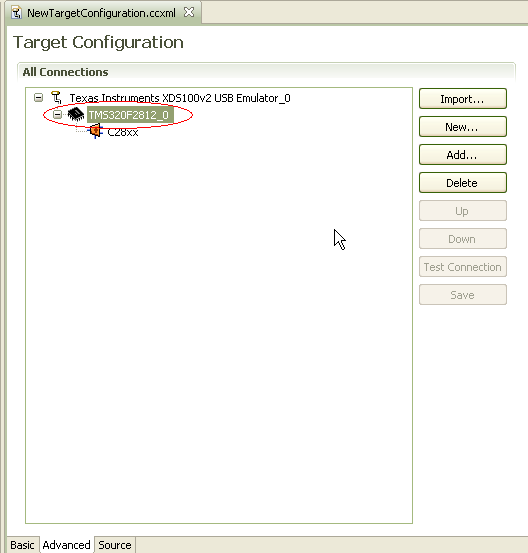
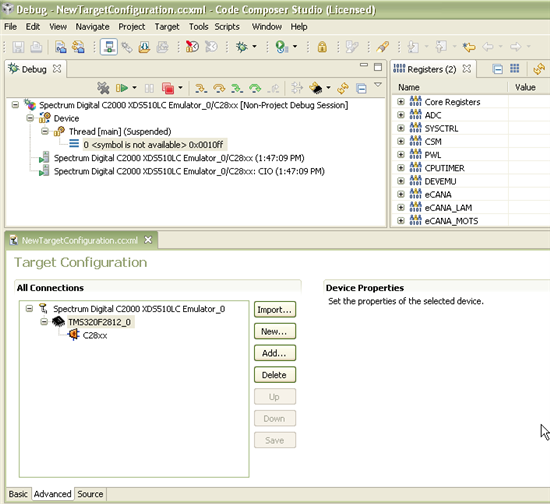
    Make sure your target configuration ccxml file uses the f2812 device xml file. How can you confirm this? In the advanced tab of target config editor and see if there is an additional node (TMS320F2812_0). This confirms that the device XML file is being used.

    EXAMPLES

    GOOD (being used):

    BAD (not being used):

    If you use the basic tab to pick the connection and device, it should automatically use the device xml file.

    Thanks

    ki

  • On Friday, October 21, 2011 12:00 PM; Ki-Soo Lee wrote:
    >
    > Make sure your target configuration ccxml file uses the
    > f2812 device xml file. How can you confirm this? In the
    > advanced tab of target config editor and see if there is an
    > additional node (TMS320F2812_0). This confirms that the
    > device XML file is being used.
    >
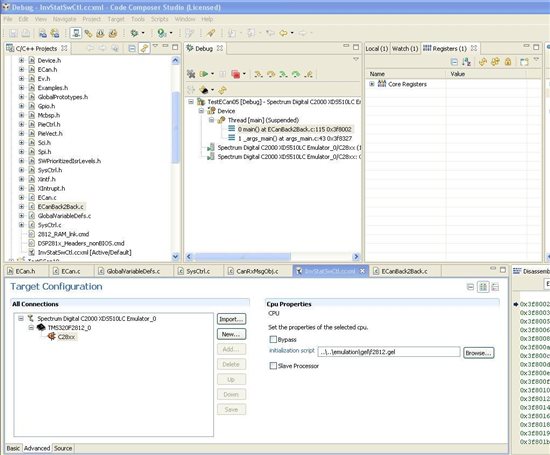
    I followed your steps to the screen reproduced here:

    As far as I can tell, I always had TMS320F2812_0 specified
    in my ccxml file, and as you can see, I still have only
    'Core Registers' in the REGISTERs window.

  • hmm. I see it in my install. What is the full version number of you CCS install? Can you attach your ccxml file?

  • On Friday, October 21, 2011 1:55 PM; Ki-Soo Lee wrote:
    >
    > What is the full version number of you CCS install?
    >
    I have 4.0.1.01001.


    > Can you attach your ccxml file?
    >
    I hope you mean 'embed', which I can do. This is my
    [target].ccxml file in the project directory:
    ]
    ] <?xml version="1.0" encoding="UTF-8" standalone="no"?>
    ] <configurations XML_version="1.2" id="configurations_0">
    ] <configuration XML_version="1.2" id="Spectrum Digital C2000 XDS510LC Emulator_0">
    ]         <instance XML_version="1.2" desc="Spectrum Digital C2000 XDS510LC Emulator_0" href="connections\SD2000USB_Connection.xml" id="Spectrum Digital C2000 XDS510LC Emulator_0" xml="SD2000USB_Connection.xml" xmlpath="connections"/>
    ]         <connection XML_version="1.2" id="Spectrum Digital C2000 XDS510LC Emulator_0">
    ]             <instance XML_version="1.2" href="drivers\sdgo28xusb_xds510lc.xml" id="drivers" xml="sdgo28xusb_xds510lc.xml" xmlpath="drivers"/>
    ]             <platform XML_version="1.2" id="platform_0">
    ]                 <instance XML_version="1.2" desc="TMS320F2812_0" href="Devices\f2812.xml" id="TMS320F2812_0" xml="f2812.xml" xmlpath="Devices"/>
    ]             </platform>
    ]         </connection>
    ]     </configuration>
    ] </configurations>
    ]

    and this is my f2812.xml file in the IDE tree:
    ]
    ] <?xml version="1.0" encoding="UTF-8"?>
    ] <!--
    ]   TI File $Revision:  $
    ]   Checkin $Date:  $
    ]   -->
    ]
    ]
    ] <device id="C28xx" partnum="TMS320F2812" HW_revision="1" XML_version="1" desc="TMS320F2812" description="">
    ]  <instance href="..\cpus\c28xx.xml" desc="C28xx" description="" id="C2800" isa="TMS320C28xx" xml="c28xx.xml" xmlpath="..\Cpus\" />
    ]  <cpu HW_revision="1.0" XML_version="1.2" description="CPU" deviceSim="false" id="C2800" isa="TMS320C28xx">
    ]   <property Type="filepathfield" Value="..\..\emulation\gel\f2812.gel" id="GEL File"/>
    ]   <!-- Project Wizard Settings -->
    ]    <property Type="stringfield" Value="--large_memory_model --silicon_version=28" id="CompilerBuildOptions" />
    ]      <!-- not used <property Type="stringfield" Value="opts" id="LinkerBuildOptions" /> -->
    ]      <property Type="stringfield" Value="2812_RAM_lnk.cmd" id="LinkerCmd" />
    ]      <property Type="stringfield" Value="rts2800_ml.lib" id="RTSlib" />
    ]   <!-- END Project Wizard Settings -->
    ]  </cpu>
    ] </device>
    ]

    I have located a path down to a set of xml files that define
    all the peripheral registers:

      f2812.xml
       +--c28xx.xml
       |   +--C28xNotVisible.xml
       +--C2000_ADC_Type0_Registers.xml
       +--281x_System_Control_Registers.xml
       +--C2000_Code_Security_Module_Registers.xml
       +--C2000_PWL_Registers.xml
       +--C2000_CPU_Timer_Registers.xml
       +--281x_Device_Emulation_Registers.xml
       +--C2000_eCAN_A_Type0_Registers.xml
       +--C2000_eCAN_A_Type0_Local_Acceptance_Masks.xml
       +--C2000_eCAN_A_Type0_Message_Object_Time_Stamps.xml
       +--C2000_eCAN_A_Type0_Message_Object_TimeOut.xml
       +--C2000_eCAN_A_Type0_Mailbox_Registers.xml
       +--C2000_EV_A_Type0_Registers.xml
       +--C2000_EV_B_Type0_Registers.xml
       +--C2000_Flash_Type0_Registers.xml
       +--C2000_External_Interface_Type0_Registers.xml
       +--281x_External_Interrupt_Registers.xml
       +--281x_GPIO_Registers.xml
       +--C2000_McBSPA_Type0_Registers.xml
       +--C2000_PIE_Registers.xml
       +--C2000_SCI_A_Type0_Registers.xml
       +--C2000_SCI_B_Type0_Registers.xml
       +--C2000_SPI_A_Type0_Registers.xml

    which matches your description exactly, but I got this from
    a co-worker's workstation. All the peripheral register links
    are missing in mine, so that file got clobbered somehow.

    Do I have to wipe out CCSv4 and install it all over again?

  • Gary Lynch said:
    I have 4.0.1.01001.

    This is a pretty old version. the f2812.xml file in that install is missing the references to the module xml files with the register definitions.

    Gary Lynch said:
    Do I have to wipe out CCSv4 and install it all over again?

    You may be able to drop in updated xml files but I would strongly recommend updating your version of v4. CCS for C28x didn't really get stable until 4.2.x. You can run the updater and incrementally update to 4.2.4.

    What confuses me is your earlier comment that some projects had the registers visible and some do not and there was no rhyme or reason. Are you saying that the same CCS 4.0.1 had some projects where the registers appeared?

  • On Friday, October 21, 2011 2:28 PM; Ki-Soo Lee wrote:
    >
    >

    Gary Lynch said:
    I have 4.0.1.01001.

    > This is a pretty old version. the f2812.xml file in that
    > install is missing the references to the module xml files
    > with the register definitions.
    >
    >
    Gary Lynch said:
    Do I have to wipe out CCSv4 and
    > install it all over again?

    >
    > You may be able to drop in updated xml files but I would
    > strongly recommend updating your version of v4. CCS for C28x
    > didn't really get stable until 4.2.x. You can run the
    > updater and incrementally update to 4.2.4.
    >
    > What confuses me is your earlier comment that some projects
    > had the registers visible and some do not and there was no
    > rhyme or reason. Are you saying that the same CCS 4.0.1 had
    > some projects where the registers appeared?
    >
    I was trying to keep this simple, but that is now blowing up
    in my face.  My original environment, installed in July,
    2010, was on a 6-year-old workstation, and ran so slowly that
    I decided to buy new hardware.

    That arrived in July of this year, and I had it installed
    from the same CD as the old workstation. At that point, I
    stopped using CCS on the old workstation, got a new licence
    ID number, and left CCS on the old workstation. As long as I
    don't try to use them simultaneously, nothing happens.

    I also have never been able to install CCS myself, and had
    to hand the job off to our MIS guy. He told me both times he
    had installed all the updates.

    So the version on the old workstation (which I haven't tried
    to maintain) is 4.1.3.00038. Most of the projects are there,
    and some show peripheral registers, while others don't. None
    of my projects on the new workstation can view peripheral
    registers.

    Although I receive routine e-mail notifications to update
    controlSuite, I have never received one for CCS. My co-
    worker, who bought his IDE at the same time, DOES receive
    routine notifications. This may explain how I got so
    out-of-date.

    I used the menu command Help >> Software updates >> Find and
    install... to upgrade. After the download I got a warning
    from Windows:
        "This feature has not been digitally signed. The
         provider of this feature cannot be verified."

    which I ignored. It then let me upgrade to 4.0.2.01003. When
    I tried again, it said there were no more upgrades
    available. (When I bought my service contract, I must have
    gotten one in second class.)

    My new f2812.xml file is dated 08/31/09, but it does have
    the peripheral register references.

    I re-build my most recent application, and behold: the
    peripheral registers have appeared!

    Thanks.