This thread has been locked.

If you have a related question, please click the "Ask a related question" button in the top right corner. The newly created question will be automatically linked to this question.

CCSv5 Custom Build Steps

Other Parts Discussed in Thread: TEST2

Does and how does "custom build step" work in CCSv5?

I tried suggestions from CCSv4

http://e2e.ti.com/support/development_tools/code_composer_studio/f/81/p/73660/299673.aspx#299673
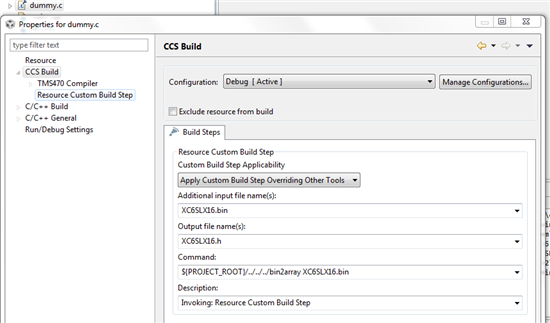


The project build does nothing.

Build selected File(s) has the following output:


**** Build of configuration Debug for project Test2 ****

C:\ti\ccsv5\utils\bin\gmake -k dummy.obj
gmake: *** No rule to make target `dummy.obj'.

**** Build Finished ****

Best regards

Thomas


  • Thomas,

    Sorry about the delayed reply. I have been trying to test something similar to your custom build step, but haven't been able to get it work so far if there is only single command specified. The example provided in the other forum thread you referenced does import and build fine in CCSv5. If there are multiple input/output files and multiple commands, then it seems to work fine. I need to research this further to check if there is an issue.

    However, if what you are looking to do is generate a header file, you can do it as a pre-build step and make sure it is picked up in the main build by following the process described in this post: http://e2e.ti.com/support/development_tools/code_composer_studio/f/81/p/73660/290290.aspx#290290

    Have you given this a try, and does it give you what you are looking for?

  • Thomas - I'm not sure which exact version of CCS you are using but there is a known issue with CCSv5.1.0.08020 where errors occur if using the file-specific post build steps. The tracking ID is: SDSCM00042280

    ki

  • Thomas,

    I got some more information on this from the CCS team. The output of the custom build step needs to be a buildable file that gets passed to the compiler or linker. Since a header file is not a buildable file this method does not work for .h files. The forum link I sent earlier is the recommended method when dealing with .h files.