This thread has been locked.

If you have a related question, please click the "Ask a related question" button in the top right corner. The newly created question will be automatically linked to this question.

Error connecting to the target using CCS v5.1

Other Parts Discussed in Thread: OMAP-L137, OMAP-L138

I have an OMAP-L137 dev kit board, and the audioSample.pjt builds and runs just fine in CCS v3.3, release 12.

I wanted to see if this example project would work in CCS v5.1.0.08020, so I created a new project by using the "Import Legacy CCSv3.3 Project" feature. I selected the project located at:

C:\Program Files\Texas Instruments\pspdrivers_01_20_00\packages\ti\pspiom\examples\evm6747\audio\build\audioSample.pjt

and I selected "Keep original location for each project".  The CCSv5.1 tools created an audioSample project under my workspace_v5_1, and to my surprise the project built just fine. Unfortunately, I got the following error message when the debugger was selected:

IcePick_C_0: Error connecting to the target: (Error -600 @ 0x0) A required dynamic library could not be located. The library isn't on the search path. (Emulation package 5.0.492.0)


I have no idea what dynamic library file could be missing, so I decided to try and build a sample project that came with CCS v5.1 instead.  I created a new project and selected "Family C6000" and  "Generic C674x Device".  For the sample project I selected:

DSP/BIOS v5.xx Examples -> evm6747 Examples -> hello.example

This project builds just fine, but I get the same "Error connecting to the target: (Error -600 @ 0x0)" message when the debugger button is selected.


I poked around the TI Wiki pages, and read thru the instructions found at:

     http://processors.wiki.ti.com/index.php/Debugging_JTAG_Connectivity_Problems

     http://processors.wiki.ti.com/index.php/DBGJTAG_Graphical_User_Interface


I downloaded and installed the Debug JTAG GUI under CCSv5.1 codebase. I selected the "Integrity" test and got the following error status:

-----[Print the reset-command software log-file]-----------------------------

This utility has selected a 100- or 510-class product.
This utility will load the adapter 'jioserdesusb.dll'.

An error occurred while soft opening the controller.

-----[An error has occurred and this utility has aborted]--------------------

This error is generated by TI's USCIF driver or utilities.

The value is '-600' (0xfffffda8).
The title is 'SC_ERR_LIB_ANY_LOCATE'.

The explanation is:
A required dynamic library could not be located.
The library isn't on the search path.

Again, the tools are complaining that a required dynamic library could not be located, but it doesn't say which one.  Any suggestions on how to resolve this problem?


  • Hi Joseph,

    There is nothing wrong with the project it seems. The issue is a connectivity issue. Thanks for trying out the JTAG utility and posting the results. Are you using the onboard JTAG emulation of the L137? And have you been using CCSv5.1 for any other work?

    Thanks

    ki

  • Yes, I am using the onboard JTAG emulation interface located at connector J201. Is there any word on when this connectivity issue will be fixed?

    Out of curiosity, is this an XDS100v1 or XDS100v2 connection?  Also, how do you manually specify which JTAG emulation interface that you want to use between the board and CCS v5.1?  (In the future I might want to use an XDS510 JTAG debugger, but I can't figure out how to traverse the Eclipse menus to make any changes).

    This is my first attempt at using CCS v5.1.  I am starting a new project based on the C6747 chip, and it has been a difficult transition to go from CCS v3.3 Platinum Release (i.e. before any .cfg, .tci, .tcf, Eclipse based changes) to the new CCS v5.1.


  • Joseph Zolyak said:
    Out of curiosity, is this an XDS100v1 or XDS100v2 connection? 

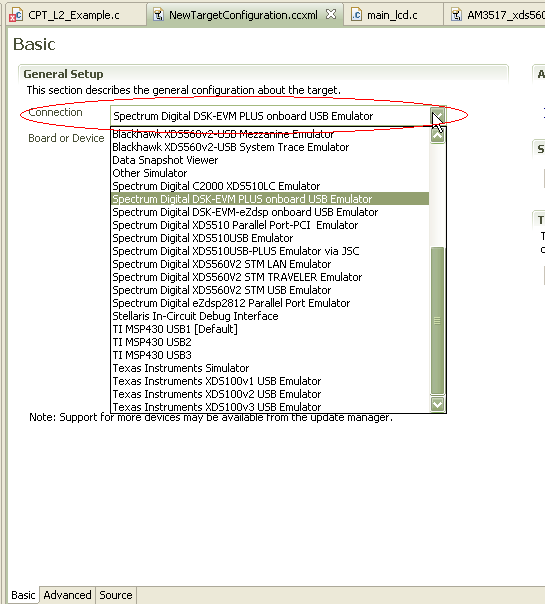
    I don't think it is either. I thought it was an on-board XDS510. What are you using for the connection type? You should be using "Spectrum Digital DSK-EVM PLUS onboard USB Emulator". Is this what you are using?

    Joseph Zolyak said:
    lso, how do you manually specify which JTAG emulation interface that you want to use between the board and CCS v5.1?

    It is the "Connection" field in the Target Configuration editor. There is a drop down list of emulators you can choose from.

    Joseph Zolyak said:
    This is my first attempt at using CCS v5.1.  I am starting a new project based on the C6747 chip, and it has been a difficult transition to go from CCS v3.3 Platinum Release (i.e. before any .cfg, .tci, .tcf, Eclipse based changes) to the new CCS v5.1.

    Yes it certainly is a massive change from CCSv3. I'd recommend looking at the Getting Started material on the wiki:

    http://processors.wiki.ti.com/index.php/Category:Code_Composer_Studio_v5#Getting_Started

    And looking at the workshop slides. While the labs are not for your device, the PPT material is still useful to look at. There is also material that highlights changes from CCSv3.3:

    http://processors.wiki.ti.com/index.php/Category:Code_Composer_Studio_v5#Workshops

    Hope this helps

    ki

  •  

    I contacted Spectrum Digital and they confirmed that the embedded JTAG controller located at connector J201 on the OMAP-L137 board is an XDS510 debugger and *NOT* an XDS100v1 or XDS100v2 debugger.  That really threw my off because the JTAG controller located at connector J21 on the OMAP-L138 board does use the XDS100 debugger!!!

    Unfortunately when I installed CCS v5.1, I selected the free license instead of the 90 day Evaluation License.  To compound that problem, there is no easy way to convert the free license over to the 90 Evaluation license unless you call up tech support.

    Once I obtained an evaluation license, the problem of the missing emulation file went away and CCS v5.1 finally recognized my OMAP-L137 board.

  • Joseph Zolyak said:
    I contacted Spectrum Digital and they confirmed that the embedded JTAG controller located at connector J201 on the OMAP-L137 board is an XDS510 debugger and *NOT* an XDS100v1 or XDS100v2 debugger.  That really threw my off because the JTAG controller located at connector J21 on the OMAP-L138 board does use the XDS100 debugger!!!

    yes, it is a bit confusing. But keep in mind that the L138 board is from a different vendor than spectrum digital (logicpd).

    Joseph Zolyak said:
    Unfortunately when I installed CCS v5.1, I selected the free license instead of the 90 day Evaluation License.  To compound that problem, there is no easy way to convert the free license over to the 90 Evaluation license unless you call up tech support.

    Note that you can use the free license with the on-board XDS510 on the board. Any on-board emulation on a kit ,whether XDS100 or XDS510, is supported with the free license.

    Thanks

    ki

  • I disagree that the free license works with the XDS510 that is on board the OMAP-L137.  I spent several days fighting with the Target Configuration editor to accept the XDS510 emulator.  I tried everything in the CCS v5 Advanced Workshop PDF slides, but no matter what I did, I could not save the configuration and then test the connection.  The CCS v5.1 Debugger would not connect to the OMAP-L137 board until I upgraded to the 90 Evaluation License to get around the XDS100 restriction.


  • Joseph Zolyak said:
    I disagree that the free license works with the XDS510 that is on board the OMAP-L137.  I spent several days fighting with the Target Configuration editor to accept the XDS510 emulator. 

    But were you using ""Spectrum Digital DSK-EVM PLUS onboard USB Emulator" as the Connection type?