This thread has been locked.

If you have a related question, please click the "Ask a related question" button in the top right corner. The newly created question will be automatically linked to this question.

LP-MSPM0G3507: What is different between Continue and Free run?

Part Number: LP-MSPM0G3507

Tool/software:

Hi

I want to execute example 'sysctl_power_policy_sleep_to_standby'

This example use timer to change Power mode.

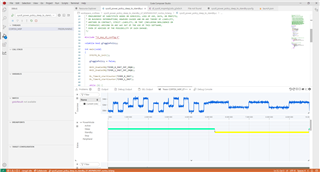
When I use Free run on debugging mode, timer works well.

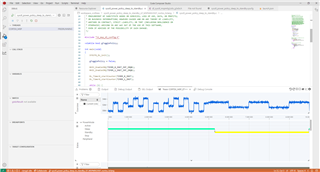
But when I click Continue on debugging mode, timer doesn't work well

Do you know what is different between Continue and Free run on debugging mode?

<Free run>
<Continue>
  • Hi Ryan,

    Are you attaching the same picture? From my view, the two picture you attached are the same. 

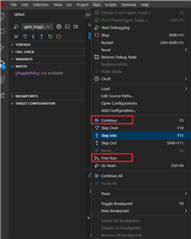
    And do you mean the example performs differently in below operation?:

    Best Regards,

    Pengfei

  • Hi Pengfei,

    Sorry, I uploaded wrong picture about <Continue>.

    The ones you highlighted with a square boxes in your picture is right.

    When I click the "Continue" button, it only enters sleep mode and doesn't enter to standby mode.

    But, If I click the "Free run" button, it enters sleep mode and standby mode.

    Why is that? What is different between them?

  • Hello,

    When I click the "Continue" button, it only enters sleep mode and doesn't enter to standby mode.

    But, If I click the "Free run" button, it enters sleep mode and standby mode.

    Why is that? What is different between them?

    "Free Run" will run the target and then detach the debug connection. The behavior of the run would be similar to as if the physical JTAG connection was disconnected. This type of run behavior would prevent the periodic polling of the debugger for the target status that happens with a standard Run/Continue. Any breakpoints set by the debugger on the target would also be disabled. Free Run is a less obtrusive mode of running the device through power transitions and low-power modes.

    Thanks

    ki