


Part Number: CODECOMPOSER
Other Parts Discussed in Thread: AWR1843AOP, AWR1843AOPEVM, UNIFLASH
Tool/software:
Hello TI Team,
I am trying to debug the MRR application on the AWR1843AOP using Code Composer Studio (CCS), following the steps outlined in the documentation located at:""/ti/radar_toolbox_2_20_00_05/docs/software_guides/using_ccs_debug.html"
Steps I Followed:
1. Set the AWR1843AOP to Flashing Mode and flashed the xwr18xx_ccsdebug.bin file successfully.
2. Changed the AWR1843AOP to Functional Mode after flashing.
3. Created a CCXML configuration file in CCS and selected the appropriate options for debugging.
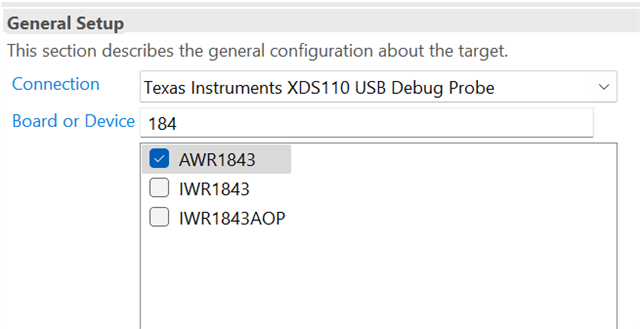
4. Ran the "Test Connection" but encountered the following error:
DEBUGSSM_0: Error initializing emulator: (Error -260 @ 0x0) An attempt to connect to the XDS110 failed.
Additional Information
Here is the setup I am using:
CCS version: 12.8
SDK version: 3.6
Radar module: AWR1843AOPEVM
UniFlash version: 8.8
I have already installed the XDS110 package.
When I connect the AWR1843AOP via USB, two COM ports appear in the Device Manager.
Could you help me resolve this XDS110 connection issue?
Are there any additional steps required to establish a successful debug session?
