This thread has been locked.

If you have a related question, please click the "Ask a related question" button in the top right corner. The newly created question will be automatically linked to this question.

LP-MSPM0L2228: Error connecting to the target: (Error -6305) PRSC module failed to write to a router register. (Emulation package 20.0.0.3344)

Part Number: LP-MSPM0L2228
Other Parts Discussed in Thread: MSPM0L2228, SYSCONFIG, LP-MSPM0G3507

Tool/software:

Hello,

We have very recently purchased MSPM0L2228 LaunchPad (LP-MSPM0L2228)  for one of our client project work. 

Initially we were successfully flash some examples like blink led, GPIO toggle, which was working without any issues.

When we started with the development and test, it stopped responding with the error "Error connecting to the target: (Error -6305) PRSC module failed to write to a router register. (Emulation package 20.0.0.3344)"
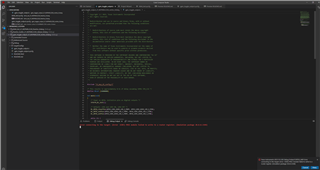


We have tried with MSPM0_Factory_Reset_Tool - https://dev.ti.com/gallery/view/TIMSPGC/MSPM0_Factory_Reset_Tool/ver/1.0.2/ Didnt help to solve the issue.

Followed the link - https://e2e.ti.com/support/tools/code-composer-studio-group/ccs/f/code-composer-studio-forum/528629/am335x-error-connecting-to-target-prsc-module-failed-to-write-to-a-router-register Which also didnt help.

Can anyone please help here to resolve the issue ?

Thanks and Regards,

Parthiban

  • Hi Parthiban,
    It is weird that the error showed after you ran that specific project into the Launchpad. Here are some things you can try:

    1. Re-install the CCS 20.0.2, the SDK, and SYSCONFIG.

    2. Review the revision of the LP-MSPM0L2228. If it is revision Rev A, try to restore the original location of the jumpers in the launchpad.

    Let me know if any helps solve this problem.

    Best Regards,

    Diego Abad

  • Hi Diego Abad Sajamin,

    Thanks for providing the steps to try.

    We have tried both the options, still the issue is same. (Error connecting to the target: (Error -6305) PRSC module failed to write to a router register. (Emulation package 20.0.0.3344) )

    We have tried CCS both in Linux and Windows, it shows up the same issue

    Since its a new broad that we purchased through TI online store, is it possible to re-place the Launchpad board (LP-MSPM0L2228) ?

  • Hi Parthiban,
    Since the launchpad worked with the previous two projects you ran, it seems that the board was not broken before arrival. Can you share the project you used? I want to check if I can replicate the same error. Also, can you confirm the revision of your board and the chip number?

    Best Regards,

    Diego Abad

  • Hi Diego Abad Sajamin,

    Thanks for reply.

    When we started with the development and test with zephyr RTOS (github.com/.../mspm0l2228, we ran in to this issue.

    Please find the link, which helps you to replicate the issue.

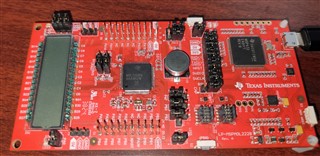
    Board Model: LP-MSPM0L2228 Rev. A
    Processor: M0L2228Q

    Attached the picture of the board for your reference.

    Thanks and Regards,
    Parthiban

  • Hi Parthiban,
    Your board seems to be fine. Can you describe to me how you found this issue? Specifically, what projects did you use in Zephyr, or how did you run it? When exactly did it show the error?
    Best Regards,
    Diego Abad

  • Hi Diego Abad Sajamin,

    Since the Mainline Zephyr RTOS dont have support for LP-MSPM0L2228 Rev. A, We starting working towards adding the support, When we tried modifing the device tree and add the based support based on LP-MSPM0G3507, we got in to this issue.

    We also we change the CCS to 12.6.0 and tried factory reset options based on - e2e.ti.com/.../Unlock-MSPM0-instructions.pdf which didnt help.

    Please let us know, Is there any option for us to send the board and get this issue resolved and get it back ?

    Thanks and Regards,

    Parthiban

  • Hi Parthiban,
    Thanks for letting me know about this. Let me consult tomorrow with my team on what can be done from here.

    Best Regards,

    Diego Abad

  • Hi Diego Abad Sajamin,

    Will wait for you on the next steps.

    Thanks and Regards,

    Parthiban

  • Hi Parthiban,
    The most common type of device unlock are NONMAIN being misconfigured. I'll consult with my team about more solutions to this possible error. In the meantime, can you confirm that you can't run any other project in your board? Also, if you have a spare board of the same chip or other M0 device, can you check the error is not happening there?

    Best Regards,

    Diego Abad

  • Hi Diego Abad Sajamin,

    Thanks for the reply. 

    We don't have any other M0, we ordered another LP-MSPM0L2228, we will be receiving same by next week.

    If you can provide the steps to do factory reset/erase, we can try the same at our end.

    Thanks and Regards,

    Parthiban

  • Hi Parthiban,
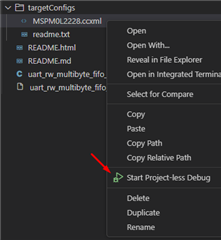
    Can you try entering BSL mode? This can be accomplished by pressing the reset button and PA18 at the same time (it should clear any program running in the Launchpad.) Also, can you try running the Factory Reset Auto through CCS 20.0.2? You can accomplish by starting a project-less debug session in the MSPM0L2228.ccxml file of any project. Let me know if that works.

    Best Regards,

    Diego Abad

  • Hi Diego Abad Sajamin,

    We have tried BSL mode and there is no success.

    Factory reset and Mass erase we have tried as per this document - /cfs-file/__key/communityserver-discussions-components-files/81/Unlock-MSPM0-instructions.pdf

    Nothing helped

    Currently the LP-MSPM0L2228 is in India, Is it possible for us to send this LP-MSPM0L2228 to TI Office In India for debug and support to make it working ?

    We are looking forward for support that can resolve the issue.

    Thanks and Regards,

    Parthiban


  • Hi Parthiban,
    I recommend asking your TI Sales representative about that. Before doing that, I need you to try the following:
    1. Unpower the board, hold the reset button and power the board again (using a USB). While holding the reset button, launch a Project-less debug. Now, the moment you launch the script, remove your hand immediately from the reset button. This should allow the script to work.

    2. If that doesn't work, go into the Debug section of CCS, expand the Threads tab, look for CORTX_M0P, and right-click in connect target for CORTEX_M0P. After that, right-click it again, and click on Show All cores. The key thing is to check if you have the following options available to connect:

    If you can't connect to the core threads, the device connection may be wrong(XDS may not work as intended). If this is the case, I recommend using a logic analyzer to check XDS lines and see if data is coming into the device. If it is connecting, then the issue is something else.

    Let me know if any of the previous work.

    Best Regards,

    Diego Abad

  • Hi Hi Diego Abad Sajamin,

    Thanks for the detailed inputs, Can you please tell me, which version of CCS i need to use to try the steps that you have provided ?

    Thanks and Regards,

    Parthiban

  • Hi Parthiban,
    You'll need CCS 20.0.2. Here's a link to download it: https://www.ti.com/tool/download/CCSTUDIO/20.0.2. I think you already have it, so the only thing you'll need to do is use any working project and try the steps. 

    Best Regards,

    Diego Abad

  • Hi Diego Abad Sajamin,

    We have tried the steps that you provided.

    When trying to do factor-rest-auto, it didnt show up any error, but the process stuck in loop in between.

    When we tried to connect to the target that you have provided in step 2, we are getting the same error (Error connecting to the target: (Error -6305) PRSC module failed to write to a router register)

    Since you pointed that, XDS may have issue, with another Launchpad (LP-MSPM0G3507), we connected the XDS out of LP-MSPM0G3507 to XDS in of LP-MSPM0L2228, which resulted in the same issue.

    When we tried the other-way, Connecting the XDS out of LP-MSPM0L2228 to the other Launchpad LP-MSPM0G3507 XDS in, the LP-MSPM0G3507 works perfectly fine, with this we concluded that, the issue is not with XDS. (Picture attached)

    Please help us to overcome this issue.

    Thanks and Regards,
    Parthiban

  • Hi Parthiban,
    Can you specify what loop did the device got trapped on? Also, did you get a chance to look over the core threads? Is that where you are seeing the error appear? 

    Best Regards,

    Diego Abad

  • Hi Diego Abad,

    CCS shows that it tries to connect. Also the CORE shows DISCONNECTED. Connection wasn't successful.

    Thanks,

    Parthiban

  • Hi Parthiban,
    Can you share a screenshot of the loop error you are mentioning? Since the core is not being reached, then the XDS not working seems to be the most likely reason. Can you try reading the SWDIO and SWCLK lines? 

    Best Regards,

    Diego Abad 

  • Please find the attached screenshots. Connect Target shows
    ```
    Error connecting to the target: (Error -6305) PRSC module failed to write to a router register. (Emulation package 20.0.0.3344)
    Error connecting to the target: (Error -6305) PRSC module failed to write to a router register. (Emulation package 20.0.0.3344)
    ```

  • Hi Parthiban,
    It looks to me that the device shows the error regardless of the reset button being pressed. Can you confirm that you get any signal coming from SWDIO and SWCLK line?

    Best Regards,

    Diego Abad

  • $ JLinkExe
    SEGGER J-Link Commander V8.10 (Compiled Sep 25 2024 14:18:20)
    DLL version V8.10, compiled Sep 25 2024 14:17:54
    
    Connecting to J-Link via USB...O.K.
    Firmware: J-Link EDU Mini V1 compiled Jul  3 2024 16:57:57
    Hardware version: V1.00
    J-Link uptime (since boot): 0d 00h 01m 19s
    S/N: 801045704
    License(s): FlashBP, GDB
    USB speed mode: Full speed (12 MBit/s)
    VTref=3.299V
    
    
    Type "connect" to establish a target connection, '?' for help
    J-Link>con
    Please specify device / core. <Default>: MSPM0L2228
    Type '?' for selection dialog
    Device>con
    Please specify target interface:
      J) JTAG (Default)
      S) SWD
      F) FINE
      I) ICSP
      C) C2
      T) cJTAG
    TIF>S
    Specify target interface speed [kHz]. <Default>: 4000 kHz
    Speed>
    The selected device "con" is unknown to this software version.
    Device "MSPM0L2228" selected.
    
    
    Connecting to target via SWD
    InitTarget() start
    DAP initialized successfully.
    No PWR-AP detected.
    InitTarget() end - Took 1.83ms
    Found SW-DP with ID 0x6BA02477
    DPIDR: 0x6BA02477
    CoreSight SoC-400 or earlier
    Scanning AP map to find all available APs
    AP[0]: Stopped AP scan as end of AP map has been reached
    Iterating through AP map to find AHB-AP to use
    Attach to CPU failed. Executing connect under reset.
    DPIDR: 0x6BA02477
    CoreSight SoC-400 or earlier
    Scanning AP map to find all available APs
    AP[0]: Stopped AP scan as end of AP map has been reached
    Iterating through AP map to find AHB-AP to use
    Could not find core in Coresight setup
    InitTarget() start
    DAP initialized successfully.
    No PWR-AP detected.
    InitTarget() end - Took 1.35ms
    Found SW-DP with ID 0x6BA02477
    DPIDR: 0x6BA02477
    CoreSight SoC-400 or earlier
    Scanning AP map to find all available APs
    AP[0]: Stopped AP scan as end of AP map has been reached
    Iterating through AP map to find AHB-AP to use
    Attach to CPU failed. Executing connect under reset.
    DPIDR: 0x6BA02477
    CoreSight SoC-400 or earlier
    Scanning AP map to find all available APs
    AP[0]: Stopped AP scan as end of AP map has been reached
    Iterating through AP map to find AHB-AP to use
    Could not find core in Coresight setup
    Error occurred: Could not connect to the target device.
    For troubleshooting steps visit: https://wiki.segger.com/J-Link_Troubleshooting
    J-Link>


    Dear Diego Abad,

    I haven't tapped the SWD lines still, will try to do sometime during this week.

    But please find the attached log where I have tried flashing using JLink without XDS connected.

    Note: We got 2 new LP-MSPM0L2228 boards today, where both XDS and JLink works fine.

    Thanks,

    Parthiban

  • Hi Parthiban,
    It seems that the board XDS may not be working. Can you try using JTAG and see if it accesses the board through it?
    Best Regards,
    Diego Abad

  • Dear Diego Abad,

    Please read the log message attached in my previous reply. Here is the summary,
    - XDS in the problematic board works fine. This is confirmed by connecting the SWD pins from the problematic board to another Launchpad LP-MSPM0G3507 and it works fine.

    - As in my previous message, JLink based access to the CPU also fails. The same works with G3507 or another L2228 board.

    In short, either accessing via XDS or JLink, the M0+ core is not accessible.

    Our main concern here is, we didn't do any hardware changes or connecting external peripherals. All we did is "west flash" using openocd and the core is went unreachable.

    Note: To avoid super long back and forth messages, I propose to have a call if possible.

    Thanks,

    Parthiban

  • Hi Parthiban,
    Thanks for correcting me on that. When I saw that the target didn't connect, I assumed that SWD didn't work. If you want to arrange a call, please get in touch with your TI Sales representative.
    Best Regards,
    Diego Abad

  • Dear Diego Abad,

    Sure, I will prepare for the call.

    But the problem related to flashing remains in the launchpad. Do you need any additional details from our end? Flashing with JLink using Seggar or SWD XDS, both didn't work.

    How to solve this?

    Thanks,

    Parthiban

  • Hi Parthiban,
    After consulting with one more team mate, I can confirm that the device is bricked (NON-MAIN seems to have been configured wrongly.) Sadly, there is no fix for this.

    Best Regards,

    Diego Abad

  • Dear Diego Abad,

    Thanks for your response. Sadly and unfortunately flashing using openocd with XDS bricked the SoC.

    How to reach sales for the replacement?

    Thanks,

    Parthiban

  • Hi Parthiban,
    I'm currently contacting them now. Can you share your email with me internally? I'll send a friend request so you can send it through there.

    Best Regards,

    Diego Abad