This thread has been locked.

If you have a related question, please click the "Ask a related question" button in the top right corner. The newly created question will be automatically linked to this question.

Loggin dynamically allocated strings - UIA

Other Parts Discussed in Thread: SYSBIOS

Hi All,

I am trying to enable loggin by using Log_printX functions. However, I have a problem with dynamically allocated strings like in the post http://e2e.ti.com/support/development_tools/code_composer_studio/f/81/p/133257/488639.aspx#488639. I read it and also read the tutorial about MCSA (UIA). There is a suggested solution fotr that, but I think I am doing something wrong because it does not work for me. My test code and .cfg part related with that are below:

--------------------------------------------------------------------------------------

char text1[15];

sprintf(text1, "%s", "allocated");
LogSnapshot_writeString(0, "text1 control", text1, strlen(text1));
Log_print1(xdc_runtime_Diags_ENTRY, "%s", (IArg)text1);

--------------------------------------------------------------------------------------

var Log = xdc.useModule('xdc.runtime.Log');
var LogSnapShot = xdc.useModule('ti.uia.runtime.LogSnapshot');
var Logger = xdc.useModule('ti.uia.runtime.LoggerCircBuf');
var Snapshot = xdc.useModule('ti.uia.events.UIASnapshot');

var LoggerParams = new Logger.Params();

LoggerParams.transferBufSize = 32768;
logger = Logger.create(LoggerParams);
logger.instance.name = "Logar";
Main.common$.logger = logger;
Main.common$.diags_ENTRY = Diags.ALWAYS_ON;
Main.common$.diags_USER1 = Diags.ALWAYS_ON;
Main.common$.diags_EXIT = Diags.ALWAYS_ON;

--------------------------------------------------------------------------------------

Then, when I look at the result via Tools->MCSA->Live all I can get is meaningless characters. I am using...

CCS 5.0.3.00028

UIA 1.00.01.17

SYS/BIOS 6.32.04.49

MCSDK 2.0.3.15

XDCTools 3.22.03.41


  • Hi Deniz,

       Could you try changing your Log_print1 call to use Diags_USER1 instead of Diags_ENTRY?  

    i.e.

    Log_print1(xdc_runtime_Diags_USER1, "%s", (IArg)text1);

    Regards,

      Brian

  • Hi Deniz,

       I've recreated your setup on my PC, and it works properly:  Here's a screenshot of what's logged when I use your .c code and .cfg settings:

    Could you delete your Debug or Release folder, rebuild your application and post the output that is sent to the console window when you build your application code?  I'd like to see if there are any warnings or other text that is generated that might shed some light on what is happening...

    Regards,

      Brian

  • Hi Brian,


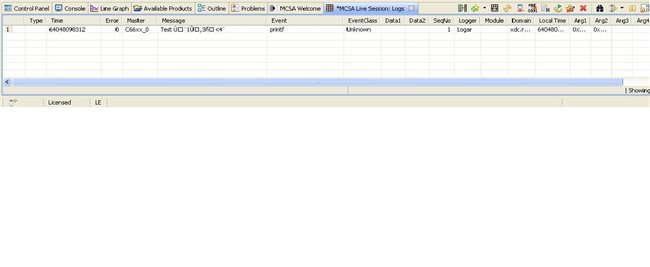
    I tried your suggestion and built the project after deleting Debug diretory, but I saw the same problem again.  My compilation output is below and also I attached the screenshot of MCSA Logs.

    Regards


    statement is unreachable  TCPMessageReceiver.cpp    /hua_evmc6678l/Peripheral Modules/Ethernet/src    line 397    C/C++ Problem
    statement is unreachable    TCPMessageSender.cpp    /hua_evmc6678l/Peripheral Modules/Ethernet/src    line 212    C/C++ Problem
    Invalid project path: Include path not found (\packages).    hua_evmc6678l        pathentry    Path Entry Problem
    Invalid project path: Include path not found (C:\Documents and Settings\DENIZKO\workspace\src).    hua_evmc6678l        pathentry    Path Entry Problem
    Invalid project path: Include path not found (C:\Documents and Settings\DENIZKO\workspace\src\webpages).    hua_evmc6678l        pathentry    Path Entry Problem
    Invalid project path: Include path not found (hua_evmc6678l\h).    hua_evmc6678l        pathentry    Path Entry Problem
    Invalid project path: Include path not found (hua_evmc6678l\src\Ethernet\h).    hua_evmc6678l        pathentry    Path Entry Problem
    Invalid project path: Include path not found (hua_evmc6678l\src\MessageParser\h).    hua_evmc6678l        pathentry    Path Entry Problem
    ti.sysbios.knl.Task : The Task.defaultTaskSection has been changed to ".far:taskStackSection".  Please review your .cfg file for references to ".taskStackSection" and replace those references with 'Task.defaultStackSection' or ".far:taskStackSection".    .xdchelp    /hua_evmc6678l    168    C/C++ Problem


  • Thanks Deniz,

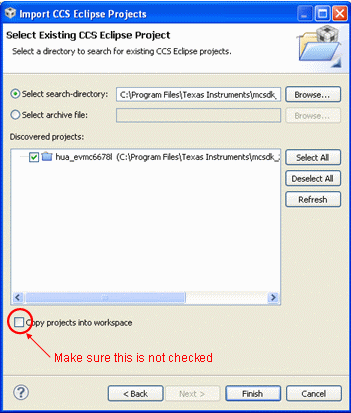
        It looks like your project was imported from C:\Program Files\Texas Instruments\mcsdk_2_00_03_15\demos\hua\evmc6678l, and when you imported the project the "Copy projects into workspace" checkbox was checked - is this right?

    To get the hua demo to build properly 'out of the box' without any modifications, you should import the project without copying the files into the workspace.  This allows the relative paths that are used in the project to work properly and find all of the other packages and include files that were installed with the MCSDK.  (Note: this applies to the other demo projects that ship with the MCSDK as well).

    So the simplest thing to do at this point would be to make a backup copy of any files in the project you have changed, delete the project from the workspace and from disk and re-import the hua project without copying the project into your workspace. 

    If you want to get the project you currently have to build cleanly, you'll need to make a number of changes to the build settings:

    (To access the build settings, right click on the project in the CCS project explorer and select Build Settings...)

    1.  click on CCS Build in the left pane, and click the RTSC tab. 

    • Uncheck the "Other Repositories" entry (which probably has something along the lines of ${PROJECT_ROOT}/..
    • Click the Add button, click the "Select repository from file-system" radio button and in the associated text box enter ${TI_MCSDK_INSTALL_DIR}/demos/hua
    • Make sure that the "System Analyzer (UIA Target)" is selected in the list of Products and Repositories and the UIA version you want to use has a check next to it
    • In the RTSC Platform box near the bottom, select the platform you want to use.  For the HUA demos, select "custom.hpdspua.evmc6678l"

    2. The source files for the hua demo projects are common to both the 6670 and 6678 projects, and are located in a folder that is in the parent folder containing both the 6670 and 6678 project folders.  So the default include path is "${PROJECT_ROOT)/.." to go one directory up from your project.   Thats why you're getting errors like "Include path not found (C:\Documents and Settings\DENIZKO\workspace\src\webpages.  To overcome this, please do the following:

    • copy the MCSDK src folder into your project (select the folder using Windows Explorer, copy it using Ctrl-C, select your project in your CCS Project Explorer and paste the folder into your project using Ctrl-V)
    • Open the Build settings for your project, click on Settings in the left pane, select C6000 Compiler / Include Options and edit the ${PROJECT_ROOT}/../src" and ${PROJECT_ROOT}/../src/webpages" entries to remove the "../ in front of the src folder (e.g. "${PROJECT_ROOT}/src/webpages")

    3. Delete your Debug folder to make sure any incorrect stuff is wiped out.  Sometimes when you have errors related to package configuration problems, 'clean' doesn't clean it enough!  Then rebuild your project.

    Hopefully that gets your project to build cleanly.   Then please try System Analyzer again to see if the dynamically allocated string gets displayed properly.

    Regards,

      Brian

  • Hi Brian,

    I have created a new project by using the platform file from hua demo. Only the import the platform not any code.  All warnings, I had got before, were diminished in the new project. However, problem still exists. Is it possible from the memory map of the project?? I attached the cfg file and screenshot of CCS Build. 

    /********************************************************************************************************************
    *  Specify all needed RTSC Modules and configure them.																*
    ********************************************************************************************************************/
    
    var Memory  =   xdc.useModule('xdc.runtime.Memory');
    
    var BIOS    =   xdc.useModule('ti.sysbios.BIOS');
    var List = xdc.useModule('ti.sdo.utils.List');
    var MessageQ = xdc.useModule('ti.sdo.ipc.MessageQ');
    var Main = xdc.useModule('xdc.runtime.Main');
    
    /* Enable BIOS Task Scheduler */
    BIOS.taskEnabled  =   true;
    
    var Task    =   xdc.useModule('ti.sysbios.knl.Task');
    
    /*
    ** Allow storing of task names. By default if you name a task with a friendly display name it will not be saved
    ** to conserve RAM. This must be set to true to allow it. We use friendly names on the Task List display.
    */
    Task.common$.namedInstance = true;
    
    var Clock   =   xdc.useModule ('ti.sysbios.knl.Clock');
    
    /* 
    ** Interface with IPC. Depending on the version of BIOS you are using the 
    ** module name may have changed.
    */
    
    /* Use this for BIOS 6.30 plus to get the IPC module */
    var Sem	= xdc.useModule ('ti.sysbios.knl.Semaphore');
    
    /* Hardware Interrupt  module */
    var Hwi	= xdc.useModule ('ti.sysbios.hal.Hwi');
    
    var Ecm = xdc.useModule ('ti.sysbios.family.c64p.EventCombiner');
    
    /*
     * Enable Event Groups here and registering of ISR for specific GEM INTC is done
     * using EventCombiner_dispatchPlug() and Hwi_eventMap() APIs
     */
    Ecm.eventGroupHwiNum[0] = 7;
    Ecm.eventGroupHwiNum[1] = 8;
    Ecm.eventGroupHwiNum[2] = 9;
    Ecm.eventGroupHwiNum[3] = 10;
    
    /*
    ** Load Module - Configure this to turn on the CPU Load Module for BIOS.
    **
    */
    /*
    var Load       =   xdc.useModule('ti.sysbios.utils.Load');
    Load.common$.diags_USER4 = Diags.ALWAYS_ON;
    */
    
    /*
    * Diagnostic Module
    */
    var Diags       = xdc.useModule('xdc.runtime.Diags');
    var Exc = xdc.useModule('ti.sysbios.family.c64p.Exception');
    Exc.enablePrint = true; /* prints exception details to the CCS console */
    
    /*
    **  Give the Load module it's own LoggerBuf to make sure the
    **  events are not overwritten.
    */
    /* var loggerBufParams = new LoggerBuf.Params();
    loggerBufParams.exitFlush = true;
    loggerBufParams.numEntries = 64;
    Load.common$.logger = LoggerBuf.create(loggerBufParams); 
    */
    
    /*
    ** Use this load to configure NDK 2.2 and above using RTSC. In previous versions of
    ** the NDK RTSC configuration was not supported and you should comment this out.
    */
     var Global       = xdc.useModule('ti.ndk.config.Global');
    
    /* 
    ** This allows the heart beat (poll function) to be created but does not generate the stack threads 
    **
    ** Look in the cdoc (help files) to see what CfgAddEntry items can be configured. We tell it NOT
    ** to create any stack threads (services) as we configure those ourselves in our Main Task
    ** thread hpdspuaStart.
    */  
    Global.enableCodeGeneration = false;
    
    
    /* Define a variable to set the MAR mode for DDR2 as all cacheable */
    /*FixUp - changed to C66*/
    var Cache       =   xdc.useModule('ti.sysbios.family.c66.Cache');
    /*FixUp*/ /*Cache.MAR224_255 = 0x0000000f;*/
    
    var Startup     =   xdc.useModule('xdc.runtime.Startup');
    
    var System      =   xdc.useModule('xdc.runtime.System');
    
    /* Required if using System_printf to output on the console */
    SysStd          		=   xdc.useModule('xdc.runtime.SysStd');
    System.SupportProxy     =   SysStd;
    
    
    /*
    ** Heap Management Module - Create a default Heap. 
    */
    var HeapMem = xdc.useModule('ti.sysbios.heaps.HeapMem');
    var heapMemParams = new HeapMem.Params();
    heapMemParams.size = 0xF4240;	/* 1Mb*/
    heapMemParams.sectionName = "systemHeap";
    Program.global.heap0 = HeapMem.create(heapMemParams);
    Memory.defaultHeapInstance = Program.global.heap0;
    
    /* Load the CSL package  - LoadPackage is equivalent to linking the library */
    var Csl 					    = 	xdc.loadPackage('ti.csl');
    
    /* Load the CPPI package - LoadPackage is equivalent to linking the library */
    var Cppi                        =   xdc.loadPackage('ti.drv.cppi'); 
    
    /* Load the QMSS package  - LoadPackage is equivalent to linking the library*/
    var Qmss                        =   xdc.loadPackage('ti.drv.qmss');
    
    /* Load the PA package  - LoadPackage is equivalent to linking the library*/
    var Pa 							= 	xdc.loadPackage('ti.drv.pa');
    
    /* Load Platform Library - LoadPackage is equivalent to linking the library */
    var Plib						= xdc.loadPackage('ti.platform.evmc6678l');
    
    /* Load Platform Library - LoadPackage is equivalent to linking the library */
    var Nimulib						= xdc.loadPackage('ti.transport.ndk');
    
    /********************************************************************************************************************
    * 	Define our Memory Map. We made up the  memory  names LL2RAM, DDR2 and SL2RAM. They do have special meaning.		*
    *																													*
    *	DDR - Anyhting destined for DDR always goes into the external RAM on the paltform.							*
    *	L2SRAM - This is data that should be placed into the Local L2 of the core.										*
    *	MCMSRAM - This is data that should go into the shared L2 (if it exists) or could be placed into LL2 if it doesnt.*
    *																													*
    *	These section names are mapped to specific addresses for a paltform using our custom memroy maps which are 		*
    *	defined using the Platform Wizard. Examples are custom.hpdpsua.evm6678l, etc.,.									*
    ********************************************************************************************************************/
    
    Program.sectMap[".vecs"] 		= {loadSegment: "L2SRAM", loadAlign:8};		/* CSL per core data structures 	*/
    Program.sectMap[".switch"] 		= {loadSegment: "L2SRAM", loadAlign:8};		/* CSL per core data structures 	*/
    Program.sectMap[".cio"]  		= {loadSegment: "L2SRAM", loadAlign:8};		/* per core data structures 		*/
    Program.sectMap[".args"] 		= {loadSegment: "L2SRAM", loadAlign:8};		/* per core data structures 		*/
    Program.sectMap[".cppi"] 		= {loadSegment: "L2SRAM", loadAlign:16};	/* per core data structures 		*/
    Program.sectMap[".far:NDK_OBJMEM"]= {loadSegment: "L2SRAM", loadAlign:16}; 	/* NDK structures 					*/
    Program.sectMap[".nimu_eth_ll2"]= {loadSegment: "L2SRAM", loadAlign:16};	/* per core data structures 		*/
    Program.sectMap[".qmss"] 		= {loadSegment: "L2SRAM", loadAlign:16}; 	/* per core data structures 		*/
    Program.sectMap[".resmgr_memregion"] = {loadSegment: "L2SRAM", loadAlign:128}; 	/* QMSS descriptors region 			*/
    Program.sectMap[".resmgr_handles"] = {loadSegment: "L2SRAM", loadAlign:16};     /* CPPI/QMSS/PA Handles				*/
    Program.sectMap[".resmgr_pa"]	= {loadSegment: "L2SRAM", loadAlign:8};		    /* PA Memory						*/
    Program.sectMap[".stack"]		= "L2SRAM";
    
    Program.sectMap[".bss"]			= "DDR";									/* BSS. .neardata and .rodata are GROUPED */
    Program.sectMap[".neardata"]	= "DDR";
    Program.sectMap[".rodata"]		= "DDR";
    Program.sectMap["systemHeap"] 	= {loadSegment: "DDR", loadAlign:128};	  	/* XDC Heap .. eg Memory_alloc () 	*/
    Program.sectMap[".far"] 		= "DDR";
    Program.sectMap[".cinit"] 		= "DDR";
    Program.sectMap[".const"]		= "DDR";
    Program.sectMap[".text"]		= "DDR";
    Program.sectMap[".code"]		= "DDR";
    Program.sectMap[".data"]		= "DDR";
    Program.sectMap[".sysmem"] 		= "DDR";								/* Malloc memory area 					*/	
    Program.sectMap["platform_lib"]	= "DDR";								/* Platform Library data structures 	*/
    Program.sectMap[".gBuffer"]		= {loadSegment: "DDR", loadAlign:32};  	/* Upload buffer used by the Web Server	*/
    Program.sectMap[".far:WEBDATA"]	= {loadSegment: "DDR", loadAlign: 32}; 	/* Web Pages and web server structures 	*/
    
    Program.sectMap[".far:taskStackSection"]= "DDR";								/* BIOS task stacks */	 
    Program.sectMap[".far:NDK_PACKETMEM"]= {loadSegment: "MSMCSRAM", loadAlign: 128};	/* NDK Buffer Pool */
    
    /********************************************************************************************************************
    * Define hooks and static tasks  that will always be running.               										*
     ********************************************************************************************************************/
    
    /* 
    ** Register an EVM Init handler with BIOS. This will initialize the hardware. BIOS calls before it starts. 
    **
    ** If yuo are debugging with CCS, then this function will execute as CCS loads it if the option in your 
    ** Target Configuraiton file (.ccxml) has the option set to execute all code before Main. That is the 
    ** default.
    */
    Startup.firstFxns.$add('&EVM_init');
    var StartEthernetParams = new Task.Params();
    StartEthernetParams.instance.name = "ethernetTask";
    StartEthernetParams.priority = 9;
    Program.global.ethernetTask = Task.create("&StartEthernet", StartEthernetParams);
    Global.netSchedulerPri = Global.NC_PRIORITY_HIGH;
    
    var Log = xdc.useModule('xdc.runtime.Log');
    var LogSnapShot = xdc.useModule('ti.uia.runtime.LogSnapshot');
    var Logger = xdc.useModule('ti.uia.runtime.LoggerCircBuf');
    var Snapshot = xdc.useModule('ti.uia.events.UIASnapshot');
    
    var LoggerParams = new Logger.Params();
    
    LoggerParams.transferBufSize = 32768;
    LoggerParams.transferType = xdc.module("ti.uia.runtime.IUIATransfer").TransferType_RELIABLE;
    logger = Logger.create(LoggerParams);
    logger.instance.name = "Logar";
    Main.common$.logger = logger;
    Main.common$.diags_ENTRY = Diags.ALWAYS_ON;
    Main.common$.diags_USER1 = Diags.ALWAYS_ON;
    Main.common$.diags_EXIT = Diags.ALWAYS_ON;
    
    Logger.enableFlush = true;


  • Hi Deniz,

       In order to use Ethernet as a UIA Event Transport, you'll need to use the ti.uia.runtime.ServiceMgr module.  The easiest way to set this up is to use the ti.uia.sysbios.LoggingSetup module, which takes care of a lot of the configuration work for you.  Please remove lines 196-202 and 207 from the.cfg file you attached to your last post and replace with the following:

    var LoggingSetup = xdc.useModule('ti.uia.sysbios.LoggingSetup');
    LoggingSetup.mainLogging = true;
    LoggingSetup.mainLoggerSize = 8*1024;
    LoggingSetup.sysbiosTaskLogging = false;
    LoggingSetup.sysbiosSwiLogging = false;
    LoggingSetup.sysbiosHwiLogging = false;
    LoggingSetup.sysbiosLoggerSize = 0; // Set to e.g. 32768 if sysBiosTaskLogging = true
    LoggingSetup.loadLogging = false;
    LoggingSetup.loadLoggerSize = 0; // set to e.g. 32768 if loadLogging = true
    LoggingSetup.eventUploadMode = LoggingSetup.UploadMode_NONJTAGTRANSPORT;

    /*
     *  This example is a single-core example, so UIA's
     *  ServiceMgr must be configured to collect events from one core only
     */
    var ServiceMgr = xdc.useModule('ti.uia.runtime.ServiceMgr');
    ServiceMgr.topology = ServiceMgr.Topology_SINGLECORE;

    Note that, if you are only logging the string at application startup or at some point in time before you start System Analyzer, you should uncheck the "Clear existing data before collection" checkbox in the System Analyzer Live configuration dialog:

     Hopefully this will be enough to get you started. 

    Regards

      Brian