I upgraded from Code Composer 4 to Code Composer 5. When I compile, I get many errors ... for example "Symbol 'BIT0' could not be resolved".
This thread has been locked.
If you have a related question, please click the "Ask a related question" button in the top right corner. The newly created question will be automatically linked to this question.
I upgraded from Code Composer 4 to Code Composer 5. When I compile, I get many errors ... for example "Symbol 'BIT0' could not be resolved".
The code worked fine for Code Composer 4. Where do I verify Code Composer 5 is using the correct libraries?
It's unfortunate that Code Composer 5 did not retrieve path info from Code Composer 4. Where do I find the path settings?
It does import your path settings from your v4 project. However if your v5 project is in a new location and you have not setup your original project to be portable then your paths may no longer be pointing to where the libraries are. Also if you have dependent projects and didn't import them into your workspace then that can cause issues as well.
To look at your library search paths go to the build options and look under linker, file search path.
John
Based on recognition of the symbol "BIT0" I surmise that you are working with the MSP430. As a suggestion, providing that information would be helpful.
This issue you describe sounds like the C compiler is the tool which is throwing this error. I presume you have included the msp430.h or equivalent for the specific device you are using. I assume this since you mention the CCSv4 project works.
You need to make sure the path to the msp430.h, or equivalent, is described to the compiler for CCSv5. This can be accomplished by modifying the Project properties for the MSP430 C compiler.
Menu : Project -> Properties
Expand CCS Build
Expand MSP430 Compiler
Select Include Options
Add dir to #include search path
You should probably have the following entries.
${CCS_BASE_ROOT}/msp430/include
${CG_TOOL_ROOT}/include
Brandon, yes, this is for an MSP430 ... and have '#include <msp430f5529.h>' in the code.
I checked. The paths you mention are already there. What else?
John, I did not see your response initially. Where do I find the suggestions you make ... ??? -> Build -> File Search Path.
I still have Code Composer 4 installed. Should I uninstall?
On my system, the CCS_BASE_ROOT = C:\ccs\ccsv5\ccs_base\msp430\include.
In this directory, I find the msp430f5519.h which defines the BIT0 (and others).
Is this file on your system?
I have both CCSv4 and CCSv5 installed on my system. There is no need to uninstall CCSv4.
This is how I determined what is was set to. I opened up the Project Properties dialog box and looked at the command line summary of the MSP430 C compiler to see what CCS_BASE_ROOT expanded to.
Menu : Project -> Properties
Expand CCS Build
Select MSP430 Compiler
Look at the "Summary of flags set" window pane on the right hand side and see what include directories (identified by --include_path=) are present.
I had already looked there ... don't see any definitions for CCS_BASE_ROOT.
The contents of the Summary of flags set are:
-vmspx -g --define=__MSP430F5529__ --include_path="C:/Program Files/Texas Instruments/ccsv5/ccsv5/ccs_base/msp430/include" --include_path="C:/Program Files/Texas Instruments/ccsv5/ccsv5/tools/compiler/msp430/include" --include_path="C:/_MyDocs/Code/Code Composer/EasyDrive/Include" --diag_warning=225 --code_model=large --data_model=large --silicon_errata=CPU22 --silicon_errata=CPU21 --silicon_errata=CPU23 --silicon_errata=CPU40 --printf_support=minimal
The include_path's are correct. Not sure what the diag_warning=225 represents.
This is quite strange. It is suddenly working. Compiles and downloads to the MSP430.
One new problem ... it flags as an error "x = x". I use this type of statement during debug to give a place to set a break point. It should be flagged as a warning, not an error.
Clyde,
Projects are set to use a specific version of the compiler. If that compiler is not present then CCS will use the closest one it can find and give you a warning or error depending on how different the error is.
To get rid of this warning you can just change the version the project is set to use.

Regards,
John
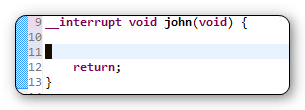
Also, the compiler has a problem with __interrupt ... see attachment. What is strange is that it compiles fine ... no errors or warnings ... but the question mark on the left edge, along with the squiggly line under __interrupt indicates there is a problem
There is no version 5 of the MSP430 compiler. 4.0 is the latest stream.
What build of CCSv5.1 are you using? There was an issue with the dynamic syntax checker and the __interrupt keyword in the beta releases but that is not present in the GA release.

5.1.0.09000 is fine. That is the same as what I am using and is the GA version. That is real strange that __interrupt is showing up as a syntax error for you.
Can you check the language mappings for your project? It is probably not using the TI settings. It should look like this. If it does not you can click on the Add button to set it up.

Clyde Eisenbeis said:Also, the compiler has a problem with __interrupt ... see attachment. What is strange is that it compiles fine ... no errors or warnings ...
but the question mark on the left edge, along with the squiggly line under __interrupt indicates there is a problem
Moving forward, it is best to open a new workspace for CCS 5.1 and import your CCSv4 projects into it rather than directly opening a v4 workspace in v5.
Clyde Eisenbeis said:One new problem ... it flags as an error "x = x". I use this type of statement during debug to give a place to set a break point.
It should be flagged as a warning, not an error.