This thread has been locked.

If you have a related question, please click the "Ask a related question" button in the top right corner. The newly created question will be automatically linked to this question.

Compile


I upgraded from Code Composer 4 to Code Composer 5 (MSP430 code). The compile icons for Code Composer 4 were displayed along the top ... don't see them for Code Composer 5.  There were two icons ... one for compiling the code that has changed ... the other for compiling all files.

  • Hi Clyde,

    do you mean build?  Have you noticed the hammer with the drop down menu in v5?  This is the build button in v5.   Could you send a screenshot of the button you can't find?  Have you tried a right click on the toolbar to customise it?

    Best Regards,
    Lisa

  • Yes, build ... and rebuild ... the blue icons on the attachment.  I did try customizing ... I see Build All which is probably similar to Rebuild ... don't see build which compiles only the file that has changed.

  • HI Clyde,

    the hammer is build, but there it is tied to a configuration - ie debug or release.  If you need more than this, you will likely have to right-click and customise a little. 

    Please keep me informed how it goes.

    Best Regards,
    Lisa

  • I did try customizing ... I see Build All which is probably similar to Rebuild ... don't see build which compiles only the file that has changed.

  • Hi Clyde,

    actually the default (Build Project, Build All etc) is actually always an incremental build that will only build the necessary files.  The difference between build project and build all is that build all will build all projects in the workspace.  In order to do a rebuild of everything you would actually have to do a clean first.  So the build button should be fine for you.

    I hope this helps.

    Best Regards,
    Lisa

  • If I understand you correctly, 'Build All' just rebuilds the files that have changed ... and 'Build Project' rebuilds all files ... correct?

    I don't see 'Build Project' as an icon option like it used to be.

    What does 'do a clean' mean?

  • Hi Clyde,

    I hope the following helps

    Build Project - incremental build of selected project.  This only builds files that have changed as you wish.

    Build All - this is the same as build project, the difference is that it goes through all projects in the workspace.  It does an incremental build on each project only building changed files.

    Clean - removes information from the previous build.  After a clean all files will need to be rebuilt.  Clean + Build Project = rebuild.

    I hope this helps.  You should be able to add these to your toolbar.

    Best Regards,

    Lisa

  • This makes no sense.  Build Project: "builds files that have changed".  Build All: "only building changed files".  I don't see the difference. 

    Clean + Build Project: It is unfortunate this has been made a two step process.  Visual Studio makes this very simple.  F6 rebuilds only changed files.  F7 rebuilds everything.  It's been like that for many years. 

    How are Build Project and Clean added as icons?  I don't see them under "Customize Perspectives".

    Also, I don't see a way to view a 'watch' window.

  • Hi Clyde,

    the difference between "build project" and "build all" is the following.

    Build Project - only builds the currently selected project

    Build All - applies to all projects in the workspace

    Both, as I mentioned do incremental builds and only target changed files.

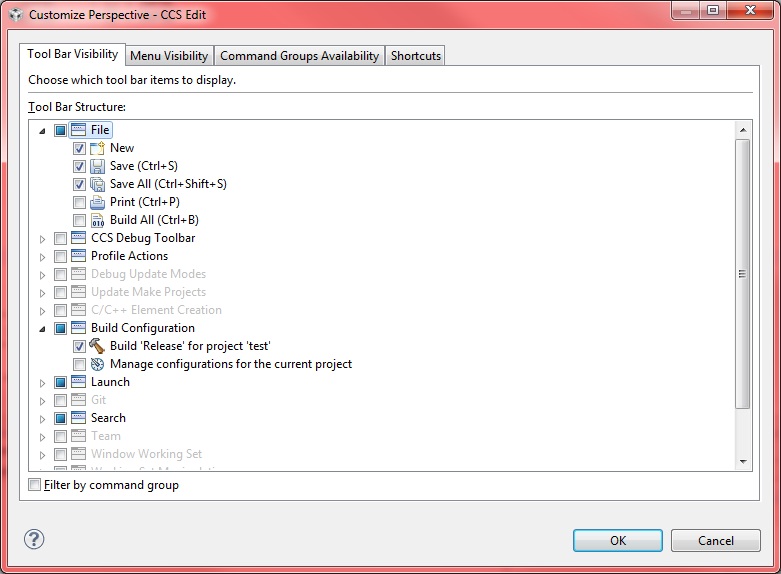
    I could not find the clean either - you may have to consider a keyboard shortcut.   Build project is the hammer button, as I mentioned before.  If you also wish build all to be there you can add it as per my screenshot below.

    I hope this helps!

    Best Regards,
    Lisa


  • And the answer to the watch window question?

  • Hi Clyde,

    sorry, I was intent on explaining the build options.

    The watch window can be found with View->Expressions.  There is also View->Other->Debug->Variables.

    Both of these are default open in the debug perspective.

    I hope this helps.

    Best Regards,

    Lisa

  • TI has changed the word Watch to Expressions?  The word Watch has been the standard for a couple of decades. 

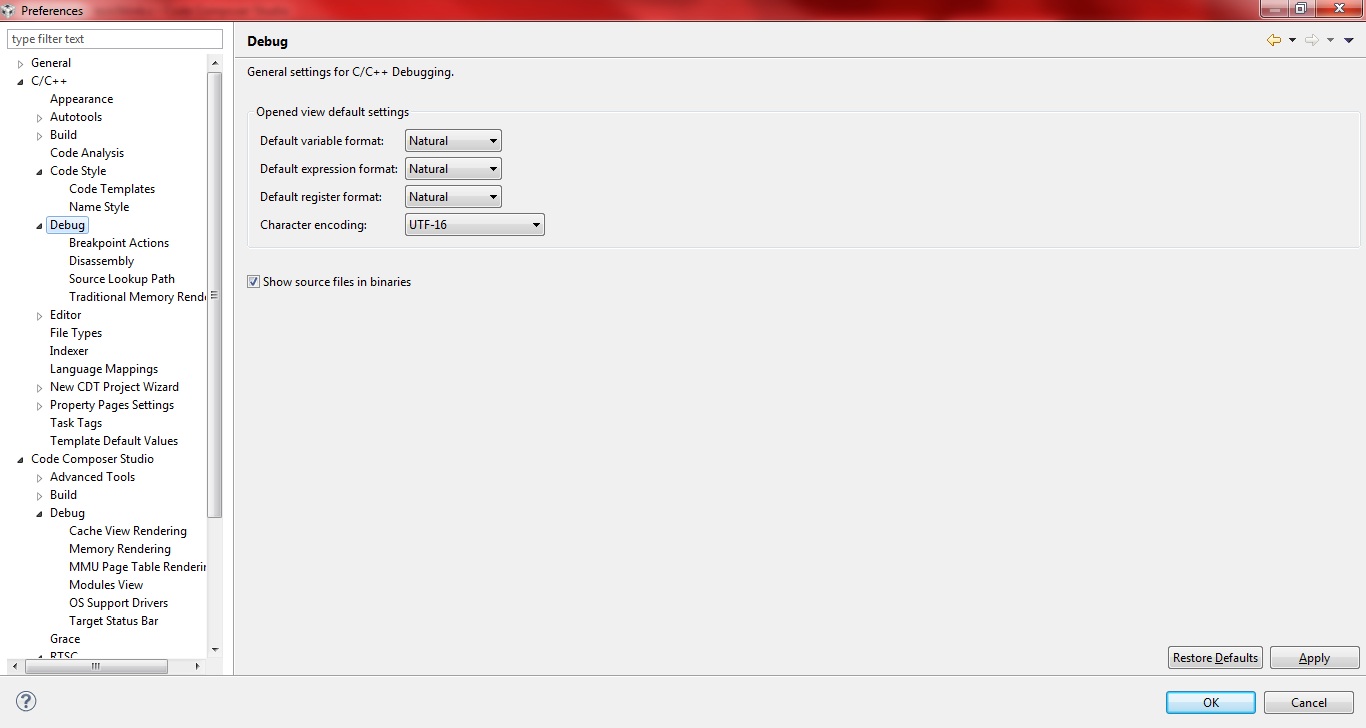
    What does one set so all Values in Variables and Expressions are automatically displayed in hex?

  • Clyde Eisenbeis said:

    TI has changed the word Watch to Expressions?  The word Watch has been the standard for a couple of decades. 

    The Eclipse community changed it.  CCS plugs into Eclipse.

    Please start a new thread as this is becoming a hodge-podge.

  • Based on your screen capture it looks like you are using the Eclipse supplied C/C++ perspective and not the TI supplied CCS Edit one.  Any reason you switched to using the C/C++ one?


    I agree with Brad there are way too many questions on this single thread.  It makes it pretty impossible to track what is resolved and what is open.

  • Hi Clyde,

    Please do ensure you use the CCS perspectives as John mentions.   Regarding your hex format question ... the attached screenshot should be self explanitory and you can look at Window->Preferences->C/C++Debug.   And yes, many of these items come from the fact we are stock eclipse based.

    Best Regards,
    Lisa


  •  I have no idea what Eclipse vs TI is.  I'm just using the defaults.  How do I switch to the TI CCS Edit one? ... I just noticed in the upper left corner "CCS Edit". 

    Also, menu Help -> About Code Composer Studio -> Version 5.1.0.09000.

  • Hi Clyde

    you seem to have things correct then if you see CCS Edit and CCS Debug. 

    Best Regards,
    Lisa