This thread has been locked.

If you have a related question, please click the "Ask a related question" button in the top right corner. The newly created question will be automatically linked to this question.

CODECOMPOSER: How to generate the motolora format files with MSPM0

Part Number: CODECOMPOSER

Tool/software:

Hi Experts,

When I use the TI ARM CLANG compiler to generate the hex file with motolora format, I find the output files is wrong. Please help check if it is a bug or I missed some key operations.

1. Enable Arm Hex Utility
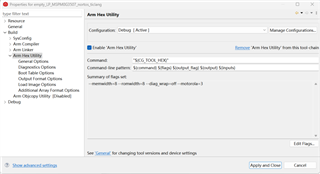
2. Check output files
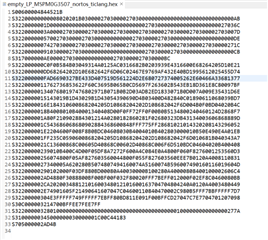
Let us focus on line 2:

S3 22 00000000 00802020 1B030000 27030000 27030000 00000000 00000000 00000000 00AB

I checked the standard motolora format:https://en.wikipedia.org/wiki/SREC_(file_format) 
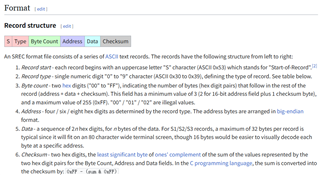
Normally, the Byte count should be odd number, because the last byte should be single checksum byte.

And, the byte count should be several specific value, normally is:

4 (address, 32bit) + 16 (data byte) + 1 (checksum) = 21 (Decimal) = 0x15

4 (address, 32bit) + 32 (data byte) + 1 (checksum) = 37 (Decimal) = 0x1F 0x25

I see it is 0x22 in the line2, so it is incorrect. I can see the following data is messed up (line 3 and following line).

I also uploaded the reference project here: (CCS 12.8.1)

test_motolora_s3.zip

Looking forward to your reply here, thanks!

B.R.

Sal

  • Thanks for reporting the issue and providing details. We will analyze the issue and file a defect if required.

    Ajay

  • Thank you for attaching the test case, which included the test executable and the hex utility command line.

    The payload here has an odd number of bytes (29).  Consider line 2 again:

    S3 22 00000000 00802020 1B030000 27030000 27030000 00000000 00000000 00000000 00AB

    The "00AB" at the end is one byte of payload plus the one-byte checksum "AB".

    29 bytes of payload + 4 bytes of address + 1 byte of checksum = 34, which is 0x22 in hex, which matches the byte count shown.

    Thus, the hex utility output looks correct as far as I can see.

  • Hi Arch,

    Thanks for clarification. Additional question here:

    How to generate the payload of "16 bytes" or "32bytes"? Do we have an option here, or we only support 29-bytes playload.

    B.R

    Sal

  • Hi Ajay & Arch,

    How to generate the payload of "16 bytes" or "32bytes"? Do we have an option here, or we only support 29-bytes playload.

    Could you help comments on this part? Thanks!

    Updated: Customer feedback that the only avaiable payload byte length is "16 bytes or 32 bytes", so we need an workaround to support this. 

    B.R.

    Sal

  • How to generate the payload of "16 bytes" or "32bytes"? Do we have an option here, or we only support 29-bytes playload.

    Unfortunately, the hex utility does not support controlling the number of bytes of data on a line.  Each line of the hex file encodes the number of bytes of data on the line.  The tool that reads the hex file as input relies on that encoding to know the number of bytes per line.  That being the case, there is no need to control the number of bytes per line.

    Thanks and regards,

    -George