


Part Number: CODECOMPOSER
Other Parts Discussed in Thread: TMS320F28388D
Tool/software:
I'm debugging TMS320F28388D's CPU1, CPU2 and CM in Code Composer Studio Version: 20.1.1.8__1.7.1,
and added watch expressions something like, 'lwip_stats' for CM core.
If I select CPU1 core in threads after adding it, I won't be able to monitor the expression and it says it's not available.
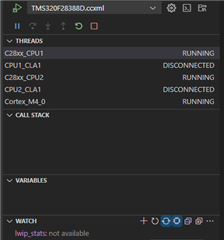
but I can monitor the expression again if only pause and run it again after selecting Cortex_M4_0.
I could just easily monitor watch expressions by selecting each cores in CCS Version: 12.7.1.00001.
Is there any way to do that in V20?
