This thread has been locked.

If you have a related question, please click the "Ask a related question" button in the top right corner. The newly created question will be automatically linked to this question.

CODECOMPOSER: GUI Composer: Is there a way to set a character symbol in a string that is shared with a label widget (or other widget)

Part Number: CODECOMPOSER


Tool/software:

I would like to set a string on the C2000 that includes the lowercase mu symbol (for microseconds), that is correctly displayed in a label widget under GUI composer.

So far, I have not been able to find the correct escape sequence.

For example:

sprintf((char*)gui_string,"Test: \\u03BC");

results in 
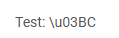
In a label whose value is linked to gui_string

Is there a better encoding, sequence, etc that will produce the desired symbol?

Thanks!

  • Hi Mark, 

    Do you need to send the unit from the target side? If you can deduce the unit based on received value, then you could append the unicode character programmatically in GUI Composer on the host side. 

    Normally bindings (connections between target date and widgets) are created through the gui, ie. .property page. However, they can also be created programmatically. Some project templates include main.js which has some example code that is commented out. If you do not have it, then it can be created by going to File-> New -> Application javascript file

    Near the top there should be an event listener function that looks like:

    /*
    * Boilerplate code for creating computed data bindings
    */
    document.addEventListener('gc-databind-ready', function()
    {

    }

    Inside there are few different examples of how to create a binding programmatically. The main advantage is that custom getter/setter functions can be added to transform or change display values in "flight". 

    I would recommend using this template example:

    // gc.databind.registry.bind('widget.id.propertyName', "targetVariable", function(value) { return value*5/9 + 32; }, function(value) { (return value-32)*9/5; });

    with something that looks like: 

    gc.databind.registry.bind('widget.label_7.label', 'streaming.c4',

           value => { return value+" µ"; } /* getter */
    );

    In above example, I am simply appending mu character with a space, but you could add javascript code to check value and determine whether a different symbol should be used based on value. 

    If this widget is a display only, then you only need a getter, however, if user can change the value which then needs to be sent to the device, then setter would be necessary to perform the reverse transformation. 

    Last, important node, there are no checks in the tool to ensure that only one type of binding is created, thus you would need to ensure that if a binding is added programmatically, then binding created through GUI (i..e widget property page) is removed. If you have both, then you will get many updates as two binding methods keep flipping between values. 

    Martin

  • Hi MartinS,

    The units is changed by a Toggle switch in the GUI, that is then linked to a variable on the target so that the target can update its operation accordingly.  So in this case, I could potentially look directly at the Toggle Switch checked field to determine which units to show in the label.

    This seems to be a good track for addressing the problem.

    When I create a new Application Javascript file, I do not see the items you describe, though some are close.  This is a V3 app, if it makes a difference.

    Trying to combine the little I know with your description above, it seems like I have something workable.  In this case, I'm using the checked event from the toggle switch to change the units.  The event listener will check the 'checked' field of the toggle switch, and set the label to the appropriate value.  Initial testing seems to work.

  • Hi Mark, 
    I was not sure which version of GUI Composer library you were using, thus information is for v2 component library. In v3 both project templates, there should be index.js which is roughly the same thing as the file that I mentioned. The structure is different and there are couple of things to keep in mind. 

    Code below starts around line #40 in index.js. The important piece is to also uncomment both lines that start with 

    await bindingRegistry.waitForModelReady(.

    ----------

    These ensure that internal data models are properly initialized. The first line waits for widget model and you do not need to change it. The second await should be using the data model that your application is using. In my case I am using "streaming" data model, i.e. it's id=streaming. 

    My test app is using this device side CCS project : gc_simple_json  Device just sends out c1..c4 variables as JSON objects. 

    // Example code:
    //
    (async () => {
    // /* Wait for widget and target models to be ready */
    await bindingRegistry.waitForModelReady('widget');
    await bindingRegistry.waitForModelReady('streaming');
    //
    // /* A simple computed values based on simple expression */
    // bindingRegistry.bind('widget.id.propertyName', "targetModelId.targetVariable == 1 ? 'binding is one' : 'binding is not one'");
    //
    // /* A custom two-way binding with custom getter and setter functions */
    // /* (setter is optional and getter only indicates one-way binding) */
    bindingRegistry.bind('widget.label_7.label', 'streaming.c4',
    value => { return value+" µ"; } /* getter */
    );
    //
    // /* 1 to n bindings */
    // bindingRegistry.bind('widget.date.value', {
    // /* Dependant bindings needed in order to compute the date, in name/value pairs */
    // weekday: 'widget.dayOfWeek.selectedLabel',
    // day: 'widget.dayOfMonth.value',
    // month: 'widget.month.selectedLabel',
    // year: 'widget.year.value'
    // },
    // /* Getter for date computation */
    // function(values) {
    // /* compute and return the string value to bind to the widget with id 'date' */
    // return values.weekday + ', ' + values.month + ' ' + values.day + ', ' + values.year;
    // }
    // );
    })();

  • Hi Martin,

    My approach to this is to set an eventListener for the toggle switch to change:

    var set_units = function(){
        
        const binding=bindingRegistry.getBinding('units.checked');
        var value = binding.getValue();
        alert("value: " + value);
    	
    	const binding2 = bindingRegistry.getBinding('label_52.label');
    	var value2 = binding2.getValue();
    	
    	if (value == true){
    	    value2 = "HELLO";
    	}
    	else{
    	    value2 = "WORLD";
    	}
    	binding2.setValue(value2);
    	
    	const binding3 = bindingRegistry.getBinding('label_22.label');
    	var value3 = binding3.getValue();
    	
    	if (value == true){
    	    value3 = "ms";
    	}
    	else{
    	    value3 = "µs";
    	}
    	binding3.setValue(value3);
    };
    
    
    const init = () => {
        GcWidget.querySelector('#units').then(input => {
            input.addEventListener('checked-changed', (inp) => {
                set_units();
            });
        });
        
    };

    The issue that I am having with this is that the result is the opposite of what is expected.  If the toggle is false, the string should be "µs" and "ms" if true, and I am seeing the reverse.  As a guess, the event listener is run before the "checked" field is updated to its new value.  Do you have an idea what may be happening here and how to work around it?

  • Hi Mark, 

    It is a bit hard to explain, however, getBinding in case of units widget is creating a new entry in data model, but there are no change listeners and data model returns cached value. It is an optimization. 

    In case of the other two labels the setValue changes a data model which then triggers a write change to the widget. The write forces the update. 

    Probably the simplest way to get at the state of units checkbox is to look at event details that are passed as argument to your eventlistener

    i.e. change the set_units to have an argument that passes in value from CustomEvent.  You code would need to change to  "set_units(inp.detail.value)" 

    Martin