This thread has been locked.

If you have a related question, please click the "Ask a related question" button in the top right corner. The newly created question will be automatically linked to this question.

LAUNCHXL-CC1310: Example projects not working with GCC

Part Number: LAUNCHXL-CC1310
Other Parts Discussed in Thread: CC1310

Tool/software:

Hi,

I can successfully create and debug example TI-RTOS projects using the Resource Explorer when I use the TI Compiler but not when using GCC.

When using GCC the projects can build and is downloaded to target but newer enter the main function. It looks like they are stuck in 'System_M.c' or something like that.

The behavior is verified in both CCS 12.8.1 and 20.1.1. Is there something that needs to be installed or configured?

Regards Peter

  • The first thing you shouuld do is to test with the recommended CCS version:

    Release Notes

    SimpleLinkTm CC13x0 SDK 4.20.02.07 was built & tested on a Windows 7 host platform using the following Integrated Development Environment (IDE) and components. Using an IDE version or TI-RTOS version not listed below may result in compatibility issues with this SDK release.

  • Hello Siri,

    Thanks for the reply and pointing me in the right direction, it works using CCS 10.4.0.

    However when I try to import the project into CCS 12.8.1 the error is the same. Is there a way to copy/move the project to a never CCS version?

    Regards Peter

  • Hi Peter,

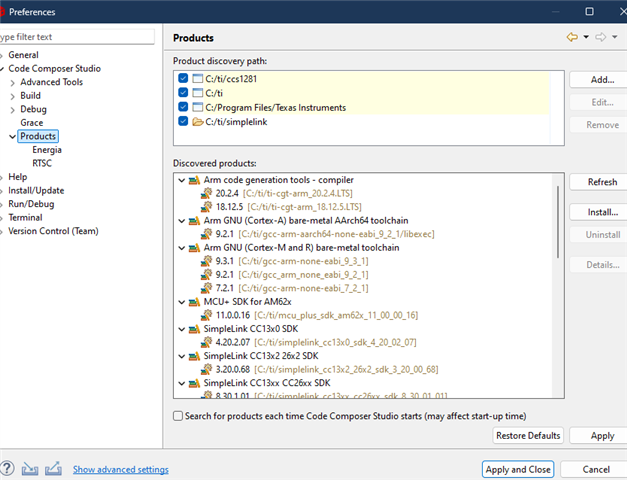
    Have you made CCS 12.8.1 aware of the GCC compiler? Through Window -> Preferences:

    Regards,

    Arthur

  • Hi Arthur,

    Thanks, but importing the project in CCS 12 or 20 and using the compiler from CCS 10 doesn't work. The application will not enter main and stay at the FaultISR() in cstartup_M.c

    Regards Peter

  • Hi Peter, 

    I see the same issue as you do.. I will investigate, and come back with results today.

    Regards,

    Arthur

  • HI again,

    I have not come to any conclusion yet, but I have involved other people on the matter. Hopefully we will come to one.

    Regards,

    Arthur

  • Hi Arthur,

    Is there an update on the issue?

    Regards Peter

  • Hi Peter,

    There is, and the consensus is that you should keep using CCS (9.1.0) and the recommended GCC (Linaro 7.2.1).

    Now, I am also working on the CCS Cloud side, to see where would the IDE affect the build.

    Regards,

    Arthur

  • Hi Arthur,

    Thanks, but then I'm sort of stuck with the CC1310 and an old tool chain. Can that be true?

    Best regards Peter

  • Hi Peter,

    That is the case, at least according to our release notes.

    However, I did investigate as to what may have gone wrong, and got a GCC build working on CCS 12.8, which means that we can most likely get it to work on CCS 20 as well. This is still using the GCC 7.2.1 compiler.

    It seems like we had at least 3 parameters that were differing:

    • Optimization settings in both tirtos and empty project (should be -Og)


    • The compiler should be set to 7.2.1 in both projects:
    • Do check that the following linker flags are present in both projects as well:

    If you cannot reproduce the build, I can eventually send you the complete workspace that I have used.

    Regards,

    Arthur

  • Note that I used the 7.2.1 toolchain that came with CCS 9.1.0. There may be metadata here that CCS has to be aware of.

  • Hi Arthur,

    Thanks, but I can't make it work.

    When I use CCS 12.8 to do like you

    1) Import empty project from Project Wizard

    2) Set compiler to GCC 7.2.1 in Empty & tirtos

    3) Set compiler Optimization to -Og in Empty & tirtos

    4) Check linker flags in Empty (tirtos has no linker)

    the debug still ends in the FaultISR().

    Best regards Peter

  • Hi Peter,

    I have tested the procedure that I have sent you once again, but this time on Ubuntu, and it worked. Here is the workspace:

    ccs12linuxgcc.zip

    However, I tried the same procedure on a different Windows computer which did not have the CC13x0 SDK and compilers from before, and it also failed.

    On the course of trying it on Ubuntu, I noticed some error pertaining to a file being too short/a too long path, so I wonder if the workspace location would matter. For instance, if we place the workspace under c:\ti\workspace_xxx, it may start working. I will try that tomorrow.

    Regards,

    Arthur

  • Hi Arthur,

    Thanks, I really appreciate your effort. I've tried, but your project won't run in my configuration after import.

    I'm using Ubuntu 24.04.2 and the workspace is located in the root of my home folder '/home/pen/workspace_pen'.

    • I unzipped your project and imported it using 'project -> Import CCS project'
    • Checked properties for errors
    • Recompiled and entered debug with a CC1310 Launchpad

    Nothing happened and the project didn't enter main, but looping in a ti assembler file.

              ti_sysbios_family_arm_m3_Hwi_excHandler__I(), ti_sysbios_family_arm_m3_Hwi_excHandler__I():
    1001bbc4:   4A05                ldr        r2, [pc, #0x14]
    1001bbc6:   B508                push       {r3, r14}
    1001bbc8:   6812                ldr        r2, [r2]
    1001bbca:   2301                movs       r3, #1
    1001bbcc:   8013                strh       r3, [r2]
    1001bbce:   4A04                ldr        r2, [pc, #0x10]
    1001bbd0:   6812                ldr        r2, [r2]
              $C$L526():
    1001bbd2:   2A00                cmp        r2, #0
    1001bbd4:   D0FD                beq        $C$L526
    1001bbd6:   4790                blx        r2
    1001bbd8:   BD08                pop        {r3, pc}
    1001bbda:   46C0                mov        r8, r8
              $C$CON599():
    1001bbdc:   0148                lsls       r0, r1, #5
    1001bbde:   2000                movs       r0, #0
              $C$CON600():
    1001bbe0:   13A0                asrs       r0, r4, #0xe
    1001bbe2:   0000                movs       r0, r0
              ti_sysbios_gates_GateHwi_Handle__label__S(), ti_sysbios_gates_GateHwi_Handle__label__S(), xdc_runtime_System_Module_GateProxy_Handle__label__S(), xdc_runtime_System_Module_GateProxy_Handle__label__S():

    Best regards Peter

  • Hi Peter,

    I found out that that there is a dependency on the device having to be flashed with the CCS 9.1.0 project in order for the CCS 12 projects to function.

    Oddly, the ELF headers, and file placement are identical. This tends to point to a difference in the tirtos build.

    Again, the safest option is to use the recommend tool versions that are located in the SDK's release notes.

    Regards,

    Arthur

  • Hi Peter,

    Apologies for the delay. The issue has been resolved, and the fix will be shipped with CCS 20.0.4.

    Regards,

    Arthur

  • Hi Arthur,

    Thanks, I'll look forward to testing it out.

    Regards Peter