This thread has been locked.

If you have a related question, please click the "Ask a related question" button in the top right corner. The newly created question will be automatically linked to this question.

LAUNCHXL-CC1352P: How do I run a "stand alone" GUI Composer app from my Mac (M1 Pro running Sequioa 15.5)

Part Number: LAUNCHXL-CC1352P

Tool/software:

My original question was closed, so I've had to start a new one.

I am trying to learn how to use GUI Composer, V2.  I have a small demo app that lets you adjust the timing of a blinking LED on a LaunchXL CC1352P4 with a dial on the screen.  However, the instructions end with "Now you can download a standalone version of your app (see image 1)

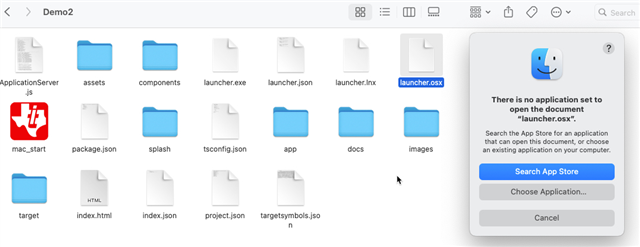
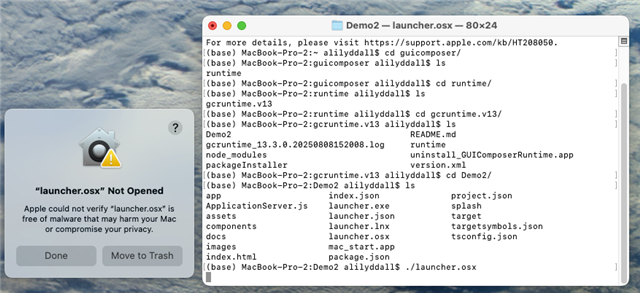
I am able to download the zip file.  I am able to install the guicomposer runtime macOS package.  I have copied the unzipped file (called Demo2) into the 'gcruntime.v13' folder.  Then I went inside the Demo2 file and tried clicking on mac_start (see image - maybe this is not the way) and got an error.  (see image 2)

1) Where have I gone wrong? 

2) Is there a good place with step by step instructions on running a "stand alone" app like this? 

3) Is V2 obsolete?

4) Do people use GUI Composer to make things that other people can use?

  • Hello,

    Are you able to run the app by running the launcher.osx executable from the terminal?

    3) Is V2 obsolete?

    It has been deprecated in favor of v3.

    4) Do people use GUI Composer to make things that other people can use?

    Yes. People can share their GC apps for other to use via the GC Gallery: https://dev.ti.com/gallery/

    Thanks

    ki

  • No.  I wasn't able to run that file either. 

    When I tried opening it by double clicking on the icon, I got this error:

    When I tried running it from the terminal, I got the same warning about malware (and refusal to open it ) as before.

    Is either of these the correct way to run it?

    Can you recommend a tutorial for Gui Composer V3?  I only started with V2 because that is the tutorial I was able to find.  I'd like to know what is most "current", works the best with CC1352 and is best supported with documentation, etc.  

    Thank you.

    Ali

  • Running the launcher.osx from the terminal should have worked. I'll need to try this out tomorrow when I have access to my macbook.

    Can you recommend a tutorial for Gui Composer V3?

    I suggest looking at this workshop. It has a tutorial for both v2 and v3. While it is for a different target, you should be able to get an idea of how to use it and apply it to your device:

    https://dev.ti.com/tirex/explore/node?node=A__ACuj7Q0odqsz7xV.GhI98w__sdtoutilities__FUz-xrs__LATEST

    v3 is certainly the recommended version. v2 has been deprecated and there is no active development on it. As for which version has the most documentation/examples for your particular device, I don't know. It would be something that the device experts can answer. However, as someone who supports the tools I would recommend v3.

  • Running the launcher.osx from the terminal should have worked. I'll need to try this out tomorrow when I have access to my macbook.

    First off, you were correct that you should use the mac_start app instead of launcher.osx. I confirmed that using mac_start is the correct method.

    With that said, the same issue occurs with mac_start. We suspect there is some issue with the app not being signed properly.

    I filed a ticket for this. Tracking link: https://sir.ext.ti.com/jira/browse/EXT_EP-12835

    There is a workaround. Please see the above line for more details.

    Thanks

    ki

  • Hey that workaround did work!  Fun to see the application run like that, but a beyond my know-how to understand how to call node that way without just copying what you wrote.  I will pursue the V3 lab that you sent me before and see if I can that to get to run as intended. 

    Is there also a way to register an interest in the ticket you filed for this V2 issue?  Or will you update this question if it gets fixed?  

    Thank you.

  • Is there also a way to register an interest in the ticket you filed for this V2 issue?  Or will you update this question if it gets fixed?  

    I don't think this issue is specific to GCv2 apps. I believe it will also impact v3 apps.

    As for getting alerts for tickets, I don't think there is a way for that. I will likely not be adding any updates to this thread since I am not always in the loop on these updates. Also I believe threads get locked after a certain period of time. So it is best to periodically check status yourself.