This thread has been locked.

If you have a related question, please click the "Ask a related question" button in the top right corner. The newly created question will be automatically linked to this question.

CCSTUDIO-THEIA: Shortcut for single project build

Part Number: CCSTUDIO-THEIA

Hello, 

In CCS (before Theia), there is a shortcut for building a single project (not Build All → Ctrl+B). There is no similar option in CCS Theia. I am developing a multicore processor application where all projects use a common shared library. Since there is also no “close project” option in Theia, a single modification in the shared library requires all projects to be rebuilt. This takes a lot of time and makes the development process cumbersome. Could you please add "Build (single) Project" function and shortcut again.  Secondly, I also upvote having "close project" option described here.


https://sir.ext.ti.com/jira/browse/EXT_EP-12559 

Best Regards,

Hakan


  • Hello Hakan,

    Could you please add "Build (single) Project" function and shortcut again

    In CCS Theia, CTRL+B will build just the active project, not all projects.

    Thanks

    ki

  • Hello Ki,

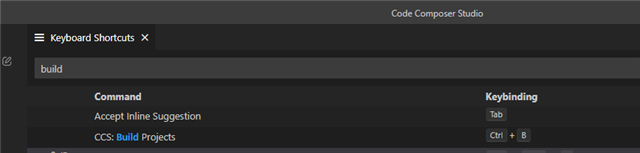
    I am confused. In older CCS, Ctrl + B is used for "Build All". When I check the shortcuts in the new CCS (see below screenshot), the same key combo is used for "Build Projects

    But when I try Ctrl + B in myself in the new CCS, I see it sometimes compiles only 1 project, and sometimes it compiles the project + its related system project. So, I cant totally confirm your claim.

    Needless to say, changing the "build all" key combo in the new CCS, was definitely a bad idea. Sorry. 

    Regards,

    Hakan

  • Needless to say, changing the "build all" key combo in the new CCS, was definitely a bad idea

    You can configure the keyboard shortcuts to the way you wish.

  • Ctrl+B or (Cmd+B macOS) "Build Projects" will build the project(s) that are currently selected in the Explorer view.  So if just one project is selected it will build that, if more than one are selected it would build those.  System projects are also a bit special.  If you had a System Project selected then it would build the core projects as well.  If you just had a core project selected then it would just build the core project.

    Additionally there is a "Build All" command that will build all projects in the workspace regardless of what is selected.  This one does not have a shortcut setup by default.

    As Ki mentioned the keyboard shortcuts are something you can change.  The default ones in CCSv20 are different in a number of cases from what we had in CCSv12.  Much of that is due to moving from the Eclipse based environment to the Theia (VS Code) style environment.  It is a bit of a tradeoff, existing CCS users are going to expect what we had and then VS Code users are going to expect it to behave like that environment...

    Regards,

    John