CODECOMPOSER: Misleading warning when importing projectspec - "Already exist! Ignoring..."

Part Number: CODECOMPOSER

I have a project defined in a projectspec file, where the bulk part of the code is in a few foldres that i include in the project by linking to the folders. using a tag like this:

<file action="link" targetDirectory="Src" targetName="Common" path="COMMONS_SRC_ROOT" createVirtualFolders="true"/>

Inside this folder I have a single file that I want to mark "excluded from build", I do this 

            <file action="link" targetDirectory="Src/Common/Tools/test" path="COMMONS_SRC_ROOT/Tools/test/DebugLog_tests.c" excludeFromBuild="true"/>

And this works.

But when importing the project in CSS ig am geeted with this dialog
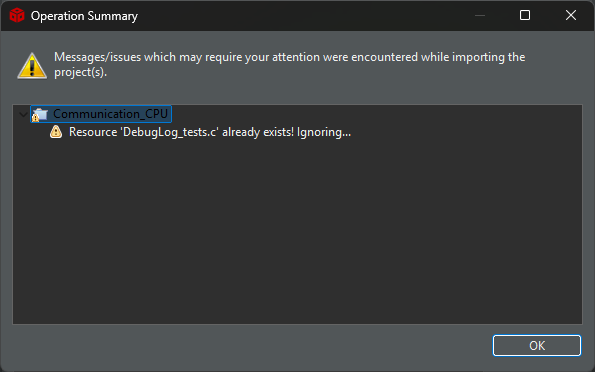
image.png

The reason I claim this to be misleading is that says "Ignoring!", but when i look in the created project, the file is excluded from build.

image.png


 So my question here is

  1. Why is this a warning in the first place, there is no conflict in the references?
    I would see it as a warning if I tried to copy a file to a exsisting virtual folder or similar, but not here.
  2. If you keep this as a warning, will you change it to be less misleading?
    I assume the "ignore" claim comes from the your code that wants to create the link, but the code that sets the attribute just runs with no warning. Creating this misleading warning.
  3. Is there any other way to mark the file marked as excluded in the projectspec file. Except for creating links to every single file?

I use CCS 12.80, if this is fixed in Theia, let me know. It would be an argument to upgrade the team.

Code Composer Studio

Version: 12.8.1.00005

  • Thanks for reporting this. I will check with engineering and also with CCS Theia to see the current behavior and let you know.

  • Sorry for the delay. I will try to get an update for you tomorrow.

  • I will check with engineering and also with CCS Theia to see the current behavior and let you know.

    Engineering confirmed that the current behavior also exists with CCS Theia.

    Note that engineering mentioned that the warning you described in your first post refers to the request to link the same file twice and not about excluding the file from the build. They provided a solution that would require a modification to the project spec. Add a 'overwriteExisting="true"' attribute to the second <file> element:

    <file action="link" targetDirectory="Src" targetName="Common" path="C:/common_files" createVirtualFolders="true"/>
    <file action="link" targetDirectory="Src/Common" path="C:/common_files/main.c" createVirtualFolders="true" overwriteExisting="true" excludeFromBuild="true"/>  

    With this attribute, CCS knows that this is not a mistake, so it does not flag it with a warning.

    Thanks

    ki

  • At first glance this seamed to work.:-)

    But it has a very bad side effect. The original file is deleted. :-(

    Taking offspring in you example, this means that after importing the project, the file "C:/common_files/main.c" is gone, deleted.

    I See this a s a bug, because not only is the file deleted, but the link in the project now points to a non-existing file.

    So clicking on the file in project explorer  gives you this.

    NB: In the meantime I found the time to install CCS_Theia and the behavior is the same.

    NBB: I think i found a bug loosely related to this in CCS_Theia, I will create a related question for that,

  • But it has a very bad side effect. The original file is deleted. :-(

    oh... yes I just tried this out and see the same effect. I will follow up with engineering.

  • Any update?

  • Ah sorry for the lack of update. This should be fixed in the latest release CCS 20.5.0.

    As per engineering:

    In CCS 20.5.0:

    if this user keeps 'overwriteExisting="true"', CCS would no longer delete the original SDK file, and it will show an error notification.

    If the user removes the 'overwriteExisting="true"', then they would see the old warning again

    And to suppress that warning, I added a new field - 'preserveExisting="true"'

        ignoreDefaultDeviceSettings="true"
        ignoreDefaultCCSSettings="true">
                
        <file action="link" targetDirectory="Src" targetName="First" path="C:/Work/tests/test-projectspecs/common_files" createVirtualFolders="true"/>
        <file action="link" targetDirectory="Src/First" path="C:/Work/tests/test-projectspecs/common_files/main.c" createVirtualFolders="true" preserveExisting="true" excludeFromBuild="true"/>
    
        <file action="link" targetDirectory="Src/Second" path="C:/Work/tests/test-projectspecs/common_files/text.c" createVirtualFolders="true"/>
        <file action="link" targetDirectory="Src/Second" targetName="text.c" path="C:/Work/tests/test-projectspecs/common_files/text_2.c" createVirtualFolders="true" preserveExisting="true" excludeFromBuild="true"/>
        
    </project> 

  • Ah sorry for the update

    Ah sorry for the (lack of) update

  • if this user keeps 'overwriteExisting="true"', CCS would no longer delete the original SDK file, and it will show an error notification.

    I have not tested it yet, but I wonder why issue an error message?

    I mean if I set `overwriteExisting="true"`, I read it as telling CCS that it is not an error or mistake to overwrite an existing target.

    And to suppress that warning, I added a new field - 'preserveExisting="true"'

    I assume the expanded meaning of this is "Don't update target file, only update meta-data / settings". Did I understand that correct?

  • I mean if I set `overwriteExisting="true"`, I read it as telling CCS that it is not an error or mistake to overwrite an existing target.

    I tried it out and got this message:

    I assume the expanded meaning of this is "Don't update target file, only update meta-data / settings". Did I understand that correct?

    Yes I believe that is the case.

  • I tried it out and got this message:

    Ok, So it's just for the linked folder case. Makes more sense then Slight smile.

    Curious how it will handle this:

    <file action="link" targetDirectory="Src" targetName="First" path="C:/Work/tests/test-projectspecs/common_files" createVirtualFolders="true"/>
    <file action="link" targetDirectory="Src/First" path="C:/Work/tests/test-projectspecs/common_files/main.c" createVirtualFolders="true" preserveExisting="true" excludeFromBuild="true"/>

    (Some wired problem with insert code block, so I insert it as normal text)

    Note the second line don't set "virtualFolders". I did this by accident in CCS 20.x when I investigated this question, the result was that I saw two "main.c" in the project explorer, and If I looked in the workspace folder using system explorer, I saw that it had created the folders "src/first" below the project folder in the workspace.

    I guess it's a side effect of CCS-Theia (unlike CCS-Eclipse) will show all files in the workspace, in the project explorer. plus the linked ones of course.

    Anyhow, this is not that important I am just curious, and I thought you may wanted to know this. I will probably test this out for my self later, and have marked this case as resolved.

    Thanks.

  • I tried it out and got this message:

    Ok, So it's just for the linked folder case. Makes more sense then Slight smile.

    Curious how it will handle this:

    <file action="link" targetDirectory="Src" targetName="First" path="C:/Work/tests/test-projectspecs/common_files" createVirtualFolders="true"/>
    <file action="link" targetDirectory="Src/First" path="C:/Work/tests/test-projectspecs/common_files/main.c" createVirtualFolders="true" preserveExisting="true" excludeFromBuild="true"/>

    (Some wired problem with insert code block, so I insert it as normal text)

    Note the second line don't set "virtualFolders". I did this by accident in CCS 20.x when I investigated this question, the result was that I saw two "main.c" in the project explorer, and If I looked in the workspace folder using system explorer, I saw that it had created the folders "src/first" below the project folder in the workspace.

    I guess it's a side effect of CCS-Theia (unlike CCS-Eclipse) will show all files in the workspace, in the project explorer. plus the linked ones of course.

    Anyhow, this is not that important I am just curious, and I thought you may wanted to know this. I will probably test this out for my self later, and have marked this case as resolved.

    Thanks.
