This thread has been locked.

If you have a related question, please click the "Ask a related question" button in the top right corner. The newly created question will be automatically linked to this question.

CODECOMPOSER: Minimum required files that theia recognizes as project

Part Number: CODECOMPOSER

Hi there support team,

Theia doesn't recognize a project in the workspace after cloning the git commit. The reason are some missing subfolders/files/settings which are no longer existing. Maybe because of the gitignore settings. Otherwise this cannot be the issue, because the debug files were builded. This are the files/folders after cloning a git commit.
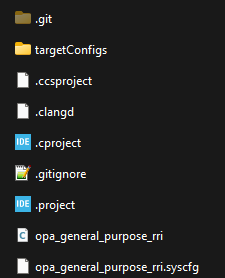
image.png
At this state, I cannot build or flash it. In Theia's workspace the symbol of this folder image.png is different to a new created project image.png

What is missing or how can I convert it into a theia project?

Thanks

  • Hello,

    The three .*project files (.project, .cproject, .ccsproject) are the absolute minimum files needed for a project to be recognized as a CCS project. 

    At this state, I cannot build or flash it. In Theia's workspace the symbol of this folder image.png is different to a new created project image.png

    Yes, you need the latter symbol since that means CCS recognized it as a valid CCS project.

    Did you open a folder in CCS to the root location of your project folder? Can I see a screenshot of the entire EXPLORER view?

    Thanks

    ki

  • Hello,

    CCS updates the whole workspace in the the explorer view. If I clone a project from the git repository, it shows the folder in the CCS Explorer. But as folder and not as Project(folder).

    I checked some workarounds to solve this. With this two variants a and b following will change:

    .project file  <name> ... </name> will updated
    \Debug\.clangd\compile_commands.json folder and file will be created
    \.settings\org.eclipse.cdt.codan.core.prefs folder and file will be created

    a) in CCS rename the folder, afterwards it is a project

    b) CCS is open, copy and paste the whole git cloned folder in the workspace, afterwards it is a project

    If I create the mentioned subfolders with files and change the filenames in the file contents manually, it dont works. It must be done from CCS. I dont understand this mechanism.

    Regards 

  • Can I see a screenshot of the entire EXPLORER view?

    I'd like to see a screenshot of what the EXPLORER view looks like with your project(s), especially the one that is not being initially recognized as a CCS project. If you rather send it to me via privately, please start a private E2E conversation with me.

    Thanks

    ki