AM6422: Can't install PRU Compiler

Part Number: AM6422
Other Parts Discussed in Thread: PRU-CGT

Per an answer on another forum post ((1) TMDS64EVM: First time using TMDS64EVM - Processors forum - Processors - TI E2E support forums ), I am attempting to follow set "Create PRU project from scratch" steps under the AM64x Academy (Creating a CCS PRU Project ), at the bottom of the page. I installed the latest install package of CCS version 12. 

In the note in the middle of step 2, I am going to View--> CCS App Center to downloand a missing PRU Compiler before setting up my demo project. When I attempt to install the PRU Compiler, I get the following error message:pru_install_failed.JPG
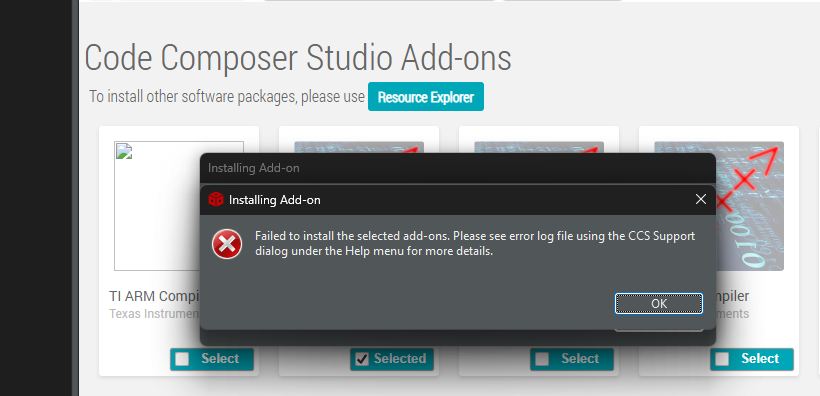
The error log contents from the failed install is attached. What next steps can I take? I installed CCS 12 over CCS v20 because the interface of v20 changes to such a degree that none of the steps outlined in the PRU Academy information aligned with the application layout, and I couldn't proceed with setting up a project correctly. 

error.log 

  • Hey there Seth,

    Hmm, interesting error. 

    I definitely don't want this to be the default experience for people using the PRU Getting Started Labs. So I will give you options for moving forward, but I will also be thinking about how to prevent future readers from running into the same thing.

    Short term:

    The PRU-CGT can be downloaded from here, and placed in your computer's ~/ti (Linux) or C:\ti (Windows) folder:
    https://www.ti.com/tool/PRU-CGT

    potential firewall issue? 

    I wonder if this issue is caused by any network security restrictions on your side, like a firewall blocking HTTPS connection to the TI servers? I am going to send your ticket to the CCS team to get their thoughts as well.

    FYI: On the topic of CCS 12.x or 20.x 

    I originally wrote these steps back in 2022, and updated everything in 2025 before any of my product SDKs were using CCS20. So I left the steps with CCS12.x in the 2025 version. However, I am just starting to write the CCS20 version of the documentation this week.

    I imagine that you will be moving through the docs faster than I can write them, so CCS12 might be the right call for the short-term. But if you are interested in drafts of the CCS20 version of the docs as I write them, let me know and I can share them.

    Regards,

    Nick

  • Short term:

    The PRU-CGT can be downloaded from here, and placed in your computer's ~/ti (Linux) or C:\ti (Windows) folder:
    https://www.ti.com/tool/PRU-CGT

    I would recommend this option.

    CCS 12.x is no longer supported. Any issues with App Center will not be addressed. That said, I did give this a try and was able to use it to install the PRU compiler without issue. So it could be a proxy issue: https://software-dl.ti.com/ccs/esd/documents/users_guide_12.8.0/ccs_troubleshooting.html#check-the-proxy-setting

    If you are still having issues, manually downloading and installing the compiler is a good option. So is using the update manager.

    Once installed, make sure that it is "discovered": https://dev.ti.com/tirex/explore/node?isTheia=false&node=A__AJRfIGmBSkp9naUDysxAFg__ccs_devtools__FUz-xrs__LATEST

    Thanks

    ki

  • Thank you this worked, I was able to build with the tools on a basic "hello world" project and will reach out on a new ticket if I get stuck when the code complexity grows.