This thread has been locked.

If you have a related question, please click the "Ask a related question" button in the top right corner. The newly created question will be automatically linked to this question.

CCS5 "run to line" disappears in right click context menu


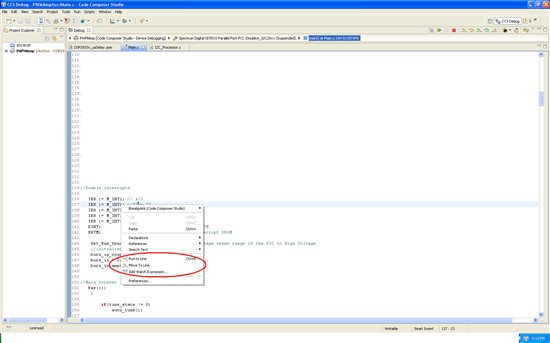
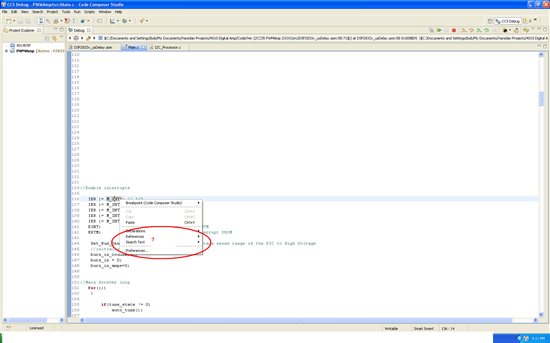
This is driving me crazy! When I'm debugging code connected to my target, sometimes when I right click on a line of code the menu item for "run to line" is present and some times it's not, FOR THE SAME LINE in the code!!  I find that if I can get it to appear, then run to a line, I then rt click on that line or another line and the choices are different. What is going on? Also, I've included screen shots of each case but they don't appear in the forum post. They do appear if I edit my post. It's ground hog day, not Friday the 13th! How can I get images to appear in the post?

  • I did find that Ctrl-R always works in the C source window and the "run to line" is visible when I rt click in the disassembly window, just not always in the C source window.

  • What browser are you using? Try a different browser.

    Are you clicking on the source line or the left margin in the editor? The menu item will only show up in the main editor area.

  • I have been using Firefox. I tried the internal and default browsers with no difference. I am clicking right on the command in the line of code.

  • Here's 2 screen shots. The top one is when it's working. Immediately after stopping from the run to line in the top trace, I right clicked and took the bottom picture. No menu item in that one, it's gone. WHY?????

  • One thing I notice when the "run to line" option is present in the context menu, is that the call stack item is highlighted in the debug window. (see the top of the screen shots from last post). If I manually highlight the current call stack item, then the choices appear.

    Update: I reset the perspective settings and now it seems the call stack is highlighted all the time and I always see the "run to line" choice.

    Can someone please tell me what option sets/determines this behavior?


  • It looks like a bug in the Breadcrumb view, after switching stackframe, you need to select it again for the run to line to show up. I have filed a CQ to track this issue: SDSCM00043063.

    Regards,
    Patrick

  • Yes that's it. Just as your reply came in, I found the same thing. If the Layout is set to Automatic or Tree, the context menu works correctly. If it's set to Breadcrumb the error occurs because the call stack item is no longer highlighted after a break.