This thread has been locked.

If you have a related question, please click the "Ask a related question" button in the top right corner. The newly created question will be automatically linked to this question.

AM2634: CCS 12.8 vs CCS 20.x for AM2634 MCU plus SDK Development

Part Number: AM2634
Other Parts Discussed in Thread: SYSCONFIG, AM2631, AM263P4

I am new to Texas Instruments microcontrollers and currently starting development with the Texas Instruments AM2634 MCU using the MCU+ SDK.

While setting up the development environment, I noticed that there are different versions of Code Composer Studio, such as CCS 12.8 (Eclipse-based) and the newer CCS 20.4.1 (Theia-based). The newer CCS v20 is based on a different IDE framework (Theia) and has a different workflow compared to the older Eclipse-based CCS versions.

Since I am just beginning with TI microcontrollers and have not used either version before, I would like some guidance from TI experts.

My questions are:

For a beginner starting with AM2634 and MCU plus SDK, which Code Composer Studio version is recommended to use?

Is it still acceptable to start development using CCS 12.8, or is it better to directly use CCS 20.x?

Are there any compatibility issues with MCU plus  SDK, SysConfig, or drivers if older CCS versions are used?

For applications involving Ethernet, SPI, and UART, does the choice of CCS version affect development or debugging?

Any recommendation on which CCS version is better to start with for new users would be very helpful.

While exploring the Code Composer Studio Resource Explorer and the Texas Instruments Training Academy, I noticed that each MCU plus SDK release seems to require a specific version of CCS, compiler, and SysConfig.

From the documentation, it appears that every SDK is validated with particular tool versions (CCS, compiler, SysConfig).

I would like to confirm if my understanding is correct.

If so, I have a few questions:

Is it recommended to use the exact CCS, compiler, and SysConfig versions specified for a given SDK?

If I start development using an older SDK with the corresponding older CCS version, is that still a good approach for learning and development?

Or is it better to start directly with the latest CCS and latest SDK versions for new projects?

I would appreciate guidance on which approach is generally preferred when starting development with Texas Instruments AM2634.


  • Hi,

    May I know the reason for selecting AM2634?

    Please start with - https://dev.ti.com/tirex/global?id=AM26X-ACADEMY and let me know your feedback

    For a beginner starting with AM2634 and MCU plus SDK, which Code Composer Studio version is recommended to use?

    Is it still acceptable to start development using CCS 12.8, or is it better to directly use CCS 20.x?

    I would suggest using the CCS 20.x, as these will be geeting new features and will be maintained by the TI. 

    Are there any compatibility issues with MCU plus  SDK, SysConfig, or drivers if older CCS versions are used?

    Yes, please refer to- software-dl.ti.com/.../RELEASE_NOTES_11_01_00_PAGE.html

  • For applications involving Ethernet, SPI, and UART, does the choice of CCS version affect development or debugging?

    Any recommendation on which CCS version is better to start with for new users would be very helpful.

    CCs 20.x would be recomended.

    While exploring the Code Composer Studio Resource Explorer and the Texas Instruments Training Academy, I noticed that each MCU plus SDK release seems to require a specific version of CCS, compiler, and SysConfig.

    From the documentation, it appears that every SDK is validated with particular tool versions (CCS, compiler, SysConfig).

    I would like to confirm if my understanding is correct.

    Yes this is correct

    If so, I have a few questions:

    Is it recommended to use the exact CCS, compiler, and SysConfig versions specified for a given SDK?

    Yes, to have seemless Out of box experience you should use the recomeded tools and compiler version.

  • If I start development using an older SDK with the corresponding older CCS version, is that still a good approach for learning and development?

    Or is it better to start directly with the latest CCS and latest SDK versions for new projects?

    I would appreciate guidance on which approach is generally preferred when starting development with Texas Instruments AM2634.

    recommendation would be to start with latest SDK, so you get previous bugs fixed and all the latest features and the tools are also updated with new features and bug fixes.

  • May I know the reason for selecting AM2634?

    yeah, it as SIL safety feature right!

    I would suggest using the CCS 20.x, as these will be geeting new features and will be maintained by the TI. 

    Creating a new project from scratch seems very difficult. I am able to use the existing examples provided in the MCU+SDK, but when I try to develop a project using only the MCU+SDK source driver APIs, I encounter many errors and issues.

    Is there any proper procedure to create a completely new project without using any existing example project, with only using TI driver Source APIs?

    I also tried creating a project using the "Empty Project" option, but even then I faced several issues.

    i am aware of this!

  • Yes, to have seemless Out of box experience you should use the recomeded tools and compiler version.

    sure

  • yeah, it as SIL safety feature right!

    You can look at https://www.ti.com/product/AM263P4  or https://www.ti.com/product/AM2612

    Creating a new project from scratch seems very difficult. I am able to use the existing examples provided in the MCU+SDK, but when I try to develop a project using only the MCU+SDK source driver APIs, I encounter many errors and issues.

    Can you share the errors you are facing?

    Also please look at this video if it helps with basic setup and getting started - www.youtube.com/watch

  • recommendation would be to start with latest SDK, so you get previous bugs fixed and all the latest features and the tools are also updated with new features and bug fixes.

    Thanks for your response.

    Can you please provide a base structure to create a new project from scratch using the TI MCU_SDK APIs?

    Just guide us to create a simple GPIO toggle project from scratch, without relying on example project.

    Your guidance will be very valuable to us!

    Thanks,
    Sai Kiran

  • Also please look at this video if it helps with basic setup and getting started - www.youtube.com/watch

    i already gone trough this, thats what i am planning to install CCS 12, that video is CCS 12

    what it means, AM2634 , is  not SIL level component, only AM2631, AM263p4?

  • Hi,

    Creating a project from scratch is not supported due to a higher level of dependency on OS, DPL, and other driver libs.

    Given that you are getting started, I will suggest starting by importing the project.

    If at all you want to do it, I will suggest understanding the sdk structure like- 

    1. There is arm r5f port, which is the startup code.

    2. Look at the makefile of different drivers, no-rtos and other sdk componenets you want to use.

  • All Am26x family SOCs are SIL qualified. I gave you a recommendation due to fact that AM263P4 and AM261x are variants with higher memory and XIP, you can choose based on cost and features you need.

    what it means, AM2634 , is  not SIL level component, only AM2631, AM263p4?
  • Is there any guide to using the SysConfig tool to generate code? I haven’t been able to find a complete guide on how to use it.

    Also, how can it be used inside Code Composer Studio (CCS)? After creating project or while creating  prorject, like first configure and just click it will create project ?

  • All Am26x family SOCs are SIL qualified. I gave you a recommendation due to fact that AM263P4 and AM261x are variants with higher memory and XIP, you can choose based on cost and features you need.

    understood!

  • Creating a project from scratch is not supported due to a higher level of dependency on OS, DPL, and other driver libs.

    okay , my application uses lot of peripherals, if importing is of separate peripherals example code and integrating them into one is very complex than creating project as new, am i correct?

  • Is there any guide to using the SysConfig tool to generate code? I haven’t been able to find a complete guide on how to use it.

    There isnt an official guide for the sysconfig tool.

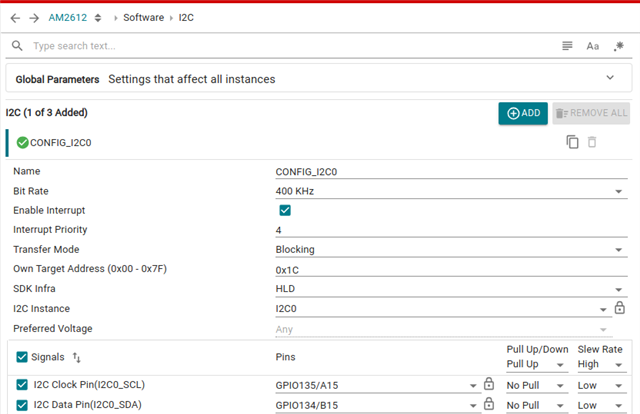
    1. You can navigate through peripherals on the left pane.

    2. In the center console, you configure a particular peripheral

    3. You can see all the problems, resource conflicts, misconfigs, warnings here:

    4. All sysconfig auto-generated code for peripherals init, clocking, pinmux and configuration is auto-matically generated and compiled and linked to your project. The list of file is here. You can use the radio-button to switch off the auto-generation of these files. You can also have a real-time diff of the changes happening in the file, when you change anything in the GUI, just click on the file name and see a git style diff.

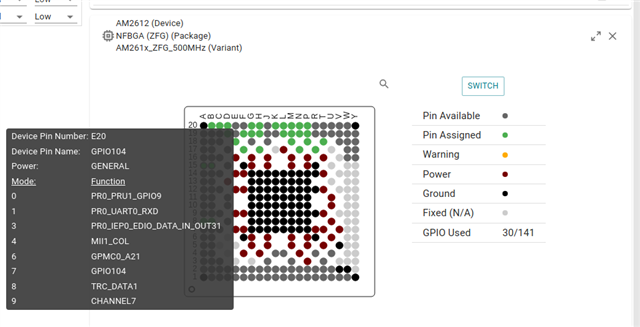
    5. You also have a pin usage diagram showing all the pins currently in use, hover over them to see what mux mode they are configured in

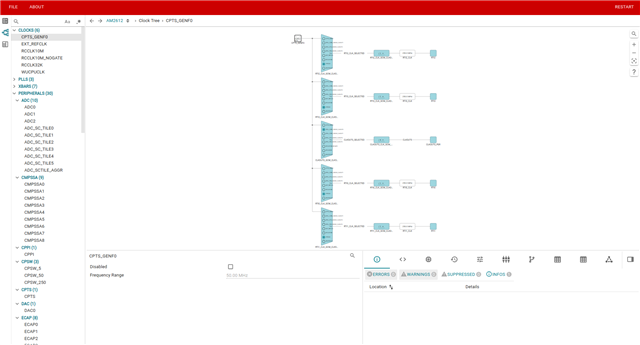
    6. Latest version of syscfg and SDK also support ClockTree to configure peripheral clocks in an interactive way:

    7. On the top-right, you have additional features like generating MPU, clock, memory summary:

    Regards,
    Shaunak

  • okay , my application uses lot of peripherals, if importing is of separate peripherals example code and integrating them into one is very complex than creating project as new, am i correct?

    Yes, recommended approach would be to start from example of the most complex peripheral, for e.g. Ethernet or flash or other complicated peripheral, and then refer other peripheral examples and add changes to the sysconfig.

    If using multi-core projects, start with multi-core IPC project.

    Regards,
    Shaunak

  • Hi Shaunak,

    Thank you for the answers and solutions you provided on this topic.

    Regards,
    Sai Kiran