


Part Number: F29H859TU-Q1
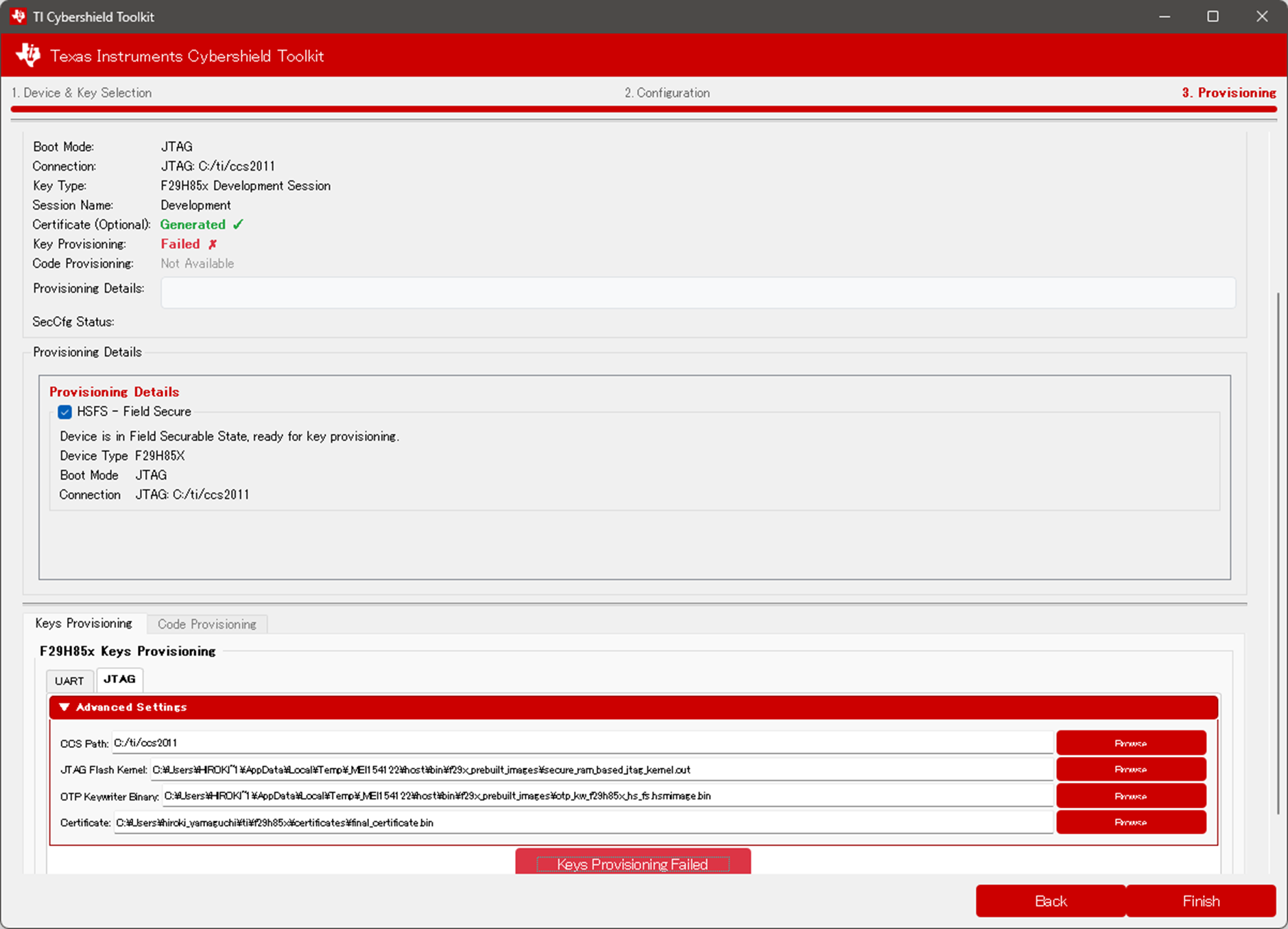
The “F29H85x Keys Provisioning” process fails.
What do you think could be the cause?
We have attached screenshots of the tool and the log files.
Also, is there a user guide or documentation for the Cybershield Kit Tool?
■Screen capture
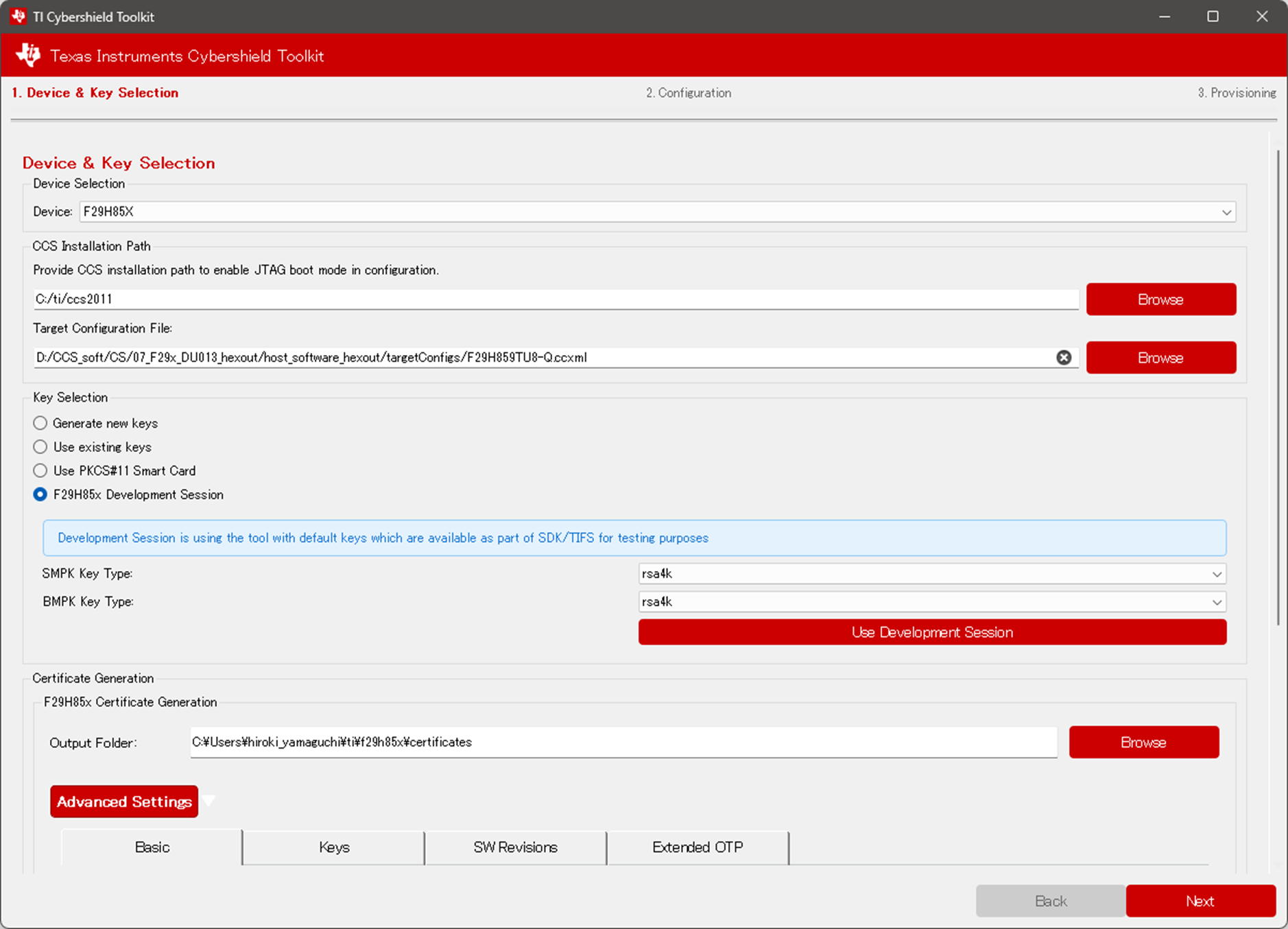
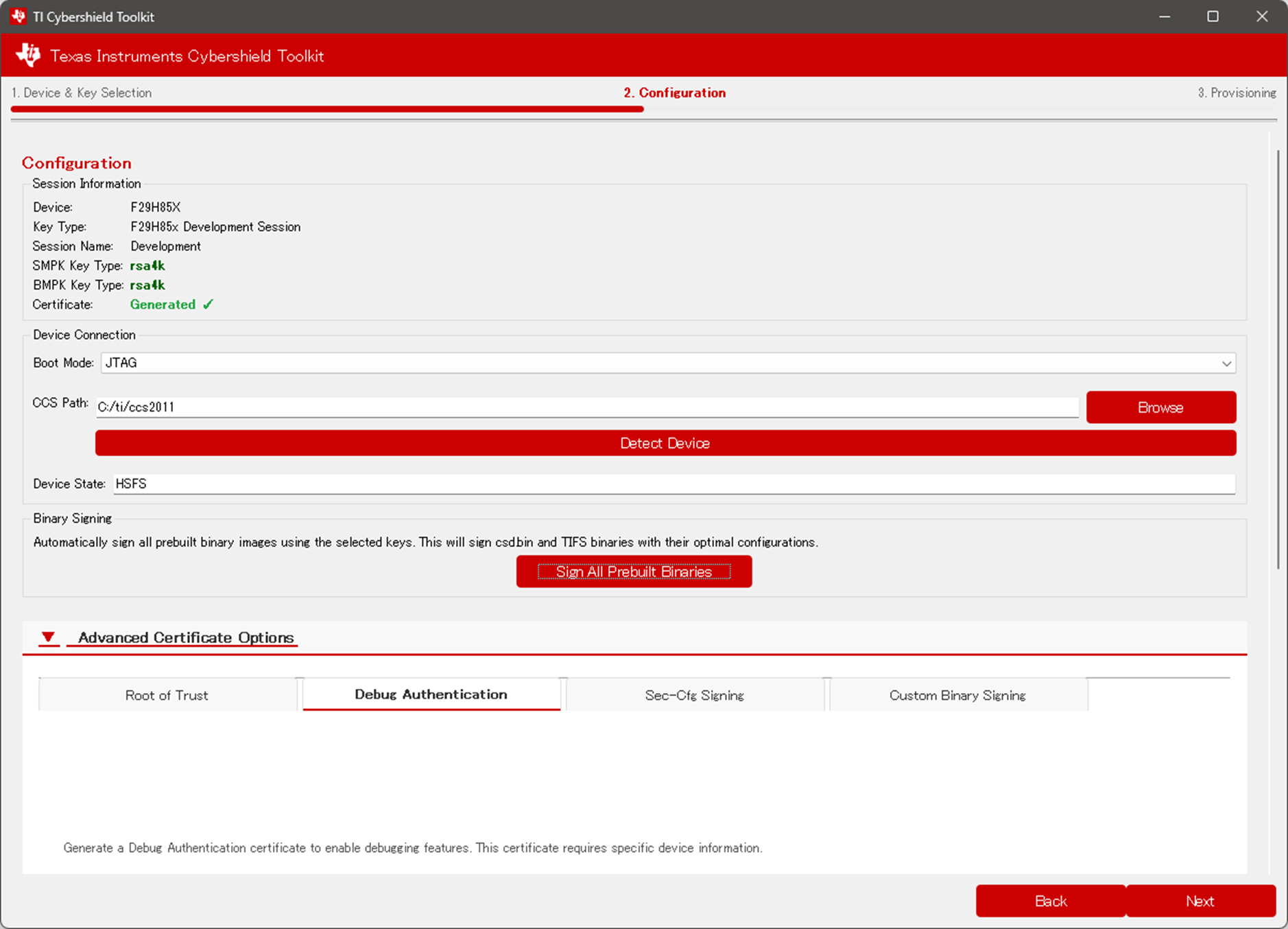
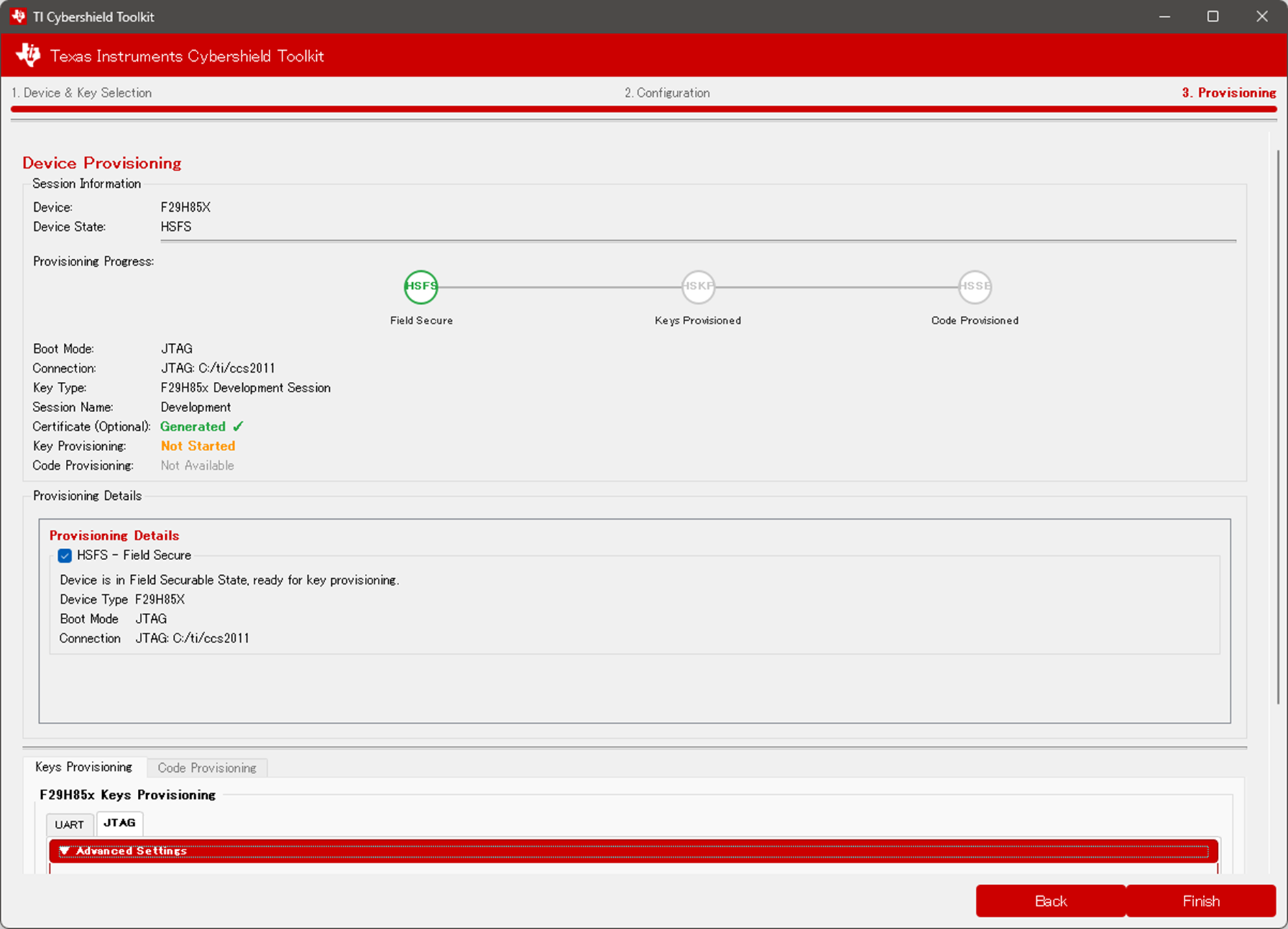
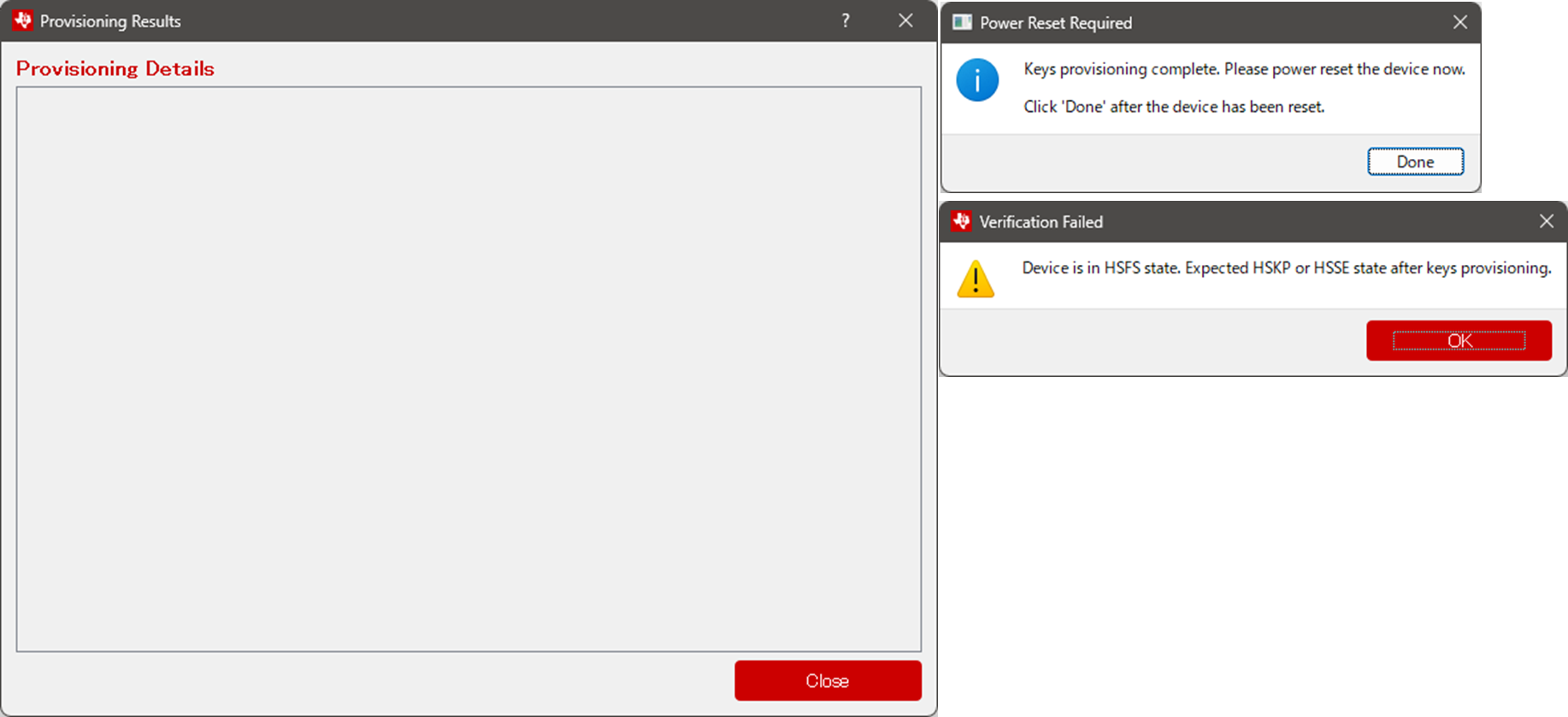
■Log
Starting TI Cybershield Toolkit Wizard...
Device changed to: F29H85X
Setting up F29 development session with data: {'smpk_algo': 'rsa4k', 'bmpk_algo': 'rsa4k', 'type': 'f29_development'}
Generate F29 certificate: {'device': 'f29h85x', 'msv': '0x1E22D', 'flags': ['msv_protect', 's_protect', 'smek_protect', 'b_protect', 'bmek_protect', 'keycnt_protect', 'smpk', 'smek', 'bmpk', 'bmek'], 'output_dir_path': 'C:\\Users\\hiroki_yamaguchi\\ti\\f29h85x\\certificates', 'pub_key_path': 'C:/ti/otp_keywriter_f29h85x_SR_10_1_01_00/sbl_keywriter/scripts/cert_gen/common/tifek/f29h85x/SR_10/ti_fek_public.pem', 'dev_sr_ver': 'SR_10', 'keycnt': '2', 'keyrev': '1', 'sr_sbl': '1', 'sr_hsmRT': '1', 'sr_app': '1', 'sr_ssu': '1', 'ext_otp': '0x80000001', 'ext_otp_indx': '0', 'ext_otp_size': '32', 'smpk_signing_algorithm': 'rsa4k', 'bmpk_signing_algorithm': 'rsa4k'}
Generating certificate with data: {'device': 'f29h85x', 'msv': '0x1E22D', 'flags': ['msv_protect', 's_protect', 'smek_protect', 'b_protect', 'bmek_protect', 'keycnt_protect', 'smpk', 'smek', 'bmpk', 'bmek'], 'output_dir_path': 'C:\\Users\\hiroki_yamaguchi\\ti\\f29h85x\\certificates', 'pub_key_path': 'C:/ti/otp_keywriter_f29h85x_SR_10_1_01_00/sbl_keywriter/scripts/cert_gen/common/tifek/f29h85x/SR_10/ti_fek_public.pem', 'dev_sr_ver': 'SR_10', 'keycnt': '2', 'keyrev': '1', 'sr_sbl': '1', 'sr_hsmRT': '1', 'sr_app': '1', 'sr_ssu': '1', 'ext_otp': '0x80000001', 'ext_otp_indx': '0', 'ext_otp_size': '32', 'smpk_signing_algorithm': 'rsa4k', 'bmpk_signing_algorithm': 'rsa4k'}
Using development session mode
DEBUG: F29 certificate generation command: script_name --device f29h85x --smpk_signing_algorithm rsa4k --bmpk_signing_algorithm rsa4k gencert -t C:/ti/otp_keywriter_f29h85x_SR_10_1_01_00/sbl_keywriter/scripts/cert_gen/common/tifek/f29h85x/SR_10/ti_fek_public.pem --msv 0x1E22D --msv_protect --bmpk --bmek --b_protect --bmek_protect --smpk --smek --s_protect --smek_protect --sr_sbl 1 --sr_hsmRT 1 --sr_app 1 --sr_ssu 1 --keycnt 2 --keycnt_protect --keyrev 1 -d f29h85x --devSrVer SR_10 --ext_otp 0x80000001 --ext_otp_indx 0 --ext_otp_size 32
DEBUG: Calling f29_main()
-----------------------------------------------
F29H85x CyberShiled Toolkit CLI
-----------------------------------------------
deleting the session Development
Creating Development Session
Saving Development session...
opening session: Development
# Using SWREV_SEC_APP: 0xb'\x00\x00\x00\x01'
# Using SWREV_SSU: 0xb'\x00\x00\x00\x01'
# Using SWREV_SBL: 0xb'\x00\x00\x00\x01'
# Using SWREV_HSMRT: 0xb'\x00\x00\x00\x01'
# Using MSV[6:0]: 0x123437
# Using Key Count: 0x$3
# Using Key Rev: 0x1
Generating Dual signed certificate!!
# encrypt aes256 key with tifek public part
# encrypt SMPK-priv signed aes256 key(hash) with tifek public part
# encrypt smpk-pub hash using aes256 key
# encrypt smek (sym key) using aes256 key
# encrypt ext_otp using aes256 key
# encrypt BMPK-priv signed aes256 key(hash) with tifek public part
# encrypt bmpk-pub hash using aes256 key
# encrypt bmek (sym key) using aes256 key
primary cert: signing with SigningAlgorithm.PKCS1_V15
secondary cert: signing with SigningAlgorithm.PKCS1_V15
writing certificates into C:\Users\hiroki_yamaguchi\ti\f29h85x\certificates
Certificate generated successfully
DEBUG: F29 certificate generation completed successfully
C:\Users\HIROKI~1\AppData\Local\Temp\_MEI154122\host\src\apps\tifs\kp_cp_f29h85x
C:\Users\HIROKI~1\AppData\Local\Temp\_MEI154122\host\src\apps\tifs\kp_cp_f29h85x\F29h85x-hsse.ccxml
Target configuration file copied to: C:\Users\HIROKI~1\AppData\Local\Temp\_MEI154122\host\src\apps\tifs\kp_cp_f29h85x\F29h85x-hsse.ccxml
Target configuration file applied: C:\Users\HIROKI~1\AppData\Local\Temp\_MEI154122\host\src\apps\tifs\kp_cp_f29h85x\F29h85x-hsse.ccxml
DEBUG: Signing specific F29H85x binaries: ['ram_based_uart_sbl.bin', 'tifs_f29h85x_hs_se_code_provisioning.release.bin']
DEBUG: F29H85x specific binary signing requested
DEBUG: Using session: Development
DEBUG: Development session with SMPK: rsa4k, BMPK: rsa4k
DEBUG: Using prebuilt images directory: C:\Users\HIROKI~1\AppData\Local\Temp\_MEI154122\host\bin\f29x_prebuilt_images
Signing ram_based_uart_sbl.bin...
DEBUG: Signing binary ram_based_uart_sbl.bin with parameters:
- Core: C29
- Boot: RAM
- KeyRev: 1
- LoadAddr: 0x200E1000
- SwRv: 1
- CCS Path: C:/ti/ccs2011
opening session: Development
primary cert: signing with SigningAlgorithm.PKCS1_V15
writing signed images into C:\Users\hiroki_yamaguchi\ti\f29h85x\signedImages
Signing tifs_f29h85x_hs_se_code_provisioning.release.bin...
DEBUG: Signing binary tifs_f29h85x_hs_se_code_provisioning.release.bin with parameters:
- Core: HSM
- Boot: RAM
- KeyRev: 1
- LoadAddr: 0x00000000
- SwRv: 1
- Debug: DBG_SOC_DEFAULT
- CCS Path: C:/ti/ccs2011
opening session: Development
primary cert: signing with SigningAlgorithm.PKCS1_V15
writing signed images into C:\Users\hiroki_yamaguchi\ti\f29h85x\signedImages
Target configuration file copied to: C:\Users\HIROKI~1\AppData\Local\Temp\_MEI154122\host\src\apps\tifs\kp_cp_f29h85x\F29h85x-hsse.ccxml
Detecting device with boot mode: JTAG, connection info: {'type': 'jtag', 'ccs_path': 'C:/ti/ccs2011'}
Error during JTAG detection: 'F29H85xDeviceModel' object has no attribute 'run_command'
2026-03-30 16:59:02,530 - apps.tifs.kp_cp_f29h85x.jtag_provisioning - INFO - Running Get Device Type command: C:/ti/ccs2011\ccs\scripting\run.bat C:\Users\HIROKI~1\AppData\Local\Temp\_MEI154122\apps\tifs\kp_cp_f29h85x\read_lifecycle.js
2026-03-30 16:59:02,533 - apps.tifs.kp_cp_f29h85x.jtag_provisioning - INFO - Using CCXML path: C:\Users\HIROKI~1\AppData\Local\Temp\_MEI154122\host\src\apps\tifs\kp_cp_f29h85x\F29h85x-hsse.ccxml
2026-03-30 16:59:11,121 - apps.tifs.kp_cp_f29h85x.jtag_provisioning - INFO - Command output:
Device is in HS_FS state
Device is in HS_FS state
2026-03-30 16:59:11,122 - apps.tifs.kp_cp_f29h85x.jtag_provisioning - INFO - Get Device Type completed successfully
DEBUG: Signing binary tifs_f29h85x_hs_se.release.bin with parameters:
- Core: HSM
- Boot: FLASH
- KeyRev: 1
- LoadAddr: 0x00000000
- SwRv: 1
- Debug: DBG_SOC_DEFAULT
- CCS Path: C:/ti/ccs2011
opening session: Development
primary cert: signing with SigningAlgorithm.PKCS1_V15
writing signed images into C:\Users\hiroki_yamaguchi\ti\f29h85x\signedImages
DEBUG: Signing binary csd.bin with parameters:
- Core: C29
- Boot: FLASH
- KeyRev: 1
- LoadAddr: 0x10001000
- SwRv: 1
- CCS Path: C:/ti/ccs2011
opening session: Development
primary cert: signing with SigningAlgorithm.PKCS1_V15
writing signed images into C:\Users\hiroki_yamaguchi\ti\f29h85x\signedImages
DEBUG: Signing Sec-Cfg default_seccfg_bankmode_0_ssumode1.out with parameters:
- KeyRev: 1
- SwRv: 1
- Boot: FLASH
- CCS Path: C:/ti/ccs2011
Using CCS path: C:\ti\ccs2011
Created temporary directory: C:\Users\HIROKI~1\AppData\Local\Temp\tmpqa4qjj71
Processing on Windows platform - CCS path: C:/ti/ccs2011
Found c29objcopy tool at: C:\ti\ccs2011\ccs\tools\compiler\ti-cgt-c29_2.0.0.STS\bin\c29objcopy.exe
Preparing commands for extracting CPU configurations...
Extracting CPU1 configuration...
Executing: Extracting CPU1 configuration
Command: "C:\ti\ccs2011\ccs\tools\compiler\ti-cgt-c29_2.0.0.STS\bin\c29objcopy.exe" -O binary --only-section=.TI.bound:CPU1_Cfg "C:\Users\HIROKI~1\AppData\Local\Temp\_MEI154122\host\bin\f29x_prebuilt_images\default_seccfg_bankmode_0_ssumode1.out" "C:\Users\HIROKI~1\AppData\Local\Temp\tmpqa4qjj71\seccfgCpu1.bin"
SUCCESS: Extracting CPU1 configuration completed successfully
Extracting CPU2 configuration...
Executing: Extracting CPU2 configuration
Command: "C:\ti\ccs2011\ccs\tools\compiler\ti-cgt-c29_2.0.0.STS\bin\c29objcopy.exe" -O binary --only-section=.TI.bound:CPU2_Cfg "C:\Users\HIROKI~1\AppData\Local\Temp\_MEI154122\host\bin\f29x_prebuilt_images\default_seccfg_bankmode_0_ssumode1.out" "C:\Users\HIROKI~1\AppData\Local\Temp\tmpqa4qjj71\seccfgCpu2.bin"
SUCCESS: Extracting CPU2 configuration completed successfully
Extracting CPU3 configuration...
Executing: Extracting CPU3 configuration
Command: "C:\ti\ccs2011\ccs\tools\compiler\ti-cgt-c29_2.0.0.STS\bin\c29objcopy.exe" -O binary --only-section=.TI.bound:CPU3_Cfg "C:\Users\HIROKI~1\AppData\Local\Temp\_MEI154122\host\bin\f29x_prebuilt_images\default_seccfg_bankmode_0_ssumode1.out" "C:\Users\HIROKI~1\AppData\Local\Temp\tmpqa4qjj71\seccfgCpu3.bin"
SUCCESS: Extracting CPU3 configuration completed successfully
Checking for CPU configuration files in C:\Users\HIROKI~1\AppData\Local\Temp\tmpqa4qjj71
Found CPU1 configuration file: C:\Users\HIROKI~1\AppData\Local\Temp\tmpqa4qjj71\seccfgCpu1.bin (size: 2048 bytes)
Found CPU2 configuration file: C:\Users\HIROKI~1\AppData\Local\Temp\tmpqa4qjj71\seccfgCpu2.bin (size: 2048 bytes)
Found CPU3 configuration file: C:\Users\HIROKI~1\AppData\Local\Temp\tmpqa4qjj71\seccfgCpu3.bin (size: 2048 bytes)
Truncating CPU2 configuration file: C:\Users\HIROKI~1\AppData\Local\Temp\tmpqa4qjj71\seccfgCpu2.bin
Successfully truncated seccfgCpu2.bin from 2048 to 2032 bytes
CPU configuration file preparation completed successfully
opening session: Development
primary cert: signing with SigningAlgorithm.PKCS1_V15
writing certificates into C:\Users\hiroki_yamaguchi\ti\f29h85x\signedImages
Creating output directory: C:\Users\hiroki_yamaguchi\ti\f29h85x\signedImages
Successfully created or verified output directory: C:\Users\hiroki_yamaguchi\ti\f29h85x\signedImages
opening session: Development
primary cert: signing with SigningAlgorithm.PKCS1_V15
opening session: Development
primary cert: signing with SigningAlgorithm.PKCS1_V15
Creating combined output file: C:\Users\hiroki_yamaguchi\ti\f29h85x\signedImages\seccfg.bin
Successfully wrote combined SecCfg to: C:\Users\hiroki_yamaguchi\ti\f29h85x\signedImages\seccfg.bin
Using signed UART kernel: C:\Users\hiroki_yamaguchi\ti\f29h85x\signedImages\ram_based_uart_sbl.cert.bin
Using signed HSM CP image: C:\Users\hiroki_yamaguchi\ti\f29h85x\signedImages\tifs_f29h85x_hs_se_code_provisioning.release.hs.hsmimage
Using signed JTAG HSM CP image: C:\Users\hiroki_yamaguchi\ti\f29h85x\signedImages\tifs_f29h85x_hs_se_code_provisioning.release.hs.hsmimage
2026-03-30 17:00:34,690 - apps.tifs.kp_cp_f29h85x.jtag_provisioning - INFO - Running key provisioning with command: C:/ti/ccs2011\ccs\scripting\run.bat C:\Users\HIROKI~1\AppData\Local\Temp\_MEI154122\apps\tifs\kp_cp_f29h85x\run_keyprov_flow.js --otp-kw-bin C:\Users\HIROKI~1\AppData\Local\Temp\_MEI154122\host\bin\f29x_prebuilt_images\otp_kw_f29h85x_hs_fs.hsmimage.bin --certificate C:\Users\hiroki_yamaguchi\ti\f29h85x\certificates\final_certificate.bin --jtag-kernel C:\Users\HIROKI~1\AppData\Local\Temp\_MEI154122\host\bin\f29x_prebuilt_images\secure_ram_based_jtag_kernel.out
2026-03-30 17:00:44,689 - apps.tifs.kp_cp_f29h85x.jtag_provisioning - INFO - Command output:
Loading OTP KW binary from: C:\Users\HIROKI~1\AppData\Local\Temp\_MEI154122\host\bin\f29x_prebuilt_images\otp_kw_f29h85x_hs_fs.hsmimage.bin
Loading certificate from: C:\Users\hiroki_yamaguchi\ti\f29h85x\certificates\final_certificate.bin
Loading JTAG flash kernel from: C:\Users\HIROKI~1\AppData\Local\Temp\_MEI154122\host\bin\f29x_prebuilt_images\secure_ram_based_jtag_kernel.out
Expecting target to not halt for 10 seconds
Log file contents:
2026-03-30 17:00:44,689 - apps.tifs.kp_cp_f29h85x.jtag_provisioning - WARNING - Command errors:
Failure: Halted unexpectedly after removing both breakpoints.
2026-03-30 17:00:44,690 - apps.tifs.kp_cp_f29h85x.jtag_provisioning - INFO - Key provisioning completed successfully
2026-03-30 17:00:44,693 - apps.qtgui.utils.log_parser - WARNING - Could not find repository base, using current directory
2026-03-30 17:01:14,522 - apps.tifs.kp_cp_f29h85x.jtag_provisioning - INFO - Running Get Device Type command: C:/ti/ccs2011\ccs\scripting\run.bat C:\Users\HIROKI~1\AppData\Local\Temp\_MEI154122\apps\tifs\kp_cp_f29h85x\read_lifecycle.js
2026-03-30 17:01:17,524 - apps.tifs.kp_cp_f29h85x.jtag_provisioning - INFO - Command output:
Device is in HS_FS state
Device is in HS_FS state
2026-03-30 17:01:17,524 - apps.tifs.kp_cp_f29h85x.jtag_provisioning - INFO - Get Device Type completed successfully
