This thread has been locked.

If you have a related question, please click the "Ask a related question" button in the top right corner. The newly created question will be automatically linked to this question.

MSPM0G3519: CCS 20.5 compiling and linking paths broken despite being shown correctly in "explorer"

Part Number: MSPM0G3519
Other Parts Discussed in Thread: MSPM0G3507, SYSCONFIG

We recently migrated from MSPM0G3507 to G3519 and can not rebuild project in entirety. 

The Include paths for compile (and linker) are not found despite being configured in project/properties, and the "reportedly missing" file still visible in the left explorer window.

image.png

**Note: some header files should not even be referenced, but ccs is still attempting to load.
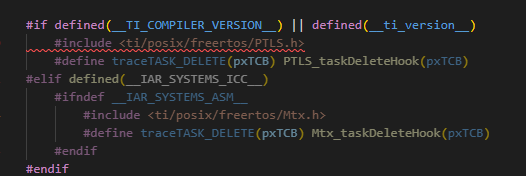
image.png


I am still looking for extraneous characters that may be in some header file, but the engineering VP has added some pressure that it may be something internal to CCS or related metadata

  • Also note that we did a concurrent update from CCS 2030 to 2050 and the SDK from mspm0_sdk_2_05_01_00 to mspm0_sdk_2_10_00_04

  • It is likely the device change and/or SDK version change. It looks like an issue with include search paths. I will bring this thread to the attention of the device/SDK experts for further assistance.

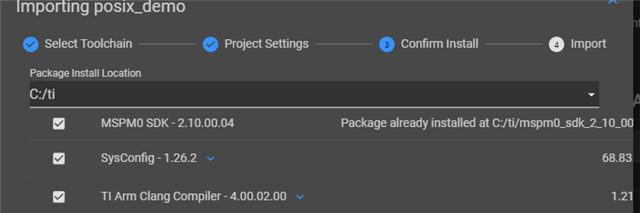
  • Retracing my steps and recreating "shell project".... It is probably a complication that importing a demo forces roll back and reference to older tools.   I can't unselect the Sysconfog and compiler installs or select newer versions already present

    (I did a total remove and re-install of all the most recent to avoid version conflicts)

  • Some of the file location path and name are changed in the latest SDK compared with the old ones. If you want to use the latest CCS and SDK, recommend to import an empty project and copy the source files and header files into the empty project. And modify the file path as needed when some error happen.

  • I did this test of building off a new project, and the relevant MSPM03519 SDK projects appear to all reinstall and enforce compiler 4.00.02 despite the more recent CCS/SDK/Compiler being already installed.

  • Can you share the project here? 

  • I cannot share the entire project, we migrated from the G3507 because we consumed most resources, so code is proprietary and extremely large.

    However, the above screenshot is a sufficient starting point.  It is the posix demo project.

    With ONLY the following installed, 

    MSPM0SDK 2.10.004

    CCS 2050 / compiler ti-cgt-armllvm_4.0.4.LTS

    syscomfig 1.27.0

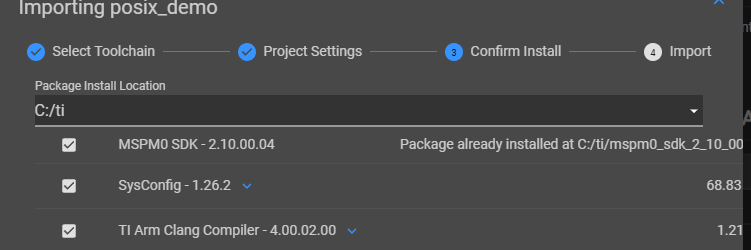
    ... this staring project is FORCING THE ROLLBACK.  It wants to install retro compiler 4.00.02. and 1.26.2.  All previous versions were un-installed because it was suggested there was a conflict between libraries being referenced in the multiproject build.

  • The Include paths for compile (and linker) are not found despite being configured in project/properties, and the "reportedly missing" file still visible in the left explorer window.

    This error is weird, for MSPM0SDK 2.10.004 do have the file msp.h at the same path with mspm0_sdk_2_05_01_00

    Could you double check your SDK install folder also about it?

    I cannot share the entire project, we migrated from the G3507 because we consumed most resources, so code is proprietary and extremely large.

    Not a full project, just a simple project can reproduce this issue is enough.

  • yes, that file exists there.  

    Ive advanced trouble shooting beyond the original reported error (one of many).   

    I found compiler incompatibility and removed ALL previous versions of CCS,SDK and Sysconfig .  The result is INABILITY to START A NEWTI/Posix program at the correct compiler version.  Repeat: CCS is FORCING a re-install of the older compiler (4.00.02) and libraries.   I suspect that if I can get this subpart of our project loaded without referencing the old compiler, problem solved.

    Why is the the compiler version hardcoded in the sample project?

    Work-around... Uninstall all TI tools, and use the old SDK/CCS and compiler that correspond to the sample project expectation.  Not viable across the department 

  • Why is the the compiler version hardcoded in the sample project?

    Sorry what's your mean here? 

    For the CCS project, when you import it into CCS, it will include the project settings that include what compiler is used that may different with the CCS currently installed, but you can change it directly I think that use what current CCS installed, 

  • I WAS NOT able to change the compiler version directly.  The checkbox in CCS is disabled. This project appears not to be backward compatible and is forcing 4.00.02.   On a previous build, with both 4.00.02 and 4.00.04 loaded- something in this configuration or code was still trying to hook the old compiler. 

  • Could you capture the setting of your project's properties like below?