TMDSCNCD28388D: Opening an example .syscfg file does not work

Part Number: TMDSCNCD28388D
Other Parts Discussed in Thread: SYSCONFIG, , C2000WARE

I have installed the new Code Composer Studio 21.0.0.1035 on both Windows 10 and macOS. In both cases, I encounter the following error when trying to open a .syscfg file from an example project:

Would you like to re-try in compatibility mode?

Error: Exception occurred calling scripting.addModule()

    at Object.addModule (localhost:49853/.../scriptingGuard.ts:52:10)
    at scriptFunc (/Users/philippglaubitz/workspace_ccstheia/led_ex1_blinky_2/led_ex1_blinky.syscfg:12:34)
    at cb (localhost:49853/.../runScript.ts:127:13)
    at t.withDeprecatedAccessAsync (localhost:49853/.../deprecatedAccessGuard.ts:24:16)
    at t.runAsUserScriptAsync (localhost:49853/.../scriptingGuard.ts:93:41)
    at runScripts (localhost:49853/.../runScript.ts:125:31)
    at t.createFromScripts (localhost:49853/.../runScript.ts:87:8)
    at c (localhost:49853/.../invalidAssignment.ts:39:12)
    at Z.createSysConfig (localhost:49853/.../LoadConfigPage.tsx:495:22)
    at Z.createConfigStore (localhost:49853/.../LoadConfigPage.tsx:399:21)
Caused by: Error: No such resource: /driverlib/device_driverlib_peripherals/common/sysctl_common.js
Paths searched: 
/Users/philippglaubitz/ti/C2000Ware_26_01_00_00/driverlib/device_driverlib_peripherals/common/.meta/sysctl_common.js
/Users/philippglaubitz/ti/C2000Ware_26_01_00_00/driverlib/device_driverlib_peripherals/.meta/common/sysctl_common.js
/Users/philippglaubitz/ti/C2000Ware_26_01_00_00/driverlib/.meta/device_driverlib_peripherals/common/sysctl_common.js
/Users/philippglaubitz/ti/C2000Ware_26_01_00_00/.meta/driverlib/device_driverlib_peripherals/common/sysctl_common.js
/Users/philippglaubitz/ti/C2000Ware_26_01_00_00/driverlib/device_driverlib_peripherals/common/sysctl_common.js
/Users/philippglaubitz/workspace_ccstheia/led_ex1_blinky_2/driverlib/device_driverlib_peripherals/common/.meta/sysctl_common.js
/Users/philippglaubitz/workspace_ccstheia/led_ex1_blinky_2/driverlib/device_driverlib_peripherals/.meta/common/sysctl_common.js
/Users/philippglaubitz/workspace_ccstheia/led_ex1_blinky_2/driverlib/.meta/device_driverlib_peripherals/common/sysctl_common.js
/Users/philippglaubitz/workspace_ccstheia/led_ex1_blinky_2/.meta/driverlib/device_driverlib_peripherals/common/sysctl_common.js
/Users/philippglaubitz/workspace_ccstheia/led_ex1_blinky_2/driverlib/device_driverlib_peripherals/common/sysctl_common.js:
while processing modules() of /driverlib/device_support.js$static:
    at t.ResourceLoader.findPathAndLoader (localhost:49853/.../resourceLoader.ts:311:11)
    at t.ResourceLoader.loadResource (localhost:49853/.../resourceLoader.ts:253:43)
    at t.ResourceLoader.getResource (localhost:49853/.../resourceLoader.ts:363:15)
    at Object.freeze.getScript (localhost:49853/.../runtimeContext.ts:1373:25)
    at loaderFunc (/Users/philippglaubitz/ti/C2000Ware_26_01_00_00/driverlib/.meta/sysctl.js:12:28)
    at func (localhost:49853/.../resourceLoader.ts:261:45)
    at t.internalBoundary (localhost:49853/.../niceExceptions.ts:64:10)
    at t.ResourceLoader.loadResource (localhost:49853/.../resourceLoader.ts:261:38)
    at t.ResourceLoader.getResource (localhost:49853/.../resourceLoader.ts:363:15)
    at W.loadModule (localhost:49853/.../runtimeContext.ts:592:27)

I would appreciate your prompt assistance. Thank you very much.

  • When I open the .syscfg file, I get the following prompt:

    “SysConfig has been updated to use standard TI part numbers. The board /boards/TMDSCNCD28388D was defined using a non-standard device name. Please select the specific device it should use below or update to a newer SDK:”

    I then select my device, but afterwards the error mentioned above appears. I have already tried several things, but none of them have resolved the issue.

  • Hi Philipp,

    Can you open the .syscfg file in a text editor and paste it here? The error says there is an issue with line 34.

    Also which verison of c2000ware are you using?

    Can you navigate to C2000Ware_version_\driverlib\.meta\device_driverlib_peripherals

    Do you see a "common" folder there?

    If its not there then it is possible that a folder called /c2000 has been created in /ti folder and that's where your correct c2000ware is. You might have multiple versions of c2000ware on your system and your project is likely picking up the wrong one (the one in /ti as opposed to the one in /ti/c2000/ )

    Can you confirm this?

    Thanks,

    Ira

  • Hi Ira, thanks for the quick reply.

    /**
     * These arguments were used when this file was generated. They will be automatically applied on subsequent loads
     * via the GUI or CLI. Run CLI with '--help' for additional information on how to override these arguments.
     * @cliArgs --board "/boards/TMDSCNCD28388D" --device "F2838x" --package "337bga" --part "F2838x_337bga" --context "CPU1" --product "C2000WARE@5.02.00.00"
     * @versions {"tool":"1.0.0+dev"}
     */
    /**
     * Import the modules used in this configuration.
     */
    const led            = scripting.addModule("/driverlib/board_components/led", {}, false);
    const led1           = led.addInstance();
    const device_support = scripting.addModule("/driverlib/device_support.js");
    const sysctl         = scripting.addModule("/driverlib/sysctl.js");
    const CMD            = scripting.addModule("/utilities/cmd_tool/cmd_syscfg/source/CMD");
    const CMD1           = CMD.addInstance();
    const CMD2           = CMD.addInstance();
    /**
     * Write custom configuration values to the imported modules.
     */
    CMD1.$name                    = "generic_ram_lnk";
    CMD2.$name                    = "generic_flash_lnk";
    
    CMD1.sectionMemory_text       = ["RAMLS0","RAMLS1","RAMLS2","RAMLS3","RAMLS4"];
    CMD1.sectionMemory_ramfunc    = ["RAMM0"];
    CMD1.sectionMemory_cinit      = ["RAMM0"];
    CMD1.sectionMemory_stack      = ["RAMM1"];
    CMD1.sectionMemory_init_array = ["RAMM0"];
    CMD1.sectionMemory_bss        = ["RAMLS5"];
    CMD1.sectionMemory_const      = ["RAMLS5"];
    CMD1.sectionMemory_data       = ["RAMGS0", "RAMGS1"];
    CMD1.sectionMemory_switch     = ["RAMM0"];
    CMD1.sectionMemory_sysmem     = ["RAMLS5"];
    
    CMD2.sectionAlignEnable_ramfunc    = true;
    CMD2.sectionAlignEnable_text       = true;
    CMD2.sectionAlignEnable_binit      = true;
    CMD2.sectionAlignEnable_cinit      = true;
    CMD2.sectionAlignEnable_switch     = true;
    CMD2.sectionAlignEnable_init_array = true;
    CMD2.sectionAlignEnable_const      = true;
    CMD2.sectionAlignEnable_ovly       = true;
    CMD2.sectionMemory_codestart       = "0x080000";
    CMD2.sectionMemory_stack           = ["RAMM1"];
    CMD2.sectionMemory_bss             = ["RAMLS5"];
    CMD2.sectionMemory_data            = ["RAMLS6", "RAMLS7"];
    CMD2.sectionMemory_sysmem          = ["RAMLS5"];
    CMD2.sectionMemory_ramfunc         = ["FLASH3"];
    CMD2.sectionMemory_text            = ["FLASH1","FLASH2","FLASH3","FLASH4"];
    CMD2.sectionMemory_binit           = ["FLASH4"];
    CMD2.sectionMemory_cinit           = ["FLASH4"];
    CMD2.sectionMemory_switch          = ["FLASH1"];
    CMD2.sectionMemory_init_array      = ["FLASH1"];
    CMD2.sectionMemory_const           = ["FLASH5"];
    CMD2.sectionMemory_ovly            = ["FLASH6"];
    CMD2.sectionRunFromDifferentAddr_ramfunc = true;
    CMD2.sectionRun_ramfunc                  = ["RAMLS0"];
    CMD2.sectionBinit_ramfunc                = false;
    
    led1.$name                = "myBoardLED0";
    led1.$hardware            = system.deviceData.board.components.D1;
    led1.gpio.gpioPin.$assign = "hsecDigital.82";

    The .syscfg file is from the Blinky example.

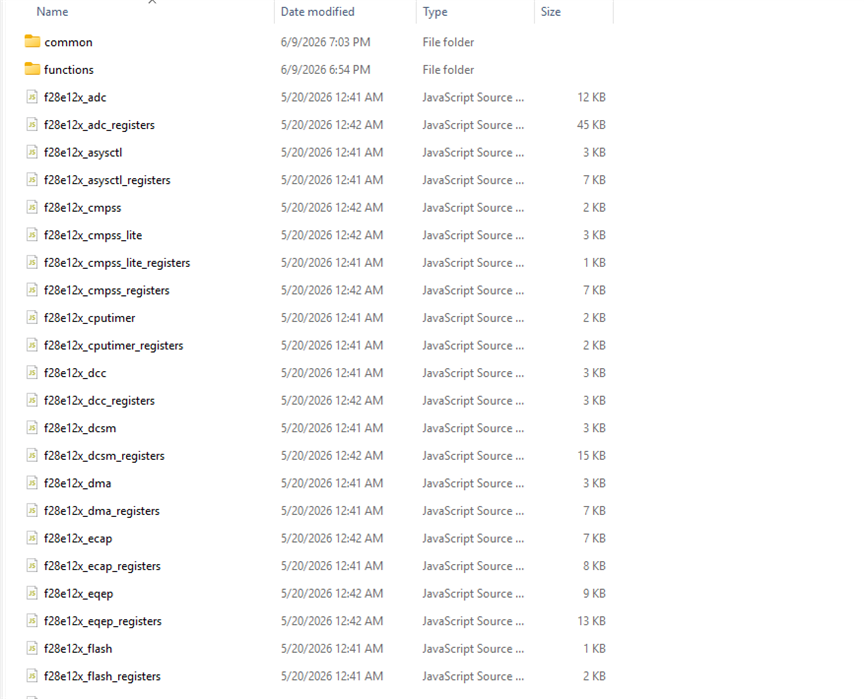
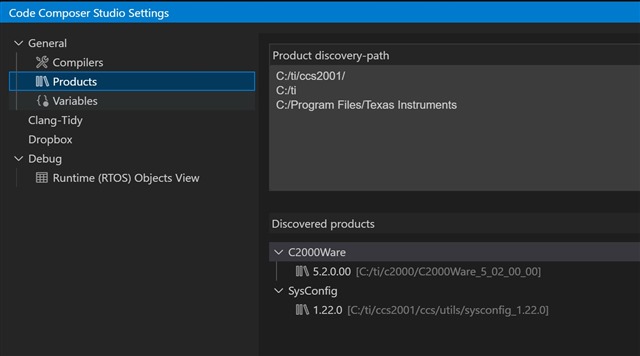
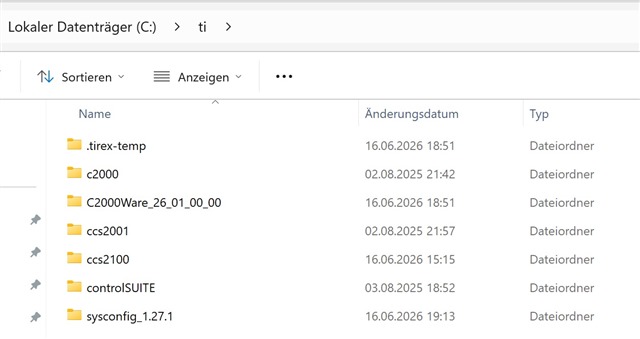
    Yes, I have two versions of C2000Ware installed. One is version 26.01, located directly in the Ti folder, and the other is version 5.02, located in the c2000 folder. But neither of them has a “common” folder.

    I also installed it on a brand-new Windows machine, but it doesn't work there either.

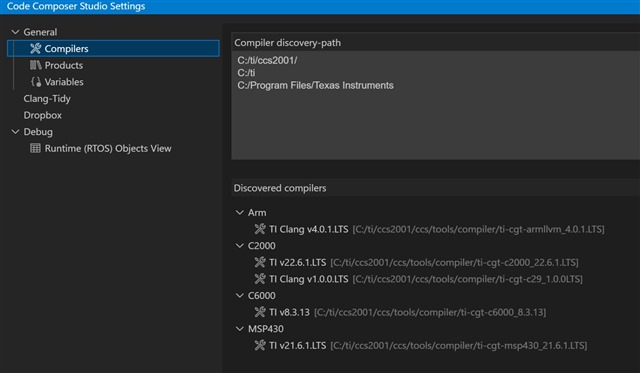
    Here are 3 more screenshots:

  • What version of C2000ware and Code Composer Studio do you have?

  • Hi Philipp,

    Please use c2000ware 26.01 as it is the latest. I suggest using CCS 20.5 or later. Also the correct installation of c2000ware should have the "common folder" in it. For example, this is in my installation of c2000ware

    I think c2000ware was not correctly installed on your system. Can you try to install it from ti.com again and delete the old existing installation?

    Thanks,

    Ira

  • Hi Philipp,

    Did you download c2000ware 26.1 from ti.com? Or was it downloaded from the TI Resource Explorer? We have noticed that the installation from TI Resource Explorer has this issue and the "common" folder gets skipped. We are working with the TI Resource Explorer and c2000ware team to have it resolved soon.

    Thanks,

    Ira

  • Yes, that was the problem—I had downloaded it from TI Resource Explorer. I've now downloaded it from the TI website, and it's working. Thank you so much for your help!