AM335X-TMW-IEC61850-DEMO: Best practices for using VS Code as primary code editor with CCS compiler on Windows

Part Number: AM335X-TMW-IEC61850-DEMO

Hi TI Team,

I am currently developing on a TI platform using Code Composer Studio on Windows. While CCS works perfectly for compiling and debugging, I would like to transition my daily code reading and writing workflow to Visual Studio Code to leverage its editor features.

My goal is to use VS Code purely as an editor while continuing to use the CCS toolchain for building the project.

Could you provide guidance or best practices on how to set this up effectively? Specifically, I am looking for advice on:

IntelliSense Configuration: How to easily export include paths and predefined compiler macros from my existing CCS project so the VS Code C/C++ extension can resolve dependencies without squiggly lines.

Compilation Database: Is there a recommended way or built-in flag to generate a compile_commands.json file directly from a CCS build on Windows?

General Workflow: Are there any official TI extensions, application notes, or community-recommended workflows for this hybrid setup (VS Code for editing + CCS for build/debug)?

My Environment:

OS: Windows 10/11

IDE: Code Composer Studio 6.1.3

Thank you for your support.

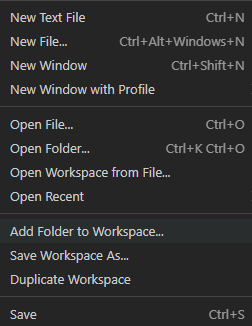
  • Install the C/C++ Intellisense extension on your VS code setup. Refer image below.

    Go to settings of the extension and add path for source directory to refer which in you case will be SDK path and workspace path.

    Refer image below.

    Open the SDK and CCS workspace project/folder in VS code using Add folder to workspace option.

    Regards,

    Tushar

  • Hi Tushar,

    Thank you for the quick response and the visual guide.

    However, while this manual method works for simple examples, it is not very scalable or user-friendly for complex projects like the AM335X-TMW-IEC61850-DEMO or other heavy industrial protocol stacks.

    Specifically, I have two major concerns with the manual includePath approach:

    Performance & Accuracy: Using recursive wildcards (/) for the entire SDK path forces VS Code to index thousands of irrelevant files, which severely slows down IntelliSense and often leads to incorrect symbol definitions.

    Missing Macros: This method completely ignores the predefined compiler macros and project-specific #define symbols configured in the CCS build settings. Without these macros, VS Code cannot correctly evaluate #ifdef / #ifndef branches, leaving large chunks of active code grayed out.

    My follow-up question:
    Since doing this manually is highly error-prone, is there any automated way to extract the exact compiler flags, include paths, and macros directly from the CCS build process?

    For example, since CCS 6.1.3 is Eclipse-based, is there a specific script, a community plugin, or a way to parse the build console log to generate a compile_commands.json file?

    Regards,

    zhengzhong lu

  • Hi 

    I am routing your thread to our CCS team for further comments. Please expect a response in a day or two.

    Regards,

    Tushar

  • Hello Zhengzhong,

    My goal is to use VS Code purely as an editor while continuing to use the CCS toolchain for building the project.

    What is the functionality in VS Code that you are missing from CCS IDE that makes you want to develop your code in VS Code?

    IDE: Code Composer Studio 6.1.3

    I see that you are using a very old and unsupported version of CCS. Is there any specific reason why you are using this old version? Please note that current CCS versions are based on Theia IDE - which itself is a fork of VS Code.

    Compilation Database: Is there a recommended way or built-in flag to generate a compile_commands.json file directly from a CCS build on Windows?

    Current versions of CCS will generate a compile_commands.json file when building a CCS project.

    Thanks

    ki

  • Hi Ki,

    Thanks for your detailed reply and the information about the latest CCS versions.

    The main reason I am still using this older version (CCS 6.1.3) is due to the PROFINET industrial communication protocol stack we are integrating. The code compilation environment and toolchain provided for this protocol stack are specifically tied to this older version of CCS. Upgrading the IDE and compiler would risk breaking the stack's compatibility or certification, so I am currently forced to continue using it for builds.

    Because I have to stick with the CCS 6.1.3 toolchain for compilation, I want to use VS Code purely as a modern editor to take advantage of features like IntelliSense and better code navigation.

    Thanks again for your help!

    Regards,

    zhengzhong lu

  • Hi Ki,

    That being said, I am quite curious: if we were to attempt migrating this old CCS 6.1.3 project to the latest version of CCS, are there any potential risks or hidden pitfalls we should be aware of?

    Given the huge gap between these versions and our dependency on the PROFINET stack, I am concerned about potential compatibility issues regarding the compiler versions, linker command files, or specific project configurations. Would you recommend such a migration? If so, are there any official guidelines or best practices for moving a project from such an old Eclipse-based CCS to the new Theia-based environment without breaking the existing stack?

    Regards,

    zhengzhong lu

  • if we were to attempt migrating this old CCS 6.1.3 project to the latest version of CCS, are there any potential risks or hidden pitfalls we should be aware of?

    This is a tricky question to answer. It really depends on the dependencies of the project. And as you mentioned in your prior post, some projects and libraries are validated with a certain version of the tools. Hence there is risk to migrate. However there are two things to note that help minimize the migration risk. The first is that older version of the compiler can be used with later CCS versions. CCS 21.0 can use the compilers that came with CCS 6.1.3. It is the compiler version that has the biggest risk. The other thing to note is that the underlying project system remains mostly the same. Of course there have been many enhancements and fixes since 6.1.3, however the project file format and system is mostly the same.

    f so, are there any official guidelines or best practices for moving a project from such an old Eclipse-based CCS to the new Theia-based environment without breaking the existing stack?

    There is some information here: https://dev.ti.com/tirex/explore/node?isTheia=false&node=A__AaZFvdACfuKSvvGOsC91Gg__CCSTUDIO-ACADEMY__RdkYJ-M__LATEST

    You should be able to import the project to CCS Theia and set it up to use the older compiler from CCS 6.1.3.But as you pointed out, 6.1.3 is very old and the gap between versions is quite large. 

    Thanks

    ki 

  • Hi Ki,

    Thank you so much for the detailed guidance and the helpful link!

    It is great to know that the new CCS Theia supports using the older compiler from CCS 6.1.3. This approach sounds like a very practical way to modernize the editing experience while minimizing the risks to our existing project.

    I will review the migration guidelines you shared and do some testing in a separate workspace. Thanks again for your time and expertise!

    Best regards,
    Zhengzhong