


Part Number: F28E120SC
Other Parts Discussed in Thread: DRV8323
Hi Experts,
Customer is planning to implement F28E120SC for Instaspin FOC application with DRV8323.
Downloaded the MOTORCONTROL-SDK (version 6.00.00.00), however, unable to view them in CCS. See below transcript from customer:
I have this version of motor control SDK install but CSS is not importing. I tried in version 20.4 as well as 21 but of no use. I am attaching the image of what I have tried.
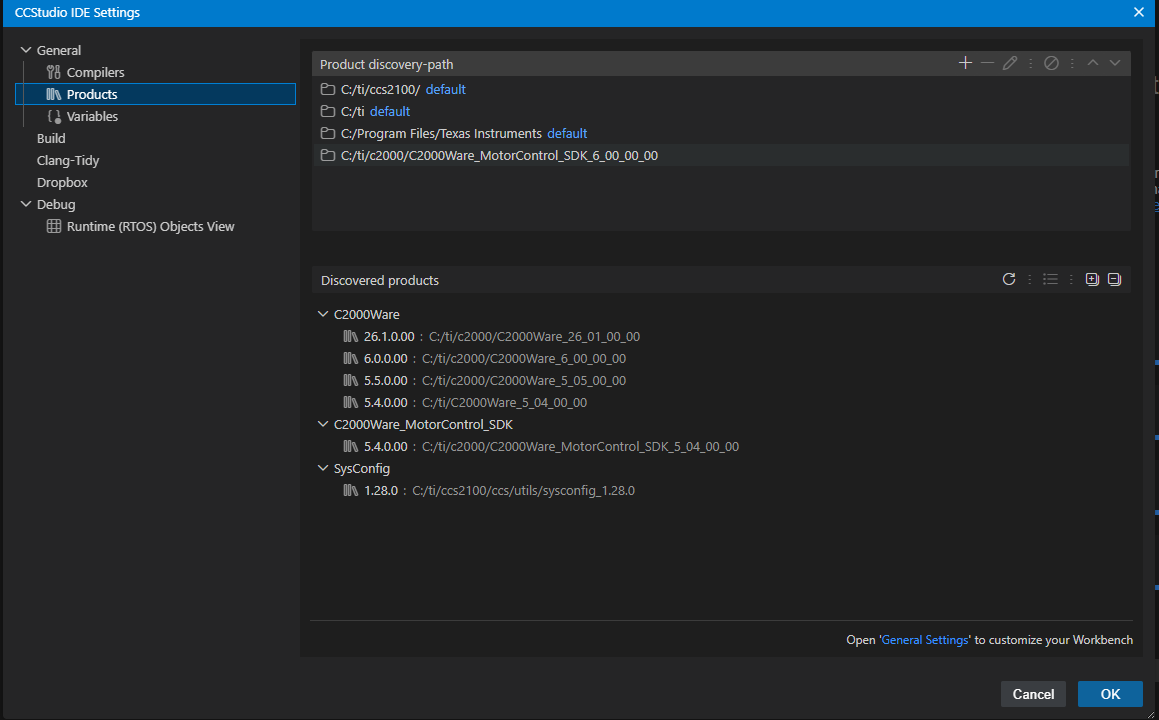
I had tried by adding proper paths where the 6.0 version of Motorcontrol SDK is present. Additionally when I check the resource explorer even in the latest ccs(21.0) it shows the version 5.04 as the latest motor control SDK.
One more thing I manually tried finding F28E12 related code for Instaspin FOC in the Motorcontrol SDK installation area, but other than some libraries, I am unable to find them.
For your further assistance. Thank you.
Regards,
Archie A.
