AM2631-Q1: CCS 12.8.0(Eclipse): Adding Predfined Symbol+value using CLI project creation

Part Number: AM2631-Q1

Hello,

How do I add predefined symbol+value when creating CCS project using command line? I would like that to show up in Predefined Symbols or in standard CDT Path and Symbols/Symbols dialogs so CDT indexer resolves #if ... constructs.

Project is created with user -ccs.buildCommand "..." and -ccs.autoGenerateMakefiles false and utilizes non-CCS build system.

Regards,

Eugene

  • Hello Eugene,

    How do I add predefined symbol+value when creating CCS project using command line?

    You can use the -ccs.setCompilerOptions flag:

    example:

    -ccs.setCompilerOptions "--define=SYMBOL=VALUE"

    Thanks

    ki

  • Hi Ki,

    This does not work at least with alternative -ccs.buildCommand "...". I tried it before asking. All I need is to make CDT indexer aware of CLI symbols passed through CLI in our build system.

    Regards,

    Eugene 

  • This does not work at least with alternative -ccs.buildCommand

    I did try this where I overrode the default build command with a custom one. However the -ccs.setCompilerOptions flag worked the same and the the symbol properly added to the Predefined Symbols section of the compiler project properties. The indexer (as flakey as it is) is properly picking it up and I can see the the proper #if block in my C code get greyed out depending on the symbol value.

  • Hi Ki,

    This is interesting ... plus 

    -ccs.setCompilerOptions "-D SYMBOL_NAME=VALUE"
    -ccs.setCompilerOptions "-DSYMBOL_NAME=VALUE"
    works but 
    -ccs.setCompilerOptions "--define=SYMBOL=VALUE"
    does not.
    Any idea why?
    Regards,
    Eugene
  • I see my error. 

    -ccs.setCompilerOptions "--define=SYMBOL=VALUE"

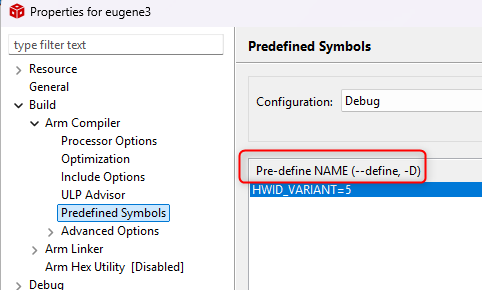
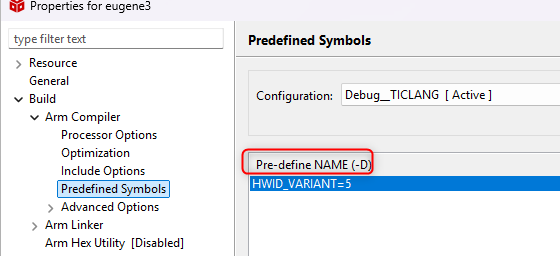
    --define is for the old TI Arm proprietary compiler. It does not apply to the newer TI Arm Clang compiler. 

    TI Arm proprietary compiler:

    TI Arm clang compiler:

    Sorry for the confusion.