This thread has been locked.

If you have a related question, please click the "Ask a related question" button in the top right corner. The newly created question will be automatically linked to this question.

AM6442: Problems getting any example program to download and run on the Cortex-R5 of the AM64x Evaluation Module

Part Number: AM6442
Other Parts Discussed in Thread: LAUNCHXL2-570LC43

Hello,

We are trying to get PX5 RTOS running on the Cortex-R5 of the AM64x Evaluation Module for a mutual customer in the industrial control space. We have found a series of examples and can build them cleanly with our CCS 12.4 tools. However, whenever we try to download them via Debug As -> Code Composer Debug Session, selecting only the MAIN_Cortex_R5_0_0 we get a series of errors, starting with:
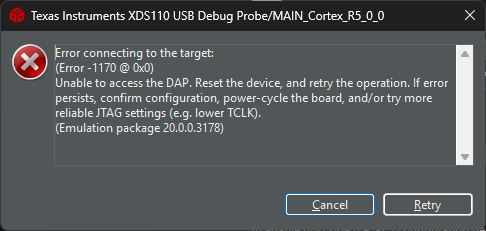
image.png

Attempting to disconnect the XDS110 debug cable and reconnecting, followed by Retry, we get:
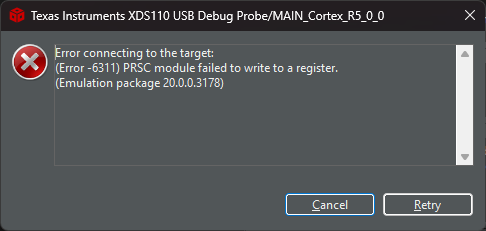
image.png

The board SW settings are:  SW2 all on, except for 3   SW3 all off

We have spent a day fiddling with this, but we suspect we are just missing a fundamental set somewhere in the sequence.  Any help would be greatly appreciated!!

Best regards,

Bill


  • Hi Bill,

    Which version of CCS are you using now? Is it same CCS v12.04?

    Also have you checked your target configuration file? Please confirm AM64x device is selected in your target configuration file.

    Please refer CCS_NEW_TARGET_CONFIG for creating target configuration file.

    Please refer CCS_LAUNCH_PAGE for CCS load and run.

    Regards,

    Tushar

  • Thanks for following up, Tushar.


    I’ve seen the documentation, but am somewhat overwhelmed by all the different boot modes and options.  I’m only trying to run the gp_timer_compare_match_callback_am64x-evm_r5fss0-0_nortos_ti-arm-clang example on a Cortex-R5.  What are the precise steps I need to take to do this?


    For now, I’m using CCS 14.4.0


    BTW, I can successfully build and load programs on the LAUNCHXL2-570LC43 board (Cortex-R5) over XDS110, so I think the tools and debugger are in working order.

  • The board SW settings are:  SW2 all on, except for 3   SW3 all off

    It looks like you don't have the correct boot mode setup on EVM and I feel the SOC is also not initialized.

    Please refer EVM_FLASH_SOC_INIT guide to initialize the SOC. The boot mode settings and steps to initialize are documented in the link.

    Once the SoC is initialized, you should be able to load the examples via CCS JTAG.

    Let me know if you still face issues.

    Regards,

    Tushar

  • Thanks, Tushar