This thread has been locked.

If you have a related question, please click the "Ask a related question" button in the top right corner. The newly created question will be automatically linked to this question.

CCSTUDIO-THEIA: CCS 21 can't find SYSCFG_DL_init

Part Number: CCSTUDIO-THEIA
Other Parts Discussed in Thread: SYSCONFIG, MSPM33C321A

I don't know what happened. I built some projects this morning and everything was fine. (I believe I did click the update which I tought was just updating an SDK)


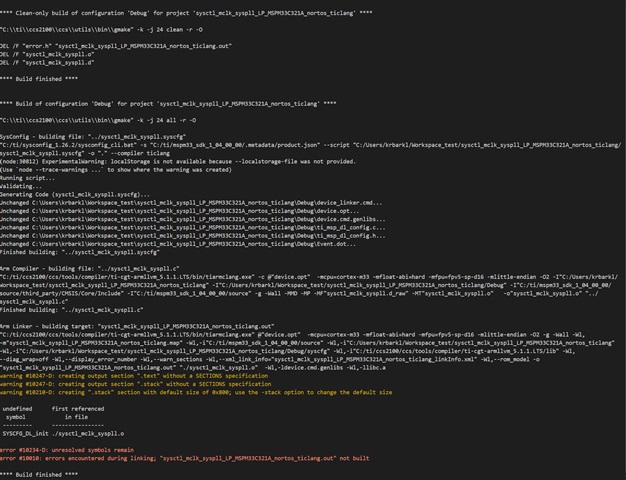
Now none of my projects in any of my workspaces for multiple MCU's cant find SYSCFG_DL_init(), or the .cmd file.
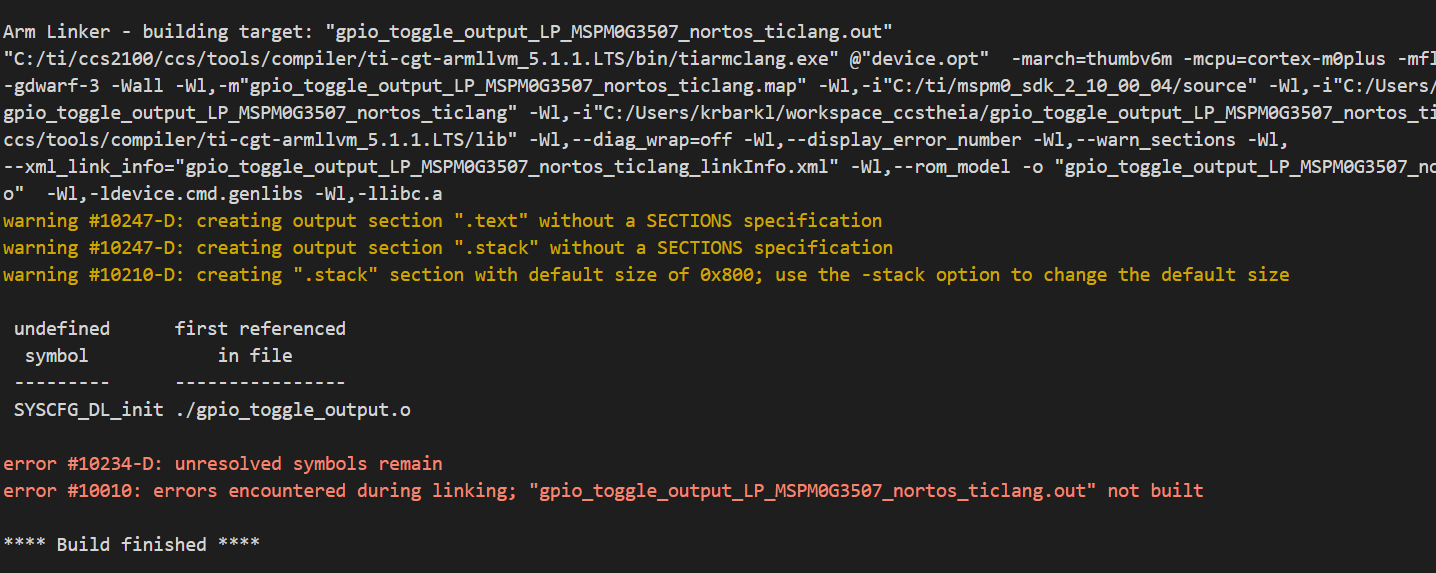
 

image.png


  • Hello Keith,

    So in your project now, you can find the SYSCFG_DL_init() and the cmd file, but when you build the project, it will report error? If you import one demo from SDK, will this error occur again?

    BR,

    Janz Bai

  • To test this I created a new workspace and imported a project. I get the same error as above when compiling.

    It looks like sysconfig created ti_msp_dl_config.c, but I *don't* see a ti_msp_dl_config.o. 

    And this happens with every project. 

    It only started happening when I accepted the update yesterday and installed a new wireless sdk, I think.

    There must be some global setting I am missing, but I am not sure which one.

  • Hello Keith,

    Please let me bring your post to our another team who maybe can give more comments.

    BR,

    Janz Bai

  • Great, I know it is a weird problem.

  • Hi Keith,

    Looks like it happens with examples from both the MSPM0 and M33 SDK.

    When compiling the last project, do you see ti_msp_dl_config.c being compiled in the build output?

    Arm Compiler - building file: "ti_msp_dl_config.c"
    "C:/ti/ccs2100/ccs/tools/compiler/ti-cgt-armllvm_5.1.1.LTS/bin/tiarmclang.exe" -c @"device.opt"  -mcpu=cortex-m33 -mfloat-abi=hard -mfpu=fpv5-sp-d16 -mlittle-endian -O2 -I"C:/Users/a0389327/workspace_ccstheia_21/sysctl_mclk_syspll" -I"C:/Users/a0389327/workspace_ccstheia_21/sysctl_mclk_syspll/Debug" -I"C:/ti/mspm33_sdk_1_04_00_00/source/third_party/CMSIS/Core/Include" -I"C:/ti/mspm33_sdk_1_04_00_00/source" -g -Wall -MMD -MP -MF"ti_msp_dl_config.d_raw" -MT"ti_msp_dl_config.o"  @"./device.opt"  -o"ti_msp_dl_config.o" "ti_msp_dl_config.c"
    Finished building: "ti_msp_dl_config.c"

  • So, I added a GPIO to Sysconfig to make it "dirty" as well as a comment in the main .c file to touch it, too

    It does compile the sysconfig

    but, it says that 

    "Unchanged C:\Users\krbarkl\Workspace_test\sysctl_mclk_syspll_LP_MSPM33C321A_nortos_ticlang\Debug\ti_msp_dl_config.c..."

    I added a GPIO, it should certainly be changed.

  • Did not help. Should I clear out the debug, too?

    I tried my main workspace and the test workspace I created to debug this.

  • can you attach the "makefile" and the other four *.mk files in the Debug configuration folder after the build?

    Are you importing a project directly from the SDK?

  • Yes, I created a new workspace and imported an example directly from the ti folder.

    For these make files I added a GPIO and a comment to the c file to force a complete rebuild.Makefiles.zip

  • Your makefiles do not reference the generated sysconfig files for some reason.

    For example, in my makefile I see:

    ################################################################################
    # Automatically-generated file. Do not edit!
    ################################################################################

    SHELL = cmd.exe

    CG_TOOL_ROOT := C:/ti/ccs2100/ccs/tools/compiler/ti-cgt-armllvm_5.1.1.LTS

    GEN_OPTS__FLAG := @"./device.opt" 
    GEN_CMDS__FLAG := -Wl,-l"./device_linker.cmd" 

    ORDERED_OBJS += \
    "./hsadc_max_freq_dma.o" \
    "./ti_msp_dl_config.o" \
    "./startup_mspm33c321x_ticlang.o" \
    $(GEN_CMDS__FLAG) \
    -Wl,-ldevice.cmd.genlibs \
    -Wl,-llibc.a \

    Where as your file is missing the items in red.

    My subdir_rules.mk and subdir_vars.mk is also quite different.

    Can you zip and attach your entire project folder so that I can import it to my workspace?

  • Here you go

    hsadc_max_freq_dma_LP_MSPM33C321A_nortos_ticlang.zip

    I didn't even clean it for you.

  • Interestingly, when I look at the makefile in the zip, it is missing the references to the generated sysconfig files. Then when I import the project to my workspace, it looks like CCS regenerates the makefiles and the makefiles looks correct.

    I am at a loss what is happening. I'll need to follow up with engineering. 

  • I just assumed that the wireless SDK I installed right before this started just mucked with some global setting. I think at this point, I am just going to re-install 21.0, unless you want me to keep it for forensic purposes. I can do some limited development on my laptop.

  • I just assumed that the wireless SDK I installed right before this started just mucked with some global setting.

    Are you referring to the simplelink wi-fi SDK?

    I am just going to re-install 21.0, unless you want me to keep it for forensic purpose

    Please give it a try. I am somewhat skeptical it will help since clearing out all the CCS cache should reset everything to default. But perhaps something got fouled up with your install. Honestly, I was going to suggest a CCS re-install next anyway...

  • Yes, CCS installed it by itself

  • OK.

    First I Uninstalled and re-installed CCS 21.

    That did not help, so I nuked it from orbit.

    I uninstalled CCS and completely deleted the C:\ti folder.

    Then I re-installed CCS, and a fresh copy of the MSPM33C SDK.

    I got warnings that I did not have Sysconfig 26 (which had been a separate folder in C:\TI)  and that it was going to use 28.

    But it still compiled fine. I am now going through and changing all the projects to use Sysconfig 28

  • That did not help, so I nuked it from orbit.

    It's the only way to be sure :)

    I got warnings that I did not have Sysconfig 26 (which had been a separate folder in C:\TI)  and that it was going to use 28.

    I did notice that you were using version 1.26.2 of sysconfig so I switched my projects to do the same. But I still could not reproduce the issue.

    If you switch it back to 1.26.2, does the issue reappear?

  • I just got it working, and now you want me to break it again?

    Using 1.26 did not cause any issues, either .2 or .0

  • I just got it working, and now you want me to break it again?

    uhhh.... yes? Thanks for trying it out. Glad to hear it didn't break anything though your original issue still remains a mystery...