This thread has been locked.

If you have a related question, please click the "Ask a related question" button in the top right corner. The newly created question will be automatically linked to this question.

Analysis tools missing in CCS5.1.1


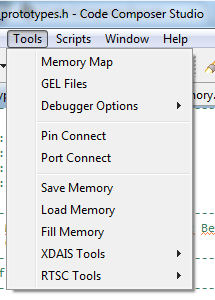
We have the latest version of CCS installed and we noticed that some tools are missing. Screenshot below.

As we start developping with Sys/bios they would be very useful. How can we get them back ?
  • Hi Clement,

    what target are you using?  Do you mean you are looking for the system analyser?  What specifically are you looking for?

    Most of our tools can be added separately (code generation, BIOS, MCSDK) and some can be added via the update manager.  Help->Install new software.

    See our wikis and keep us informed whether you are able to find all you need. 

    http://processors.wiki.ti.com/index.php/Multicore_System_Analyzer

    http://processors.wiki.ti.com/index.php/Main_Page

    http://processors.wiki.ti.com/index.php/BIOS_MCSDK_2.0_User_Guide

    Best Regards,
    Lisa

  • We use the C6678EVM

    We are looking for the RTA  tools, ROV, Image analyser, graph, trace control, trace analyser, profile, ...

    We use bios_6_32_05_54, mcsdk_2_00_05_17, xdctools_3_23_01_43, CCS v5.1.1.00031 

    Thank you

  • Hi Clement,

    odd, it sounds like you have all you need so I am surprised you are having problems finding it.    What emulator do you use?  What do you see under

    Window->Preferences->Code Composer Studio->Build->RTSC->Products?

    What OS are you on?  Where are the XDC, MCSDK etc installed?

    Best Regards,
    Lisa

  • Emulator XDS100v1

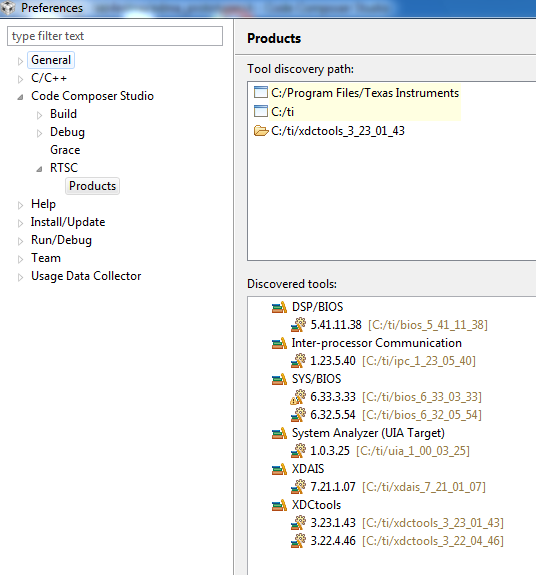
    screenshot of RTSC-> products

    dont pay attention to SYS/bios 6.33.3.33 we don't use it.

    We are on windows 7 32 bit

    Everything (CCS, MCSDK, XDC) is installed under C:ti

    Thanks for the follow-up

  • Hi Clement,

    Unfortunately RTDX/Real Time Analysis/Trace are not supported with the XDS100.

    This is why, even though it does seem you have the tools installed, you are not able to use them.

    I hope this helps explain.  I guess you are using the free license ....

    Best Regards,
    Lisa

  • hmm

    Yes we use the free license but with a full license would it change something ?

    Strange thing is that we also have CCS v 5.0.1.201102161400 installed with a full license (long story short we couldn't use it with the new install of CCS for some strange reason) AND it does include all the tools mentionned above and we could use them (graph for example) with the same board, same emulator.

    So that's very confusing, can you shed more light on this issue ?

    Thank you.

  • Hi Clement,

    ok, I wonder if actually you are encountering this know issue we had with the MCSDK not installing properly.  There were a few issues with both migration from 5.0.x and installation over 5.1.

    Please have a look at this thread and its links and let us know if that helps resolve the issue.  It could be this is what is happening.

    http://e2e.ti.com/support/development_tools/code_composer_studio/f/81/t/164155.aspx

    Best Regards,
    Lisa

  • Ok,

    my co-worker re-installed CCS 5.1 and then re-installed MCSDK without the MCSA

    and now he has the tools.

    I guess it'll work for me too.

    Thanks

  • Hi Clement,

    great, glad to hear that's all it was.  I appologise as I overlooked that this might still be hitting some users.  All the best with development.

    Best Regards,

    Lisa