This thread has been locked.

If you have a related question, please click the "Ask a related question" button in the top right corner. The newly created question will be automatically linked to this question.

Run/Debug configurations for CDT projects using GCC


I want to use CCSv5.1 to create/develop GCC programs.  I have MinGW installed and can compile/build/debug C programs fine using those native tools.  I run into issues when I want to project to be managed within CCSv5.1.

I'm following the CCS Help for "tutorial: creating a simple application"  (located here:
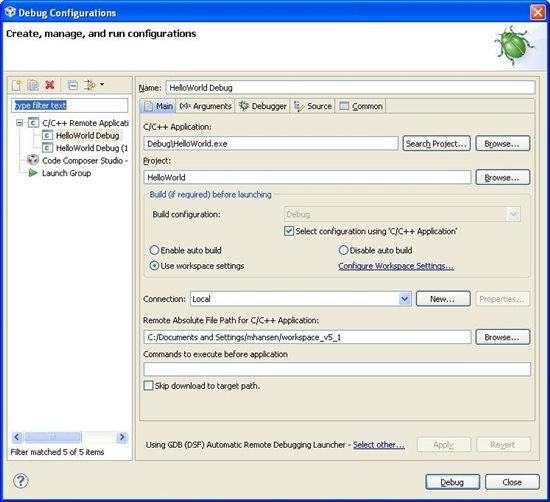
Step 3 is where I'm running into issues: I want to setup a configuration.  The help seems incomplete (or intended for a different version of CCS).  The GUI that pops up in my CCS is this:
The help makes no mention of what to enter for Connection and "Remote Absolute File Path...".  Both seem to be required before I can proceed to debug.  I took a guess at setting it to local but it doesn't work right.  When I click Debug, it attempts to launch the debugger and then then I get this:
can you please help me set this up?  Note that the .exe does build.  I can go to the folder in a DOS shell and run the .exe to see "Hello World" print to the console.
My dev platform is Windows XP.
thanks,
Mike
  • Mike,

    I am not exactly sure how is your system setup, but from the description it seems you want to run the application in the same host as Eclipse, right?

    If so, the configuration you are trying to use is for remote applications, therefore you will need to enable the local CDT GDB debugging.

    Go to menu Window --> Preferences --> General --> Capabilities and enable CDT GDB Debugging. This will show additional options for Debug Configurations - the one for local applications is C/C++ Application

    I haven't done any local Windows application debugging, but the configurations are very similar to a remote application. One detail is to set a suitable GDB debugger in the tab Debugger of the Debug Configurations screen.

    Some additional details can be found here.

    Hope this helps,

    Rafael

  • Thanks.  This setting solved my debug problem:

    desouza said:

    Go to menu Window --> Preferences --> General --> Capabilities and enable CDT GDB Debugging. This will show additional options for Debug Configurations - the one for local applications is C/C++ Application

    Now a somewhat minor issue.  Where is the console display for printf outputs and such?  When I click the run application, the output will display:

    but when I debug, no such output:

    There is no "!!!Hello World!!!" or "sum = 13". What do I need to do to have a console window show the I/O output?

    Mike