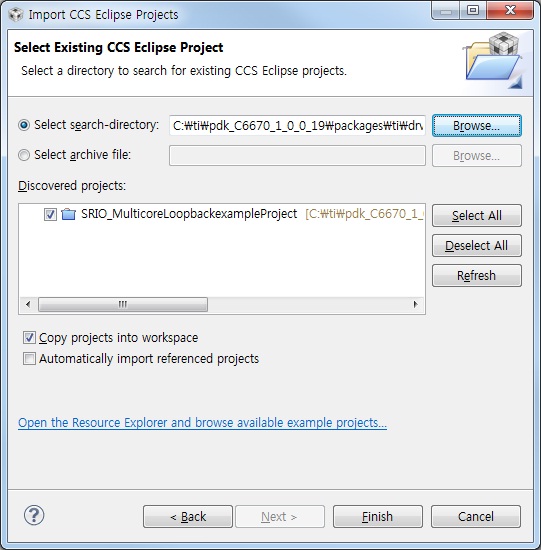
When importing example projects into workspace in CCS v5.1, there are linked *.c.
I'd like to import and really copy all project files into workspace without link files properties.
What should I do?
Br,
This thread has been locked.
If you have a related question, please click the "Ask a related question" button in the top right corner. The newly created question will be automatically linked to this question.
When importing example projects into workspace in CCS v5.1, there are linked *.c.
I'd like to import and really copy all project files into workspace without link files properties.
What should I do?
Br,
HI,
how have you imported the projects? Do you add any files yourself? One option you have is to create a fresh workspace/project and import you code instead of your project. When you add a file to a project you are able to select "copy" or "link"
Please let us know and we will do our best to see what options you might have if you would prefer to avoid linked resources.
Best Regards,
Lisa
Hi Sangchul,
have you put all files in the project directory? How have you added the files? What exactly are you trying to do?
Unfortunately for us to be able to tell you the best options, we would need a bit further information.
Best Regards,
Lisa
Sangchul Oh said:With all due respect, to add each file into project of workspace repetitivley requires my deep patience. Is there another easier way to copy all files automatically by CCS v5? My importing option and result are captured as the follows; I don't want linked files.
The example projects in PDK are desiged and set up to use linked resources, hence even though you select "copy project to workspace" it is only copying the project files to your workspace while the source files are still being referenced from their original location within the PDK installation. The example projects are designed this way to facilitate a directory structure that allows source/header files to reside in one single location while different projects can still reference them.
Unfortunately there isn't a way for CCS to identify those linked resources and automatically copy them to your workspace. If you really want to do this, you would need to do it manually - you can create a new project, identify the required source files and copy them into your project folder. Or you could make a copy of the example project, then modify the copy to remove linked resources and add them physically.
Hi Sangchul,
Aarti provided a nice explanation.
A few things I would like to add
- you can also add files more than one at a time. You also have the option of adding files to your project by dragging and dropping
This is of less relevance to you but I wanted to point out, as stated in this wiki I meant to send in my earlier replies ... you also have an option to convert the linked resource paths to be absolute if they are set up to be relative. But this does not convert them away from still being linked in.
http://processors.wiki.ti.com/index.php/Include_paths_and_options
Are you concerned about linked resources due to wanting to move your project around or share it with others? Have a look here as well
http://processors.wiki.ti.com/index.php/Project_Sharing
http://processors.wiki.ti.com/index.php/Portable_Projects
Best Regards,
LIsa
Your comment is the unique way to solve this problem at this moment, I think.
I appreciate it.
Hi Sangchul,
ok, glad to hear you have the options and information you need now. All the best with development.
Best Regards,
Lisa