This thread has been locked.

If you have a related question, please click the "Ask a related question" button in the top right corner. The newly created question will be automatically linked to this question.

Update to CCS V5.2 - deinstall 'old' 5.1 first?


Hi,

It seems that CCS V5.2 was released (http://processors.wiki.ti.com/index.php/Download_CCS).

just a small question: What is the 'normal' procedure to update a former CCS V5 installation (in my case V5.1.1) - first uninstall the old one or just install the new one? I dont want to keep the old one in parallel. A sentence about that in the readme or releasenotes (general information -> installation) would be nice,

bye,

Thomas

  • Hi Thomas,

    the upgrade from 5.1.1->5.2 using Help->Check for Updates should be available in a week or so.  However I would not use this path if you used the 5.1.1. lite installer. But normally you can use the built in update tool.  If you can not wait and do not want two versions, then an uninstall and installation of 5.2 is the only option.

    Hope this helps clarify.

    Best Regards,
    Lisa

  • HI,

    Just adding to Lisa's response; although we don't have this mentioned in the release notes (which would be nice to have), the installer tells you to uninstall the previous version if you try to overwrite it.

    Cheers,

    Rafael

  • Hi Lisa and Rafael,

    Basically your answer is "calling ccs_setup_5.2.0.00069.exe will not update a former V5.1 installation but install a seperate copy".

    Lisa, what is the "lite installer"? I downloaded the Windows "offline installer" from http://processors.wiki.ti.com/index.php/Download_CCS and called ccs_setup_5.1.1.00031.exe. Is this the "lite installer"?

    I tried the Help -> Check for Updates. This seems to hang for long time (more than 1 hour/forever) at "50%", I cancelled it. Is there a way to get diagnostic log messages,
    for example what adress 'check for updates' is currently trying to reach? I did not find any logfile around in the CCS directory. A timeout or a more detailled output would also be great for that. I checked the proxy settings in "Window - Preferences" and it seems that this was the reason. After setting the correct proxy here the updates were found.

    'Check for updates' tells me to install 'C6000 Compiler Tools 7.3.5', currently I have 7.3.1. It seems that installing replaces the old version by the new one. Is there a way to keep several versions of the Compiler Tools (to build software releases in the same environment in the future)?

    bye,

    Thomas

  • Hi Thomas,

    the lite installer is the web installer, so you used the recommended path of installing from the full installer.

    Yes, you can certainly have multiple compiler versions and in fact the update should not have removed the old one.  You can check this window->preferences->code composer studio->Build->code generation tools.

    please keep us informed if this helps.

    Best regards,
    Lisa

  • Hi Lisa,

    meanwhile I've seen that there is a logfile in the CCS workspace/.metadata/.log, in which there are 'connection refused' entries, before I checked for proxy settings. This could be helpful if automatic updates fail.

    a proxy setting using 'internet explorer settings' or using 'proxy configuration script' would be great instead of the hardcoded manual settings. you know, we have to change passwords every few weeks. now I have my username and password as proxy authentication written there in CCS on my PC and 3 test PCs/buildserver. Every time my password changes I have to think about changing this in CCS and 15 other places. Small thing but one more of these small things...

    It would be cool if more details about the update process were displayed. Sometimes it seems to take really long and you dont know if it hangs or just takes so long. At the attempt just now, the progress stopped at 47% for about 20minutes, then suddenly jumped to 'finished'.

    After the update, both build tools versions 7.3.1 and 7.3.5 are installed (window->preferences->code composer studio->Build->Compilers) and I can select the compiler I want to use in the projects build options. it seems I have to select it at any project at any build configuration. Its somehow hard to keep project settings synchron if you have several projects, every setting requires several clicks and you loose track of what is changed where... And it is also hard to check with a diff before checkin because one click seems to change a lot in the config files. but well - it seems to be like that.

    Is it possible to install an older version of the build tools? This might be an exotic request. but in the past I used to keep every old compiler on a network drive (I used to use makefile builds and the most likely solution is to switch back to that, on the other hand I dont want to maintain makefiles and CCS projects since this gets asynchron in no time). I want to be able to rebuild older software releases exactly the way they were created. Suppose I use CCS and my buildserver crashes and I have to reinstall it in 3 years from now, how do I get build tools 7.3.1 then?

    On a second test PC I did not install the available CCS 5.1 updates. I checked in the CCS project files on my first PC (with the switch to 7.3.5) in the sourcecontrol repository and built the project on the second PC and - surprise: it built without message with the old compiler. Is this really desired like that? If I select 7.3.5, I normally want it to be built with that and refuse to build if this build tool is not there.

    I will wait for the V5.2 installation to be able on 'check for updates' channel. The reason why I am interested in V5.2 is the command line build, this was said to be improved in 5.2. It would be an advantage for me to get an errorlevel != 0 if the build failed (since I build automated on a buildserver and want to stop or stop running tests when build fails).

    thanks and bye,

    Thomas

  • Hi Thomas,

    in your project settings you can select a compiler version.   Also when creating a project.  So you can use the older version.  

    Please give that a try and keep us informed.

    Best Regards,
    Lisa

  • yes - I know. I not just can but have to select the compiler version at any project and any build configuration seperately.

    But: is there a way to install/select a certain older version than the latest available build tools version? If my project is now released built with 7.3.1 and I have to provide a patch in 3 years, I want this to be built also with 7.3.1. How do I get this version if it is not directly installed with a 'then old' CCS?

  • Hi Thomas,

    yes you should be able to continue using the same version and in fact people install and/or point to compiler versions from CCSv3.3.  

    You can manage the versions the same place you looked to see that you had two versions installed.  Window->Preferences->Code Composer Studio->Build->Code Generation Tools.

    I hope this helps ease your worries. 

    Best Regards,
    Lisa

  • Hi Lisa,

    thanks - one last thing: Is it possible to copy ccsv5/tools/compiler/c6000_7.3.5 to a network drive and select it in the project settings -> CCS General -> Compiler Version -> more -> select build tool from file system? When I select the directory there, it seems that nothing happens, it seems that the locally installed version is used. Re-opening 'Compier Version -> more'  still shows the locally selected V7.3.5.

    The same would be good for the used DSP BIOS version. Is it possible to 'copy' build tools and DSP BIOS to a network directory and start a build with that?

    If the CCS projectfiles checked into the subversion repository would point to the network-drive build tools and DSP BIOS, the result of a build would be the same if the requested build tool version was locally installed or not and that would be great...

  • Hi Thomas,

    you should be able to select a compiler using more and browsing to it as you describe.  In fact we have one of our workshops where in a lab you do just this.  Did you select the proper directory? 

    Best REgards,

    Lisa

  • For a few minutes, it looked like CCS 5.2 was available on the "Check for Updates." I received a message stating that service release 5.2 was going to be installed - then I received a message saying "unable to connect to server - please try again later."  When I check now, I get a message saying my software is up to date (with 5.1.1).

    Any idea when the "Check for Updates" will be able to update to CCS 5.2?


  • Hi Todd,

    this is available actually.  Could you please provide a bit further information on what you did?  What updates were found?  What did you try to install?  Ie did you only select the service update?  Did you select the installer ... which would have had required by it?)  Have you tried since?

    Best Regards,
    Lisa

  • Hi Lisa,

    I have noticed the same behaviour, unfortunately I did not take a screenshot of the 'unable to connect to xyz' message. What I did:

    - I had CCS 5.1.1 installed.
    - CCS 5.2.0.00069 is reported available at 'check for updates'
    - a few seconds after installation start (too less to download a ccs installer...), a CCS restart is requested
    - then after a few seconds, a popup message 'unable to connect to .... please check later' appears
    - after a restart of CCS, a new 'check for updates' reports CCS being 'up to date'

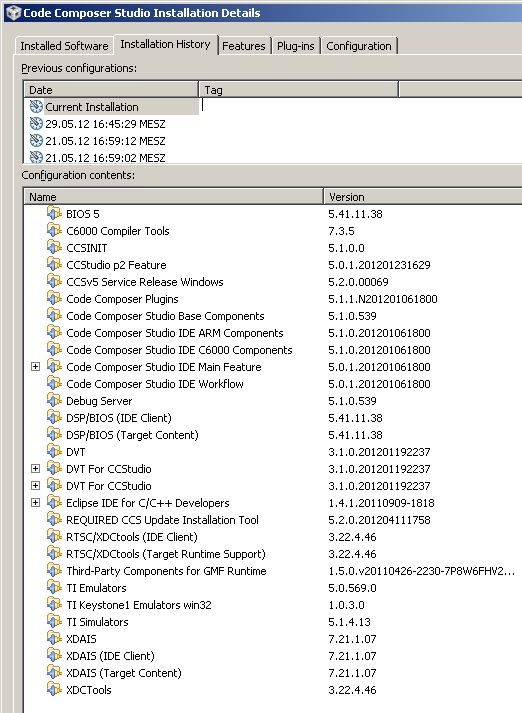
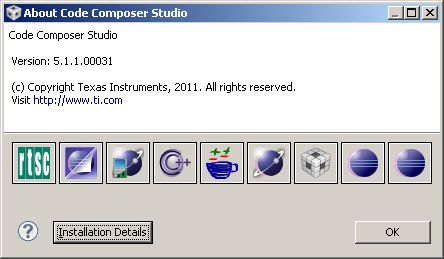
    Installation details shows a "CCSv5 Service Release Windows" 5.2.0.00069 being installed. But CCS itself is still reported to be V5.1.1:


    bye,

    Thomas

  • All:

    My "update" at 6:55 am was similar to Thomas9070 - except that I do NOT have "CCS v5 Service Release Windows" displayed.

    Very similar story:

    - I had CCS 5.1.1 installed.
    - CCS 5.2.0.00069 is reported available at 'check for updates'
    - a few seconds after installation start (too less to download a ccs installer...), a CCS restart is requested
    - then after a few seconds, a popup message 'unable to connect to .... please check later' appears
    - after a restart of CCS, a new 'check for updates' reports CCS being 'up to date'

    I have not been successful in having an update to CCS 5.2. So far, I have been getting the "up to date" message when I do "Check for Updates."

  • Thomas9070,

    My working theory as to what has happened in your case goes as follows:

    The search for updates found a bunch of possible components. You accepted the updates and part of the update content was downloaded. Not all the update content is downloaded before Eclipse requests you to restart. If the initial update download is successful, the feature list is updated to reflect the new versions. Eclipse then asks you to restart.

    After the restart, additional installation steps are run that cannot be completed while Eclipse is running. One of these steps requires  additional content be downloaded. This download step has failed. Perhaps it was unable to resolve the required network address. The point where the failure occurred did not roll-back the feature version displayed in eclipse to properly reflect what is installed.

    When eclipse starts after the failure, it appears that all the features are up to date even though not everything has been updated.

    We can retry this update by itself as follows

    * Download the web installer from the CCS download page.

    * Run the web installer and give it the CCS 5.1.1 install folder as the installation location.

    If download problems persist, you can also download the full ccs install package as a zip file. If you run the installer from this package and give it the 5.1.1 install folder as the destination, it will update the 5.1.1 install to 5.2.0.

    If you are seeing download problems when using the web installer, I would like to see if there is more data I can get from you. As the initial eclipse portion succeeds, there must be something different about how the installer is resolving network addresses vs what eclipse is doing.

  • Todd,

    Could  you give the approach I mentioned above a try and let me know how it goes?

  • Thomas,

    The "normal" procedure would be to update through "check for updates".

    If you choose to install a new version without doing an update, it can be installed into a different folder in parallel. When you are happy with the new version, the previous version can be uninstalled or deleted.

  • All:

    Tried to download web update as requested. Here is what I get:

    "Unable to access http://go-bradley.am.dhcp.ti.com/CCS5.2.0.00069_win32. Check your settings and try again."


  • Todd,

    Thank you.

    The web installer is failing to resolve the download location even though Eclipse was able to. There seems to be a difference between how Eclipse resolves proxies vs the Web installer.

    Probably the best way for you to be able to update your install would be to download the full install package, run the installer from there, and give it the location of your 5.1.1 install as the install location. Since everything is local, it won't be affected by download problems.

    Did you configure any of the proxy settings in Eclipse in your v5.1.1 install, or are you just using the defaults?  Do you have http_proxy environment variable set?

  • Andy:

    As far as I know, I did not configure any of the proxy settings in Eclipse.

    Background info:

    Windows 7, 32-bit.

    Presently updated to CCS 5.1.1.00031


    So, I need to uninstall CCS 5.1.1 before installing CCS 5.2, right?


  • Andy:

    Also, if I uninstall CCS 5.1.1, will there be a problem with the license when re-installing CCS 5.2?

  • Andy:

    Ok, spent 15 minutes downloading the "full" windows version.

    I did not uninstall CCS 5.1.1 - ran the CCS 5.2 installer, and again received the message: "Unable to access http://go-bradley.am.dhcp.ti.com/CCS5.2.0.0069_win32." At this point, it stated "installation failed" (or something similar). At this point I needed to go to task manager to shut down the installer. (I am not sure why a "full" installer needs to access http://go-bradley.am.dhcp.ti.com/CCS5.2.0.0069_win32 - can you tell me?)

    Fortunately, CCS came back up with CCS 5.1.1 and I can still work with my code.

    Not sure what to do next - I do not trust the installer, so I do NOT plan to uninstall CCS 5.1.1.


  • Todd,

    You do not need to unininstall 5.1.1 to instal 5.2. You can install into a different folder if you wish and leave your 5.1.1 version separate. They will not interfere with each other. The desktop shortcut will point to the most recently installed version, but you can start which version you wish from the shortcut located in the root of the install folder.

    The "unable to access..." message is misleading. The installer is checking for access to a list of URLs. It can't contact any of them. This happens to be the last one it checked. The message should really be something along the lines of "Unable to connect to any CCS download sites."

    When running from the full install, the installer shouldn't need to contact any download sites. I need to look into why it is doing that.

  • Andy:

    Thanks for your feedback. I will try installing to a different folder, and let you know how it goes. (But not today.)


  • Andy:

    Just finished installing into a separate folder. I did not see any of the problems of yesterday when I did this.

    CCS 5.2 has come up, used it on an existing workspace, and I have seen no problems so far. Thanks for your help.