This thread has been locked.

If you have a related question, please click the "Ask a related question" button in the top right corner. The newly created question will be automatically linked to this question.

Installation problem CCS, LaunchPad not found


I recently upgraded my PC from Vista 32Bit  to Windows 7 64Bit. On Vista I had a running implementation of CCS, that worked with the MSP430 LaunchPad using the USB, so I guess the hardware is o.k.

I downloaded "ccs_setup_5.2.0.00069" and installed it. As far as I know, all necessary drivers should be included. Neverthelsee, if I compile and run a project with the LaunchPad conected by USB I get following error msg: 

Error connecting to the target:
Could not find device (or device not supported)

Therefore, I guess there is some driver missing. In the device manager under USB Controller I can not find any JTAG specific entry.

Do I need any additional driver???

any help is apreciated, Daniel

  • Hi Daniel,

    do you have full admin privileges?  Did you install only MSP430 support?  Did you use the full or lite installer?  The full installer is recommended.  DId you unzip the installer first (in case of full installer)?  Did you install to and use only directories with no accented or special characters?  Do you have any anti virus programs turned off?

    Best Regards,

    Lisa

  • Hello Lisa,

    thank's for the speedy answer.

    Yes, I have admin privileges. I did install only MPS430 support.

    I used the installer "ccs_setup_5.2.0.00069.exe" that downloaded and extracted all the stuff automatically.

    There should be no problems with funny characters in file names that I am aware off.

    Concerning virus programs, I have avira running, should I turn this off during installation?

    thank's Daniel

  • Hi Daniel,

    I would try turning off antivirus yes.  I would also try the full installer.

    Please keep us informed.

    Best Regards,
    Lisa

  • Just wanted to add a couple of things.

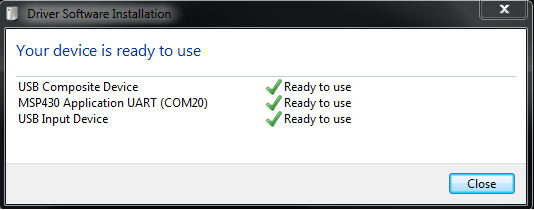
    When the Launchpad is initially plugged in and Windows installs the driver, you should see a dialog like:

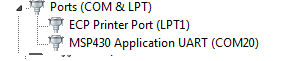
    After the drivers are installed, you should two these entries in thew Windows Device Manager (in addition to other devices you may have). Under HID:

    And under Ports:

  • Hi Lisa and Andy,

    I just realized how large the traffic is in this forum. You do a tremendous job, thanks a lot!!!

    Now to my problem. I switched off the antivirus and reinstalled to no avail. Then I realized that in the device manager MSP430 only appears under Ports, not under USB ( I did not check, that "USB Input Device belongs to TI". I finally verified with a terminal emulator, that the problem ist NOT the USB driver.

    Finally I had a look at the hardware-- CCS was right all along, it could not connect because of a hardware problem!  Fixed this and now everything works as it should.

    Thank you once more for your speedy answers despite of the tremendous amount of traffic, Daniel

  • HI Daniel,

    I am glad to hear all is now up and running and all the best with development.


    THanks for the update.

    Best Regards,
    Lisa