This thread has been locked.

If you have a related question, please click the "Ask a related question" button in the top right corner. The newly created question will be automatically linked to this question.

CCS V5 floating license problem


I following the tutorial
http://processors.wiki.ti.com/index.php/License_Server_Administration_for_CCS#Configuring_Code_Composer_Studio to install CCS V5 floating license.

After  ./lmutil lmstat -a
I got following error message

   License file(s) on pirat-server: /opt/license_server/licenses/TMDSCCS-ALLF10-v5.lic:

pirat-server: license server UP (MASTER) v11.10

Vendor daemon status (on pirat-server):

 tidspssw: The desired vendor daemon is down. (-97,121)


I used ifconfig to check the MAC address, this is the answer

eth2      Link encap:Ethernet  HWaddr 00:13:d4:da:2f:42

         inet addr:140.92.62.129  Bcast:140.92.255.255  Mask:255.255.0.0

         inet6 addr: fe80::213:d4ff:feda:2f42/64 Scope:Link

         UP BROADCAST RUNNING MULTICAST  MTU:1500  Metric:1

         RX packets:86096 errors:0 dropped:0 overruns:0 frame:0

         TX packets:4434 errors:0 dropped:0 overruns:0 carrier:0

         collisions:0 txqueuelen:1000

         RX bytes:11054148 (10.5 MB)  TX bytes:608541 (594.2 KB)

         Interrupt:17


I have checked the license file, and its ID is “ SERVER this_host 0013d4da2f42”

It seems OK, how dow I solve this problem?

thanks

  • Hi,

    could you send the tidspssw log?  Where do you see this error, in the license manager?  Did you set it up using the gui license admin?  Did you make sure all necessary ports are unblocked and the vendor daemon is in the correct directory along with the manifest file?

    Would you be able to provide a bit further information?

    Best Regards,
    Lisa


  • HI Lisa
    thank you for your reply.

    The tidspssw log is as follows

    10:16:30 (lmgrd) -----------------------------------------------
    10:16:30 (lmgrd)
    10:16:30 (lmgrd)
    10:16:30 (lmgrd) The license server manager (lmgrd) running as root:
    10:16:30 (lmgrd)        This is a potential security problem
    10:16:30 (lmgrd)        and is not recommended.
    10:16:30 (lmgrd) tidspssw already running 27000@pirat-server
    10:16:30 (lmgrd) The license server manager (lmgrd) is already serving all vendors, exiting.

    The error message disappears after step 9

    9. To test if the license server is running and properly loaded the TI daemon <tidspssw> simply type:

    host$ ./lmutil lmstat -a


    I also try to use GUI license admin, but I can’t open the license manager GUI after step 5.

    5. Follow the on-screen instructions.

    • In the step Choose Install Folder point to the directory: /opt/license_server
    • In the step Launch Configuration the default values can be used
    • In the step Start the Server check the box Start server now. A browser window will open with the main license manager GUI. Leave it open for now.
  • Hi,

    we may need some further information.  Do you have two copies running?  It is odd you get a message that the license is already running ....?   Could you please send your setup details?

    Best Regards,
    Lisa

  • Hi,

    I just thought I would check for updates?  Or whether you are able to send a bit further information here?

    Best Regards,
    Lisa

  • Hi Lisa

    sorry I'm late for reply.

    I only run one copy.

    In order to check my license is work or not, I install the license server in windows.

    In the windows the license is work.

    But in linux(ubuntu 8.04) the license can't work.

    What information should I send to you???

    thank.


  • Hi Chien-Hsiang,

    as much detail as possible.

    Ok, so the server running on windows is fine, is that correct?   But server on Linux is not?  What MAC address did you submit for your license file?  It may make sense if the license file was generated for the windows machine, that is why it works there.  If you wish to run the server on Linux, you will need a license file setup for the MAC address of the LInux machine.  License files are generated to be on a machine with a specific MAC address, even floating licenses are coded with the servers MAC address.

    Do you think that could explain the issue?

    Best Regards,
    LIsa

  • Hi Chien-Hsiang,

    I just wanted to check whether there is any update to your enquiry or whether you could provide further details.

    Best Regards,

    Lisa

  • Hi Lisa,

    The problem is still unsolved.

    Our machine has two OS, Linux(ubuntu 8.04) and windows xp sp3.
    So, I think the mac address different is not my problem, because the network card is the same. so the mac  address is the same, too.

    My install step is as follow

  • Hi Chien,

    you may have too old a version of Ubuntu.   Also, could you please send the logs from the flexnet manager as well as the vendor daemon?  (tidspssw)

    Best Regards,

    Lisa

  • Hi Lisa,

    I can't open the flexnet manager.


  • Hi Chien,

    you should not need to open the license program to find and send the logs.   These logs are in the license manager installation directory and vendor daemon directory which should be under the same directory tree.

    Note Linux is a bit different when it comes to MAC address etc.

    Best Regards,
    Lisa

  • Hi Lisa,

    The tidspssw.log in "/opt/license_server/logs" is as follow

    11:02:32 (lmgrd) -----------------------------------------------
    11:02:32 (lmgrd) Please Note:
    11:02:32 (lmgrd)
    11:02:32 (lmgrd) This log is intended for debug purposes only.
    11:02:32 (lmgrd) In order to capture accurate license
    11:02:32 (lmgrd) usage data into an organized repository,
    11:02:32 (lmgrd) please enable report logging. Use Flexera Software LLC.'s
    11:02:32 (lmgrd) software license administration solution,
    11:02:32 (lmgrd) FLEXnet Manager, to readily gain visibility
    11:02:32 (lmgrd) into license usage data and to create
    11:02:32 (lmgrd) insightful reports on critical information like
    11:02:32 (lmgrd) license availability and usage. FLEXnet Manager
    11:02:32 (lmgrd) can be fully automated to run these reports on
    11:02:32 (lmgrd) schedule and can be used to track license
    11:02:32 (lmgrd) servers and usage across a heterogeneous
    11:02:32 (lmgrd) network of servers including Windows NT, Linux
    11:02:32 (lmgrd) and UNIX. Contact Flexera Software LLC. at
    11:02:32 (lmgrd) www.flexerasoftware.com for more details on how to
    11:02:32 (lmgrd) obtain an evaluation copy of FLEXnet Manager
    11:02:32 (lmgrd) for your enterprise.
    11:02:32 (lmgrd)
    11:02:32 (lmgrd) -----------------------------------------------
    11:02:32 (lmgrd)
    11:02:32 (lmgrd)
    11:02:32 (lmgrd) The license server manager (lmgrd) running as root:
    11:02:32 (lmgrd) This is a potential security problem
    11:02:32 (lmgrd) and is not recommended.
    11:02:32 (lmgrd) tidspssw already running 27000@pirat-server
    11:02:32 (lmgrd) The license server manager (lmgrd) is already serving all vendors, exiting.

  • Hi chien-hsiang chen,

    Are you sure you do not have multiple instances?  Have you tried not running as root? 

    11:02:32 (lmgrd) The license server manager (lmgrd) running as root:
    11:02:32 (lmgrd) This is a potential security problem
    11:02:32 (lmgrd) and is not recommended.

    Can you provide any further details on your setup? 

    Best Regards,
    Lisa

  • Hi Lisa

    I'm sure have one instance.

    I tried to used not root account, 

    the tidspssw.log as follows:

    14:04:51 (lmgrd) -----------------------------------------------
    14:04:51 (lmgrd) Please Note:
    14:04:51 (lmgrd)
    14:04:51 (lmgrd) This log is intended for debug purposes only.
    14:04:51 (lmgrd) In order to capture accurate license
    14:04:51 (lmgrd) usage data into an organized repository,
    14:04:51 (lmgrd) please enable report logging. Use Flexera Software LLC.'s
    14:04:51 (lmgrd) software license administration solution,
    14:04:51 (lmgrd) FLEXnet Manager, to readily gain visibility
    14:04:51 (lmgrd) into license usage data and to create
    14:04:51 (lmgrd) insightful reports on critical information like
    14:04:51 (lmgrd) license availability and usage. FLEXnet Manager
    14:04:51 (lmgrd) can be fully automated to run these reports on
    14:04:51 (lmgrd) schedule and can be used to track license
    14:04:51 (lmgrd) servers and usage across a heterogeneous
    14:04:51 (lmgrd) network of servers including Windows NT, Linux
    14:04:51 (lmgrd) and UNIX. Contact Flexera Software LLC. at
    14:04:51 (lmgrd) www.flexerasoftware.com for more details on how to
    14:04:51 (lmgrd) obtain an evaluation copy of FLEXnet Manager
    14:04:51 (lmgrd) for your enterprise.
    14:04:51 (lmgrd)
    14:04:51 (lmgrd) -----------------------------------------------
    14:04:51 (lmgrd)
    14:04:51 (lmgrd)
    14:04:51 (lmgrd) tidspssw already running 27000@pirat-server
    14:04:51 (lmgrd) The license server manager (lmgrd) is already serving all vendors, exiting.


    after " ./lmutil lmstat -a", I got the message as follows:

    chchen@pirat-server:/opt/license_server/bin$ ./lmutil lmstat -a
    lmutil - Copyright (c) 1989-2012 Flexera Software LLC. All Rights Reserved.
    Flexible License Manager status on Mon 7/2/2012 14:08

    License server status: 27000@pirat-server
    License file(s) on pirat-server: /opt/license_server/licenses/TMDSCCS-ALLF10-v5.lic:

    pirat-server: license server UP (MASTER) v11.10

    Vendor daemon status (on pirat-server):

    tidspssw: The desired vendor daemon is down. (-97,121)


    how should i do to get more setup information for you?


  • Hi Chien,

    I would google the error you get.  Unfortunately these flexlm issues are not always easy.

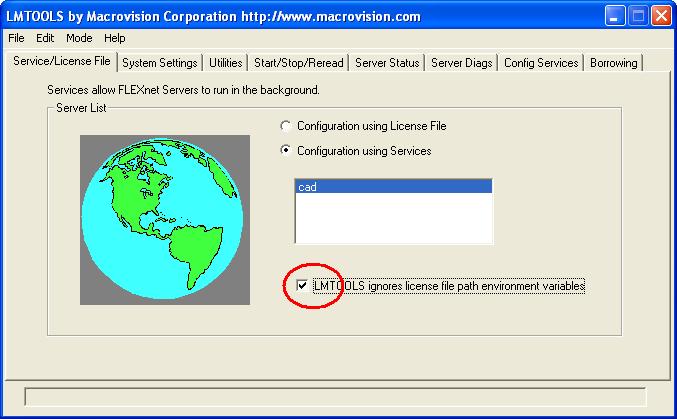
    One thing to try is to check box LMTOOL ignores license file path environment variables on Service/License file tab of LMTOOLS.   See the attached screenshot.

    Please keep us informed.

    Best Regards,
    Lisa

  • Hi Chien-Hsiang,

    just thought I would check whether there is any update to your enquiry and whether the latest tip was helpful.

    Best Regards,
    Lisa