This thread has been locked.

If you have a related question, please click the "Ask a related question" button in the top right corner. The newly created question will be automatically linked to this question.

Problem connecting to MSP430 Launchpad

Other Parts Discussed in Thread: MSP430G2553, MSP430WARE, CCSTUDIO

A customer reported not being able to connecto to the MSP430 Launchpad using this setup:

Operating System: Windows 7 (64 bit)
IDE: Code Composer Studio Version 5.2.0.00069
Hardware: MSP-EXP430G2
Device: MSP430G2553
Firmware: MSP430_LaunchPad_Workshop.exe from the Getting Started with the MSP430 LaunchPad Workshop
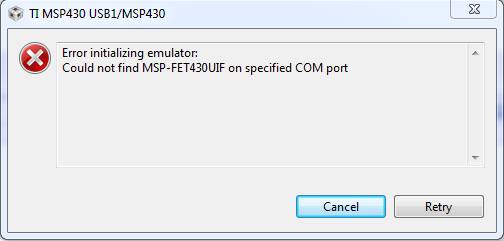
 

The workaround was to install and use the previous version of CCS: Code Composer Studio v5.1.x

More complete screenshots are attached.  What added information would you like me to collect next time I encounter this problem?

0777.Main Screen.zip

  • Hi Jason,

    I will try to reproduce this.  Is this will all projects and workspaces?  How was the transition to 5.2 made?  Install?  Update?  Was antivirus turned off?  Any details are helpful

    Best regards

    Lisa

  • Lisa TI said:

    Is this with all projects and workspaces?

    We tried only one project in one workspace before abandoning efforts to isolate the problem.  This was Lab 2 step 8 on page 2-12 of the Getting Started with the MSP430 LaunchPad - Student Guide and Lab Manual.  I can only assume that the student followed the other documented instructions leading up to this point.

    Lisa TI said:

    How was the transition to 5.2 made?  Install?  Update? 

    This was a fresh installation.

    Lisa TI said:

    Was antivirus turned off?

    Unknown, however if this was the source of the problem I might have expected the same problem when using CCS v5.1.x

  • Hi Jason,

    I have just tried on my own Win 7 64 bit PC.  I found no problem connecting and debugging the launchpad.  I used the labs you highlighted.  I noted CCS could only seem to find the lab10 projects and those worked for me.

    Are there any other symptoms?  Can you connect and debug with the launchpad at all?

    Best Regards,

    Lisa

  • Lisa TI said:

    Are there any other symptoms?  Can you connect and debug with the launchpad at all?

     
    It's going to be tricky for me to continue this debugging.  The customer was satisfied to switch to CCS v5.1.x  Now that he's up and running, I don't really want to bother him to install CCS v5.2 again. 
     
    Here's what I'll do instead.  I will share this thread with the presenter of the workshop material.  If he sees the same problem agian, I'll ask him to report more details.  I will also upgrade my computer to Windows 7 in the first half of September, so I'll be able to revisit this again with the latest version of CCS at that time.  I'll also keep an eye out for other customers who encounter this.
  • Hi Jason,

    ok, many thanks.  For sure if you continue to see this come up please let the MSP team and us know.   I am happy to hear the customer seems to be happy with using v5.1.1 for now. 

    Best Regards,
    Lisa

  • I have got the same problem with MSP-EXP430G2 LaunchPad and CCS v5.1 (see attached screenshot).

    Driver installed correctly, "MSP430 Application UART (COM10)" is present in Device Manager under "Ports (COM and LPT)".

    PS: CCS v5.1 have no G2553 chip (installed on my LaunchPad) in the list of devices, so i had to choose G2452.

    PPS: IAR v5.40.1 works fine with LaunchPad, i can load and debug my program without any problem. OS installed: Windows 7 Ultimate x32.

  • Hi Sergey,

    that is odd you do not seem to be able to select the G2553.   I actually have done a lot of work with this chip on my standard v5 install.  Have you installed the latest version?  Ie tried 5.2?  How have you set up the configuration?  Ie what makes you feel the G2553 is not there for you?  Further details would help.  Have you double checked the option for this chip is simply not being filtered out.

    Best Regards

    Lisa

  • Currently i can't use CCS v5.2 because of licensing. When installing v5.1.0.00010 i deselect whole "Target Content" node (i don't need DSP/BIOS, IPC and I/O, XDCtools, XDAIS). I choosed the MSP430 USB FET emulator only. There is no such files as MSP430G2553.xml, lnk_msp430g2553.cmd, msp430g2553.h in my CCS directory tree.

    Here is my launch and target configurations:

  • Jason Work said:

    A customer reported not being able to connect to the MSP430 Launchpad using Windows 7...

    Are there any other symptoms?  Can you connect and debug with the launchpad at all?

     
    I will upgrade my computer to Windows 7 in the first half of September, so I'll be able to revisit this again with the latest version of CCS at that time.  I'll also keep an eye out for other customers who encounter this.

    [/quote]

    I could not reproduce any problems connecting to the MSP430 LaunchPad using my Windows 7 computer.  Here is my setup:

    Operating System: Windows 7 (64 bit) Professional with Service Pack 1 on a Dell Latitude E6410 computer (but "My Computer" says E6420)
    IDE: Code Composer Studio Version: 5.2.1.00018 (and result of Help --> Check for updates is, "No updates were found.")
    Hardware: MSP-EXP430G2
    Device: MSP430G2553
    Firmware: msp430g2xx3_1.c from MSP430Ware

    This is my Code Composer Studio installation configuration

    Installation Configuration said:

    ARM BIOS6                                  6.33.5.46
    ARM Compiler Tools                         4.9.6
    ARM Compiler v4.9 Help                     4.9.0.201203231355
    ARM IPC                                    1.24.3.32
    ARM XDCTools                               3.23.3.53
    BIOS 6                                     6.33.5.46
    Blackhawk CCSv5.2 Emulation                5.2.0.200
    Blackhawk CCSv5.2 Emulation Update         5.2.0.205
    C2000 BIOS6                                6.33.5.46
    C2000 Compiler v6.1 Help                   6.1.0.201203281421
    C2000 Device Support                       3.1.0.2
    C2000 Emulation Flash                      1.0.0.2
    C2000 IPC                                  1.24.3.32
    C2000 XDCTools                             3.23.3.53
    C2800 Compiler Tools                       6.1.0
    CCS NowFlash Emulators                     5.1.0.0
    CCSINIT                                    5.1.0.0
    Code Composer Studio Base Components       5.2.0.293
    Code Composer Studio IDE ARM Components    5.1.0.201206191800
    Code Composer Studio IDE C2000 Components  5.1.0.201206191800
    Code Composer Studio IDE Main Feature      5.0.1.201206191800
      Code Composer Studio IDE Core Components 5.1.0.201206191800
      Code Composer Studio IDE RTSC Components 5.0.1.201206191800
    Code Composer Studio IDE MSP430 Components 5.1.0.201206191800
    Code Composer Studio IDE Workflow          5.0.1.201206191800
    Compiler Tools On-line Documentation       1.0.5.0
    Debug Server                               5.2.0.293
    DVT - Graph Visualization                  3.2.0.201206032146
      DVT UI Scripting                         3.2.0.201206032146
    DVT - Profiler Analysis Manager            3.2.0.201206032146  
      Control Engine                           3.2.0.201206032146
    DVT - RTA Feature                          3.2.0.201206032146
    DVT - System Analyzer                      3.2.0.201206032146
      UIA Autostart                            3.2.0.201206032146
    DVT - Trace Control                        3.2.0.201206032146
      DVT Core Components                      3.2.0.201206032146
      DVT Core Components For CCStudio         3.2.0.201206032146
    Eclipse IDE for C/C++ Developers           1.4.2.20120213-0813
      Eclipse Platform                         3.7.2.M20120208-0800
      EPP CPP Feature                          1.4.2.20120213-0813
    Grace                                      1.10.4.36
    Hercules Emulation                         5.2.0.0
    Image Analyzer                             3.2.0.201206032146
    IPC                                        1.24.3.32
    LWInstaller                                5.2.1.00018
    MSP430 BIOS6                               6.33.5.46
    MSP430 Compiler Tools                      4.1.2
    MSP430 Compiler v4.1 Help                  4.1.0.201203281425
    MSP430 Emulators                           5.2.1.4
    MSP430 IPC                                 1.24.3.32
    MSP430 XDCTools                            3.23.3.53
    MSP430ware                                 1.25.0.29
    REQUIRED CCS Update Installation Tool      5.2.0.201204111758
    ROV                                        3.2.0.201206032146
    Spectrum Digital Emulators                 5.2.0.03
    Stellaris Emulators                        9102.0.0
    TI Simulators                              5.2.4.17
    Trace Analyzer                             3.2.0.201206032146
    UIA                                        1.1.0.04
    XDAIS                                      7.21.1.07
    XDCTools                                   3.23.3.53 

    Here are some of the details at decision making points of my CCS installation process:

    .

    .

    .

    .


    If I wanted to ensure that the MSP430 LaunchPad was properly connected, even without Code Composer Studio, I could check the device manager.  Here's what I saw after plugging it in for the first time.

    .


    In order to test the communications with the MSP430 without CCS, we could try other programming tools.  More details for that are here.

    Is there a tool like LM Flash Programmer for the LaunchPad?


  • I have installed CCS v5.2 (code size limited license) instead of v5.1 - everything works fine. I think the problem was that there was no G2553 device in my CCS5.1 installation...

  • I am having the same problem. Has a solution to this been found ?

  • Hi William,

    have you tried CCSv5.2?  Can you provide further details?

    Best Regards,

    Lisa

  • I had installed CCS5.2 ,  I called TI support and we tried several things to fix the issue. I reinstalled the software, instaleed updates and it did not work. I then closed the Dell Stage program running om my desktop and change the com port for the launchpad. It began working. But today it is expericing the same problem. I believe there is some program on here from Dell interfering with it.

  • I have to turn off The Dell Stage program and an Accu Weather program runing on my desktop in order for the CCS to connect to the Launchpad. Hopefully this will help someone else that is expericing the same problem.

  • Hello from Germany,


    I run the latest version of Code Composer Studio (Version: 5.3.0.00090) under  Windows 7 Pro SP1
    I'm not able to connect my Launchpad EXP430G2 (Target is MSP430G2553).

    The Compiler/Linker says: MSP430: Loading complete. Code Size - Text: 1604 bytes Data: 12 bytes.
    After disconnect/connect the USB-Cable the Demo-App (Temperature_sense_Demo) starts
    to toggle the red/green LES's.

    access with the MSP430Flasher results:

    ****************************************************************************

    Evaluating additional triggers...done
    Initializing interface on TIUSB port...done
    Checking firmware compatibility...done
    Reading FW version...done
    Reading HW version...done
    Powering up...done
    Configuring...done
    Accessing device...done
    Reading device information...done
    Resetting device...done
    Refreshing registers...
    /* ----------------------------------------------------------------------------
    * UseCase : MSP430Flasher.exe
    * Arguments : -n MSP430G2553 -i TIUSB
    * ATTENTION: Default options used due to invalid argument list.
    * ----------------------------------------------------------------------------
    * Driver : loaded
    * Dll Version : 20409001
    * FwVersion : 30394216
    * Interface : TIUSB
    * HwVersion : E 2.0
    * Mode : AUTO
    * Device : MSP430G2xx3
    * EEM : Level 1, ClockCntrl 1
    * VCC ON : FALSE
    * UseCase specific tasks: ----------------------------------------------------
    * Disconnecting from device...
    * ----------------------------------------------------------------------------
    * Driver : closed (No error)
    * ----------------------------------------------------------------------------
    */
    ****************************************************************************

    To me it's seems like Code Composer Studio performs a download
    while "Run/ConnectTarget" is disabled (greyed out).

    I've also tried to change the COM-Settings (COM17->COM3 and back)
    without results...

    What is wrong ??
    Pleas give me a little suggestion.

    regards Thomas